
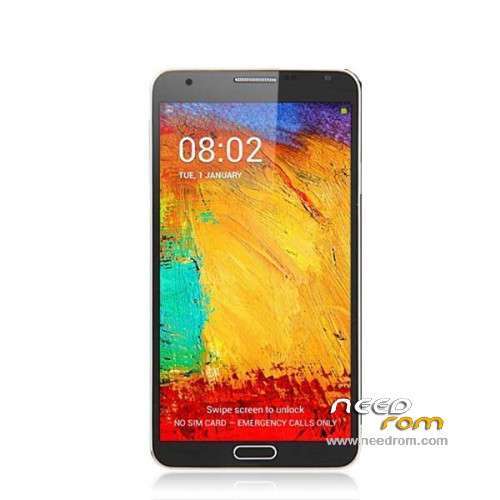
- Title: STAR N9002 MT6582
- Listed: March, 2014
- Last modified: 08/19/2014 2:37 am
- Version: ROM Android 4.3 (4.2.2)
You must be logged for ROM download.
36161 total views, 5 today
2 Total favorites
 Member Info
DESCRIPTION
ROM Phones STAR&Ulefone N9002 MT6582 – ROM Android 4.3 (4.2.2)
ONLY MT6582
Update Official ROM STAR N9002 MT6582 and Ulefone version : 20140328_GQ3013C_V1_hedy82_wet_v116_jb5
———————————————————————————————————————————————
Update Official ROM STAR N9002 MT6582 and Ulefone version : 20140310_GQ3013C_V1_hedy82_wet_v116_jb5
———————————————————————————————————————————————
Official ROM STAR N9002 MT6582 and Ulefone version : 20140116_GQ3013C_V1_hedy82_wet_v116_jb5
MT6582 + 1G Ram + 8G Rom + 1280×720 HD + Dual sim + Air Gesture/Eye Control
Gapps include – No Rooted
Language support : Multilang
Install ROM :
- Unpack FlashTools, and Click on Flash_tool.exe
- Select a the MT6582_Android_scatter_emmc.txt in ROM
- Wait file to be added into Flash Tool
- choose Option->USB Model,click USB Model
–> Choose Option->DA DownLoad All->Speed->High Speed, click High Speed
- Turn off your phone, remove the battery.
- "Press F9 (hit Download button)" OR " if upgrade ROM Firmware->Upgrade "
- and connect your phone into the computer via USB data cable.
- The process will start and a red progress bar will appear after color purple, yellow.
- And green circles display
- Finish !
- You can now safely disconnect your phone and turn it on.
※Please make a backup of your device before installing or updating ROM
yes, its down at left side screen, but only works with a magnet..original cover have that magnet.
This Rom works on Ulefone N9002 Quad Core MTK6582 1.3 Ghz 1GB 8GB 5.7 Inch HD?
Star e Ulefone brands is the same?
Thanks,
FB
anyone help me ? pplease my phone is note 3 i thin star mt6582 1.3 quad dual sim with out pen is this rom work ? my phone is n8000 note 3 mt6582 is this work
Lost my touch screen and soft buttons from my n9002 ulefone. All works with a mouse but touch ded. Need help please. Any one know how realive the touch?? Thanks
Some feedback please… I just bought this phone, with 20140116 ROM. Should I update it?
Trouble with me…
After update the ROM, everything was allright, even the camera was 13 Mp.
Then I found some strange values in RAM and Memory. Decide to restart the phone…
The touch is crasy, I can't select nothing, i touch in one place and other aside is selected. Soft bottons are not working wither… the phone is working but screen touch are irresponsive.
I try to flash the 20140116 original rom in the top of the thread, but it's the same. I can't even insert the pin code…
What's wrong… ??? my phone is useless…!!!
Well, I have the NVRAM error and touch screem mismatch.
I would advise everyone to backup the NVRAM before update.
Can someone provide me a copy of a NVRAM backup so I can install it, and solve my trouble. And I hope the touch mismatch will be solved too with that… please?
Thanks.
PMoto.
NVRAM backups are phone specific mate, because IMEI numbers are phone specific (there is no guarantee that a backup from someone else will work for you). If you don't have a backup (which you always should), you can simply open the back cover, pull your battery and below it, you should be able to find your IMEI1 and IMEI2 numbers. Now one method to restore them is to download MTK Droid Tools (v2.5.3 works), enable USB debugging on your phone, connect it to PC, run the program (your phone should be recognized). Then click on root button (if you aren't rooted that is), click on button IMEI/NVRAM and insert your IMEI numbers. Restart phone and confirm that the error is gone.
Actually I'm puzzled by how you lost your NVRAM in the first place (I hope you did not format your phone through SP Flash Tool), ideally this shouldn't happen on an MT6582 phone using either of the roms found here (I've flashed both of them with no issues whatsoever). Which option did you choose, in order to flash ? I'd always go with 'Download Only' instead of Firmware upgrade.
No, I did not format. The flash operation went well, and I was able to see the new rom working. Only after a restart I lost the touch funcionality (everything is out of the place, but image is ok) and get the NVRAM problems. Memory test to the phone with DroidTools says i have NO NAND memory…(???)
I don't understand…
I'm not sure if I download or upgrade the new ROM, but I found all my app and stuff after flashing, so I guess I upgrade (maybe that's the default options after install Flash Tools).
Anyway, I've flashed both in this thread even with format all + download option, and everything the same…
I know NVRAM is phone especific, but with a copy, I could restore it, and them put MY own IMEI's.
I don't know other way to restore NVRAM, either I don't know how to restone my touch funtion working properly…
Any help will be much apreciated.
Thanks.
Just to report that the restore of a copy of the original NVRAM did not solve the touch mismatch, so I strongly DONT ADVISE anyone to use this ROM.
After flashing, and like I state in posts before this one, my phone lost NVRAM and touchscreen funtion is all messed up.
SO – DONT FLASH THIS!!!
So, for those who flashed this ROM, the phone's touch is gone forever? No possible solution except return the phone to manufacturer? I have the same problem..
Did you get a touch mismatch – you touch in a place and the phone screen select another?
I still don't have a solution. I'm trying to get a backup from a original ROM to try to solve the problem.
If I get it, I'll post it here.
Anyway, this upgrade will mess your phone's memory with false values and state it as a 6589 instead of 6582.
So please, don't use it.
Yes.. I've made a backup of the original rom with mtkdroid before flashing this one (but not NVRAM backup from IMEI change button), but restoring the original rom did not solve the touchscreen issue..
In the rom backup there is a file nvram.bin, i tried flashing this file by changing the scatter file, but nothing has changed after that..
That's a shame, if the original backup did not solve the touch problem, there is not much to do except a touch replace.
Do you have NVRAM errors too?