
- Title: STAR N9589
- Listed: April, 2013
- Last modified: 04/25/2013 10:29 pm
- Version: ROM Android 4.2.1
You must be logged for ROM download.
19653 total views, 2 today
 Member Info
DESCRIPTION
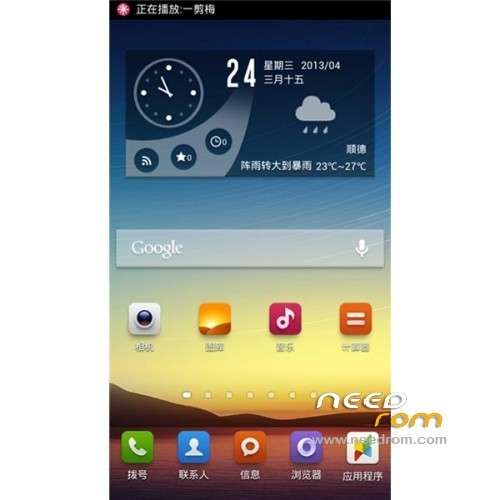
ROM Phone STAR N9589 – ROM Android 4.2.1
Model Name: STAR 9589
Android version:4.2
ROM:Hee hee miser
ROM version number:Android 4.2.1
Based on the official version: Official 03/29/2013
ROM features:
Smooth, can say with certainty than the official line brush smooth power,
look at the news everyday use send messages to talk skype absolutely do not feel any heat,
heat position feel almost stable with a different location. Only watching movies playing
games and fast Internet access with 3g kept open, heat stable.
Language support: Multilang
ROM Install :
Unpacked driver installation and install.
To unpack SP_Flash_Tool_exe_v3.1252.1.104.zip run Flash_tool.exe
Select a the in scatter_emmc.txt in ROM
Click Flash_tool.exe interface Firmware-> Upgrade
Phone after taking the battery in put something
Connect the data cable
Brush finished with green circles appears
or
Install with SP MDT:
Unpack the archive N9589-SPM.zip and archive with the ROM
1). Turn off the smartphone. Cable is not connected to the computer.
2). Remove the battery and insert it again
3). Connect your phone to a computer cable. The operating system detects a new device
4). Disconnect the cable from the computer.
5). Run SPMultiPortFlashDownloadProject.exe
6). Choose Database Factory menu> Configuration File data source and specify the file MTK_DATABASE.mdb (it is in the folder SP_MDT).
7). Choose File> Open File Agent download and specify the file MTK_AllInOneDA.bin (it is in the folder SP_MDT).
8). Click File and select the MT6589_Android_scatter_emmc.txt file (it's in the folder with the rom).
9). (The most important.) Many complain that the phone after flash based MT6589 "fall" camera (front or rear), the display does not work properly (shows nothing, tilt, brightness bad , wrong color, etc..) The thing is that the manufacturer changes the device over time. Different batches of devices can be different matrix of the camera, the display controller different. To account for these situations uboot firmware file includes all drivers possible (at the time of insertion) for the cameras and the display device specific. All you need to do – is to specify the correct front sensors and a rearview camera and a display controller faithful (see screenshot at the end of the manual). SENSORS not prescribe NAMES CHOOSE THE RIGHT hand only BY GETTING sensor button. N9589 for 99% of the need to choose this options:
Main sensor = ov8825_mipi_raw (back to camera), Sub sensor = ov3660_yuv (front), LCD = RX_572OTM_501A (display)
10). The other parameters are fixed, as in the screenshot below.
11). Click "Start all".
12). Connect your phone to a computer cable. The program should see and blink. If the phone is not detected, then unplug it from the computer, remove and insert the battery and reconnect it to the computer.
13). After (OK) click Stop and disable any phone.
14). Completed.

or
CWM with Recovery-CWM
※Please make a backup of your device before installing or updating ROM
What’s a lewa? And so I do need to be on a computer then?
LEWA – an Android-based type of ROM, with a few twists (other good example: MIUI)… so basically it is still Android but with enhancements especially on visual/'cosmetic' aspect For the file you can either directly download from your phone browser – or transfer it to your phone if download from your computer – save it into SD card and flash it using CWM… So far no OTA update for this phone… Cheers…
Will it still have the market place? So I can click on the links above from my phone that I’m on now and download them from here then go into my downloads folder on my phone and run everything from here? Without the computer? Please clairify. Thank you
YES it does come with Google Play Store (market place) built-in. And YES you can download it via phone browser and store it in your SD card BUT NO you can't install it directly from there; compulsory to root your phone and either (1) install it via CWM Recovery, or (2) via the provided tools as explained in the page. In my case I just use the CWM Recovery (I install the MLAIS CWM English version firsthand) only gripe is that the front cam display tilted and I'm still try to figure out to use the SPD-MT method to correct it. Cheers…
Ok so I tried it with the spmdt got to step (8) scatter file.found it in the cwm file,after all was ready I clicked start. The box reminder popped up and said the bin was empty in the scatter file to check the settings so I did and the only box TB at was checked in the scatter file was recovery the rest of the boxes we’re unchecked and there was no way to check them all or any. What do I do now?
I tried everything, deleted all file’s, re installed them, installed driver, and still same thing comes up when I click start. If I can paste a photo on here to show what it looks Looks I will try.
Does any one know if the first one works, the Rom install because the SP MDT wouldn’t work for after several attempts.
I cant play Puzzle and dragon in this phone
since the phone come with unroot
but after i install the game
it still keep quit when i tried to open it
what should i do? root it first and install the SuperUser?
anything do with the rom? please help, i really want to play P&D
Hi, Andy idea on show to sue microusb ethernet adapter?
is this ROM compatible to my unit?
Cherry Mobile Blaze 2.0 Specs