
- Title: STAR N9599
- Listed: May, 2013
- Last modified: 05/13/2013 8:52 pm
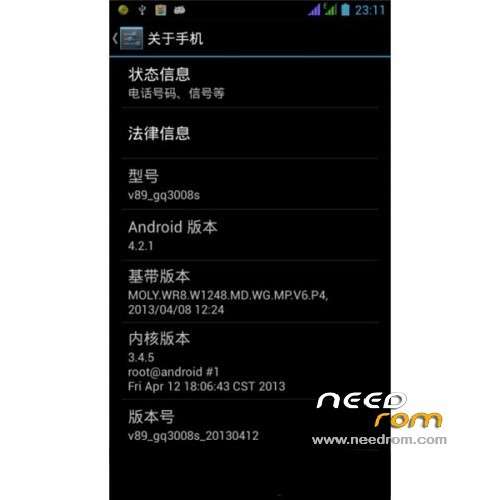
- Version: ROM Android 4.2.1
You must be logged for ROM download.
23878 total views, N/A today
2 Total favorites
CUSTOM


 Member Info
DESCRIPTION
ROM STAR N9599 4G – ROM Android 4.2.1 Backup
Based on V89-gq3008s-20130412
Just Backup of mobile STAR N9599 4G can help some persons
Language support: Multilang
ROM Install :
unpack the archive and put the ClockworkMod folder in the root directory of the SD card by default, reboot into recovery mode, select Backup / Restore - Restore
※Please make a backup of your device before installing or updating ROM
thanks a lot….
do you no what rom work with star n7189
Thank you, and can you tell me how to root the N9599?
do this work with the star n7189
its not work with my phone (based on Based on V89-gq3008s-20130401).
Recovery mode taken me (error while restoring "/system") Can you help me?
Helo, you get install this rom in your phone?
Hi, how can install the cmw recovery for this phone? pls
well my problem is wich my phone is Based on V89-gq3008s-20130421, and this ROM is Based on V89-gq3008s-20130412, can i install this Rom in my phone?, cause my original rom i have issues with the wifi…i cant connect wherever wifi tested
I have to change to motherbord because it had a error. So I need now a flashable ROM not a CWM-R based ROM.
What can I do now?
It is possible to flash a N7189 ROM to this phone?
Please help.
This is no longer required. I have successfully installed it in two steps. Unfortunately, completely missing the tootl including Google Play Store!
How can I uplooad my ROM here?
Hi, I download this ROM. What causes that I have a messages " Error while restroring /sytem! ?
Who can help me?
THX in advance
its not work with my phone
Star N9599 MTK6582 1.5GHz Cortex A9 1GB RAM 8GB
help me please
had a little trouble, got the error: (error while restoring /system), found the solution and it's becuase of different CWM versions (im running 5.5.0.4).
Delete "system.ext4.tar", rename "system.ext4.tar.a" to previously deleted "system.ext4.tar", open "nandroid.md5".
Then, replace the md5 value of "system.ext4.tar.a" with "system.ext4.tar", and delete system.ext4.tar.a and it's md5 value and delete the following md5 sums with their name:
data.ext4.tar.a
data.ext4.tar
cache.ext4.tar.a
cache.ext4.tar
.android_secure.vfat.tar
.android_secure.vfat.tar.a
simply this restore backup makes a extra ".a" file containing the actual data, and some CWM don't support this
attempt to restore again
however in this backup there is no google play nor keyboard, only reason i needed this is i lost the /xbin symlinks which work with this backup.
thanks and good luck to everyone else