
- Title: STAR S7589
- Listed: May, 2013
- Last modified: 05/09/2013 1:42 am
- Version: ROM Android 4.2.1
You must be logged for ROM download.
23144 total views, 3 today
 Member Info
DESCRIPTION
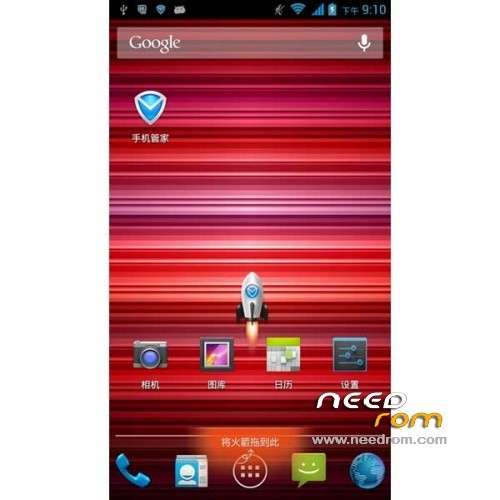
ROM STAR S7589 – ROM Android 4.2.1
Model name: Star S7589 4G/8G based on version Official : v89_jbl1a698_20130422_LF
Features ROM:
1, integrated the latest version of the root can be arbitrarily close
2, to streamline some useless applications
3, to maintain the original style, do the template to use
4, modify all the background
Language support: Multilang
Install ROM :
CWM ( Tuto in PDF i have not translate )
Step 1: Download the custom card brush ROM copied to an external SD card root directory
Step 2: the shutdown state. While holding down:
Power button + volume button + volume key to enter the recovery mode of Brush, Clear user data and cache, and then enter the card brush
Options Brush can.
Step 3: Brush complete, restart the phone
※Please make a backup of your device before installing or updating ROM
Hi guys, can you help me please?
When i lunch the falsh tool and i select the scatter file and than i select download, i have this message: " "notall images are correcttle loaded, which may cause boot up issue! DO you stiil want go on downloadling anyway?" ….. what can I do????
Hi OviEcc, this rom is supossed to be installed trough the recovery mode.
1) Put the ZIP file you have downloaded into the internal phone memory.
2) turn off your phone.
3) remove the sim card and the sd card.
4)turn on your phone pressing the power button and the volume + at the same time for a few seconds, you'll be entering to the recovery mode.
5) Go to install from zip option, you can enter pressing the home key or the power button, i can't remember wich one is, try it
6) once you entered to this option, go to the zip file and confirm the installation.
7) wait for the installation proccess, it takes about one minute to finish the installation.
8)go back to the main recovery menu.
9) re-start your phone.
10) The rom should be successfully installed.
after flash thru int sd, cannot detect ext sd card…. any help?
SOLVED…
You have to take out the battery… then the SD Card… around 15 – 30 second… then put both back & start it back… problem solved…
This rom works find except PC does not detect the device via USB port connection? So unable to transfer files!
Hi, Im also having this problem… Anyone that could help? TQVM
I try to download three times ROOT-S7589-20130422.zip
but every time stop to download at 90% the result is a corrupted zip file, can you fix the file?
Best regards
Hi All…
Complete newb here…does any one have a step by step install for getting the S7589-CWM-EN-recovery on the phione??? The only one I could find relating to the S7589 says to power off the phone , plug in the USB and then hit download, everything just seems to hang when using flashtools as if the device isn't detected. Drivers seem to be installed ok and I can see the phone in devices when the phone is turned on and of course it disappears when off. Is there a key combo that needs to be entered or should the phone be turned back on?? Not to clear on this and of course better to ask before I end up bricking it.
Mobile phone to pc dont work,
I Patched drivers and more but i cant my phone with the pc connect
can someone fix the download fails every time
@the Devoloper for the S7599 ROM
Hello,
I have bought a week a go the newer S7599 Model. It is the same aka S7589 – only instead 8 = 16GB ROM.
O.K. I rootet the device and flash CWM-Recovery 5.5.0.4 on it. Then i make same Test´s.
So – I tried to Restore a backup from 1 day before.
The Restore without any problem. (I make wipes data factory reset and dalvik cache)
After reboot all Apps are restored – but no 3G/ Baseband are on the Phone. WiFi and Bluetooth have function, but no 3G/ Baseband!
I think, you have connections to kingelon for a Firmware-Flash for the S7599. Or you have answers, how I can do to receive it back. About the Phone: Build Number (S7599)
01v21_v89_jbla698_2g_20130625 – Jelly Bean 4.2.1
You know, I´m here in Germany, you are in Shenzen. You have developed – I read your post – a very nice Rom. But I think, I don´t can use it.
Please help me. Thanks a lot of your cooperation!
Greetings from Germany.
Louis777
BTW: the Folder /system/etc/firmware with the modem.img is present on my Phone. I think, the init on boot doesn´t work. If you have a Firmware_Flash for me, you can uploaded by 4shared.com. They have the Limit on each File by 2GB!! It´s free!
Just try this rom she's pretty good,
Same as the other Pc connection won't work but the connection work in MTP device connection.
Very smooth rom For me Great whith a root fully working.
Yes, please upload S7589 official ROM: 01v21_v89_jbl1a698_2g or last?