
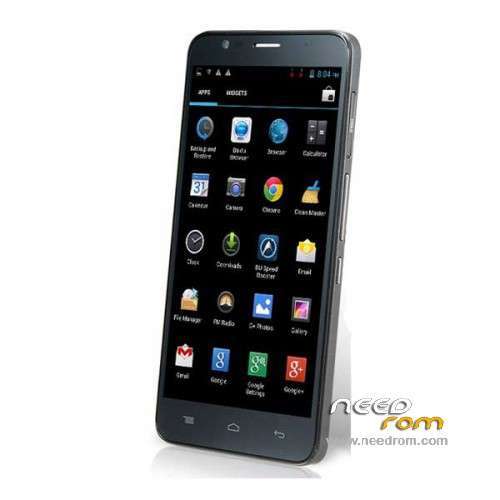
- Title: TCL S720
- Listed: September, 2014
- Last modified: 09/11/2014 4:19 am
- Version: ROM Android 4.2.2
You must be logged for ROM download.
30198 total views, 3 today
5 Total favorites
 Member Info
DESCRIPTION
ROM Phone TCL S720 – ROM Android 4.2.2
ONLY MT6592
Official ROM TCL S720 Version: TCL_S720_vA03-0. – 14.06.29 – Unicom (WCDMA)
Gapps include – No Rooted
Language support: Multilang
Install ROM :
- Unpack FlashTools, and Click on Flash_tool.exe
- Select a the MT6592_Android_scatter.txt in ROM
- Wait file to be added into Flash Tool
- choose Option->USB Model,click USB Model
–> Choose Option->DA DownLoad All->Speed->High Speed, click High Speed
- Turn off your phone, remove the battery.
- "Press F9 (hit Download button)" OR " if upgrade ROM Firmware->Upgrade "
- and connect your phone into the computer via USB data cable.
- The process will start and a red progress bar will appear after color purple, yellow.
- And green circles display
- Finish !
- You can now safely disconnect your phone and turn it on.
※Please make a backup of your device before installing or updating ROM
Makes the phone heat up a little more than the lewa and is not as good as the lewa when it comes to ram management… but its more snappy. The ROM is faster..
Unfortunately GPS does not work, is there a solution?
I agree GPS does not work
the rom is very good for stock android experience. touch and response is very good.
Fast good Rom , but not full multilanguage, for ex. lithuanian language is not included .. Very sad about it
Hello.
questions:
How I supose to remove the battery when the battery is not removable? I haven't access to the battery.
2. What .bin do I have to choose from rom zip? there are 3 .bin files. which one do I have to chose to save my stock rom then to put the new one? What are the steps to save my rom firstly, before to do something wrong?
Thanks.
I have installed the rom RED MI, and I would like to change it for this rom, but when I select a MT65592_Android_scatter.txtr in ROM, the program flashtools gives me this error: " Initializing scatter file failed. Please check the name of scatter file which you load is legal". What can I do to resolve this problem.
Dear friends,
I have this problem: I got a brand new TCL S720 and the Google Play did not work, being a known rom issue. So, before doing anything, I've managed to make a backup of it's original rom with MTK Droid tools whichI supose it did it well. Then I've tried to install a CWM recovery to try the rom for it from here. The CWM recovery seemed to install succesfully but I didn't manage to install the new rom. If I remember well, it stucked on boot logo. Then tried to revert at it's original stock recovery, managed to have the phone back as it was in initial state, but doing more tries, It remained stucked on boot logo. The problem is that my computer doesn't recognise it anymore, when I connect it to USB it tries to install MTP usb driver but even before the driver was installed well, now it refuse to install, like the driver is not good or the proper driver doesn't exist. So the only thing I can do is to boot on stock recovery but even I tried to copy the original rom as update.zip on external SD and to flash the phone using install update from sd card in recovery mode, It doesn't find the external sd card. So I'm stuck here, the computer doesn't detect the phone to try flashing it with SP flash tool or MTK Droid tool, and I also can't flash it from sd card. Have you any idea how to make it work again?
Thanks in advance.
the way I flashed my TCL S720
1. Download and Extract ROM into new folder and rename it as "Official ROM TCL S720" without " ".
2. Download SP Tools from needrom.com link given in post and extract in SP Tools folder.
3. Enable USB Debugging from settings==>Developer options and Connect phone to PC with internet 'on' and let it install needed drivers automatically. Disconnect phone by remove USB option from PC.
4. Switch off phone, take out SIM cards and SD card.
5. Note down IMIE for both SIM cards.
6. Now run flash_tool.exe from SP Tools folder.
7. Click Options==>Download==>Check DA DL All with Ckecksum, and close it.
8. In the Smart phone flash tool action bar: Welcome, format, download, read back and memory test, select: Download (Do not press download button yet).
9. Select download agent MTK_Allinone_DA.bin from SP Flash tools folder.
10. Select Scatter loading MT6592_Android_scatter.txt from Official ROM TCL S720 folder. Wait for 5-10 secs for loading all options.
11. Select: Firmware Upgrade option from drop down menu.
12. Now click Download Button with Down Arrow (Green) (without the phone connected yet).
13. Connect your phone to PC. Firmware upgrade will start and take about 3-5 mins. When finished a green Tick mark with OK will appear.
14. Disconnect phone. Insert SIM cards, SD Card, Battery and start with power on button.
15. first boot takes a while, so be patient
Enjoy a new phone !
Thank you very much, your guide is working really well, in 5 minutes I update the new firmware, now we need only the gps fix, and hope tcl will release in future official 4.4.4
Hi. I've managed to make my phone work again a few days ago. I've noticed that the phone was recognisable by computer only after the battery was completely flat (this is the problem with non removable batterry phones…). Only after that I was able to flash it, but this rom above isn't as far as I see the stock rom. Does anyone have the orriginal stock rom, or better, the stock rom of Alcatel One Touch Flash (6042D) which is the same phone but with Android Kit Kat?
@wiwid, thanks for detailled instructions, I've already done that with no success because my problem was that my phone was almost a brick, it wasn't even detected by computer, it doesn't charging anymore, was completely dead, moreover, when I connected, it said the usb device is not recognised or malfunction. So after I've waited over night, my computer was able to detect it again, it been started charging (battery 1%) then I've been able to flash it again. Hope this will be useful.