
- Title: THL T100S
- Listed: September, 2014
- Last modified: 02/27/2016 3:50 pm
- Version: 4.3 & KK 4.4.3
You must be logged for ROM download.
83726 total views, N/A today
405 Total favorites

 Member Info
DESCRIPTION
" Who do not appreciate effort, doesn't deserve it " >> Aristotle.
ROM T100S-XF :4.2.2 I think is Perfect fully
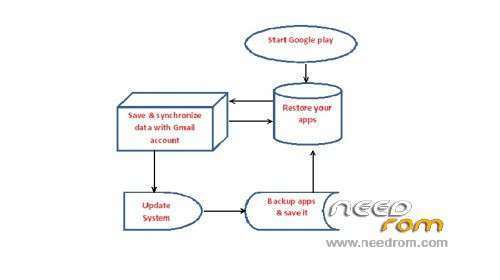
After installed ROM set your options and wait to updat it and restart the mobile, Google is restoring all your apps.
kk4 : kitkat 4.4.3 good ROM
=> IF my Work convince you, To me as a thanksgiving: Voting .
Any action that is considered minor, if people don't like it.
I don't ask from anyone use my ROMs.
—————————————————————————————
=>> Who want Support me to Donate ?
USA $
BENEFICIARY: OKAB BADR ACCOUNT: 26204602204650 .
BANK OF BENEFICIARY: PRIVAT BANK DNEPROPETROVSK,UKRAINE . SWIFT CODE: PBANUA2X .
INTERMEDIARY BANK: JP MORGAN CHASE BANK, New York ,USA. SWIFT CODE: CHASUS33 .
CORRESPONDENT ACCOUHT: 0011000080
PayPal : baderagab@gmail.com
Europe €
BENEFICIARY: OKAB BADR ACCOUNT: 26204602204702 .
BANK OF BENEFICIARY: PRIVAT BANK DNEPROPETROVSK,UKRAINE. SWIFT CODE: PBANUA2X .
INTERMEDIARY BANK: JP MORGAN AG Frankfurt Germany , SWIFT CODE: CHASDEFX .
CORRESPONDENT ACCOUHT: a/c № 623 16051 45 .
※Please make a backup of your device before installing or updating ROM
You can take silent boot from playstore. Or you delete in system media the bootaudio.mp3….
many thanks Bader.
Go it, Geniustyle!
Use some sqlite editor ( i use sqlite database debugger, but you need sql skills, i think there’s other sqllite editors more simple for your need).
Open /data/data/providers.android.telephony/databases/telephony.db and open the table siminfo.
Delete de record that corresponds with the name you can’t change.
Reboot and that’s all.
Be carefull of this operation. Make copies of the files or take the cautions you think it’s needed.
Cheers,
Seakoink
hi seak, I ran your instructions to the letter and just modified it seems to work but just reboot everything is cleared
First, you need to reboot vefore changing the name of the sim, because the database is loaded at bott and cached, all the changes you do with sqlite applies at next boot overriding what you did in settings
I tried even so, I’ve tried both manually edit and delete the line, but every time I reboot the problem returns. I rirpistina all data but still does not let me insert sim on the main custom phone number. I also tried to change sim but the problem remains on the main slot. On the secondary slot everything works. Nin understand why!
The sequence is: First, delete with sqlite, reboot, change the sim name with the settings it must work.
Ensure the /data is mounted as readwrite.
Seakoink…maybe I'm doing I do not understand … the problem is that I can not enter the phone number in the personalization of the main sim. The name of the sim can not change it normally. When I try to type in the phone number on the main sim tells me "failed", the rest can not change everything, color manager name etc.. In the secondary sim everything works properly
The only thing i can say is: change it directly with sqlite.
Probably the problem is the permission or the owner of the database file, but i can’t help you more, sorry
One last thing: you committed the changes?
With sqlite debugger after updating or deleting a record, you must click below on “commit” to apply the changes you did.
If you don’t, you’ll loose any change