
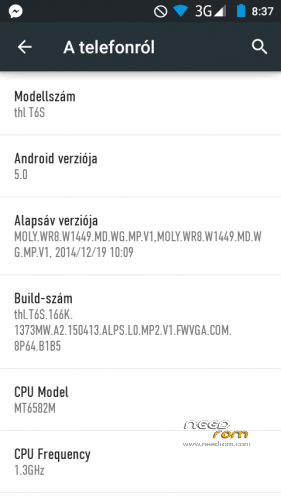
- Title: THL T6S Android 5.0 ROOTED Flashtool version
- Listed: May, 2015
- Last modified: 05/08/2015 2:47 pm
- Version: 5.O rooted
You must be logged for ROM download.
34427 total views, 2 today
36 Total favorites
CUSTOM












 Member Info
DESCRIPTION
flashtool version.
unzip. open with flashtool 5.0. open scatter and DA agent all in one).
Select recovery1.img its an upside-down cwm recovery.
select firmware update. press download.
wait 5-15 minutes.
enjoy.
PLEASE HELP ME WITH DONATE  THANKS
※Please make a backup of your device before installing or updating ROM
can you make a ebrtweak for setting the internal storage to 6gb partition? or just a customized ebr1 and ebr2 set to 6gb internal storage
I mean it's a waste since the total storage of t6s is 8gb so why not set the internal storage to 6gb? and since the phone storge is the same with the external sdcard, it's kind of useless having a phone storage partition of 4gb since I put all my files to sdcard.
Thank you if there'd be a 6gb ebr partition for internal storage.
I tried with custom ebr1 and 2 but it didn't work, had to re flash with the correct files
custom ebr1 and ebr2 works dine with me though the bug is that it doesn't give you cellular service
it says "no service"
but my internal storage for applications is 5.5gb. Though I can't reformat the other partition since when you format it, it also destroys the firmware
How to install this rom can give step by step pless
Not works…
I correctly follow the tutorial, choose recovery_1, but when i clic "download" (firmware up), there is nothing…
I reboot my phone in fastboot mode, i see on the screen of SmartPhone:
=> FASTBOOT mode…
I use an high quality usb cable (stock from nexus 5 original)
I have win7 64b legal (no crack), full updated.
thank in advance for helping me!
maybe other way :
Can i flash with my custom recovery? (philz)
If yes, how?
thk!
my phone cant find any signal and telling me that there is no signal
hy Good Job is better thats Stockrom
hy Good Job is better thats Stockrom
Anleitung zum Eintrag einer neuen IMEI
Wenn ihr beim Flashen einer Rom ausversehen die IMEI gelöscht habt, erfahrt ihr hier, wie ihr diese ohne Backup wiederherstellen könnt. Um eine neue Imei einzutragen, braucht ihr in diesem Fall Root-Rechte. Um herauszufinden, wie ihr euer Telefon rootet, nutzt ihr am besten Google und sucht nach“*Mein Smartphonename Root“. Sobald ihr Root-Zugriff habt, könnt ihr eure Imei einfach wiederherstellen.
1. Ladet euch die Mobile-Uncle herunter und installiert die App auf eurem Smartphone.
2. Nachdem ihr die App installiert habt, könnt ihr mit Mobileuncle eine neue Imei eintragen. Wählt dazu „Engineer Mode, Engineer Mode (MTK), Connectivity, CDS Information, Radio Information.
3. Nun wählt ihr die Simkarte aus, der ihr eine neue Imei eintragen wollt. Wenn ihr beide Imeis neu eintragen müsst, wählt ihr erst Phone 1 und dann Phone 2.
4. Zur Imei: Die Imei könnt ihr auf der Handyverpackung ablesen. Zwar gibt es im Internet auch Fake-Imei-Generator, allerdings ist es illegal, sich einfach eine neue IMEI ins Smartphone einzutragen.
5. Bei Phone 1 klickt ihr auf „AT(SPACE)+“ und gebt dort „EGMR=1,7,“YOUR IMEI“ ein. Klickt danach auf „send at command“
6. Bei Phone 2 klickt ihr auf „AT(SPACE)+“ und gebt dort „EGMR=1,10,“YOUR IMEI“ ein. Klickt danach auf „send at command“
7. Startet danach euer Telefon neu. Um zu prüfen, ob die IMEI erfolgreich eingetragen wurde, gebt einfach in der Telefonfunktion *#06# ein um eure IMEI anzuzeigen.
thank you so much from mexico
Works Great!!!!!
I try a lot of stuffs to root T6S after update to Lollipop and fail every time, thank for upload a rooted stock rom!
Perfect!!
IT would be better if it had OTA…