
- Title: TWRP Recovery 2.8.6.4 for Lenovo K910SS / E
- Listed: April, 2015
- Last modified: 05/14/2015 9:05 pm
- Version: 4.4.x - 5.x.x
You must be logged for ROM download.
22738 total views, 3 today
2 Total favorites
CUSTOM


 Member Info
DESCRIPTION
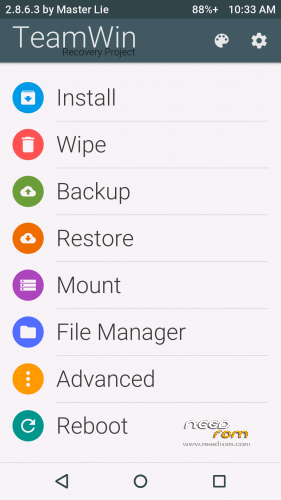
This is TWRP 2.8.6.4 recovery with custom Play theme for LENOVO K910SS / E version and it is compatible with 4.4.x , CM11, CM12 and CM12.1. This TWRP is compiled from lollipop source .
First of all, note the following:
a) You must be root
b) The bootloader must be unlocked (if not already unlocked, see instructions)
Use this Unlock Bootloader instructions to unlcock bootloader.
Changelog:
In the version 2.8.6.4 Fixed Connection OTG flash drives and their reading and writing
Install only the modified recovery
Instructions:
Metod 1:1. Lenovo_K910SS_TWRP-2.8.6.4_by_master_lie.zip from the above links
2. Move zip file into sdcard
3. Restart your device in recovery
4. Select the archive and install TWRP Recovery5. Reboot device
Metod 2:
1. FLASH_TWRP_recovery_2.8.6.4_K910SS_4.4.7z from the above links
2. Unpack the archive, so there are no gaps in the title and up the path to the unpacked folder, for example C: User Your_name FLASH_TWRP_recovery_K910SS_4.4
3. Run bat:
FLASH_recovery_with_unlocked_bootloader.bat - to flash recovery when unlocked (unlock) loader (fastboot).
FLASH_recovery_DD_with_root.bat - to flash recovery with of locked (lock) bootloader (fastboot), but with the right Root.
RUN_recovery.bat - for one time run recovery with unlocked (unlock) bootloader (fastboot), without flashing.
4. Wait for reboot device in new recovery.
5. Enjoy.
Please DO NOT mirror this
※Please make a backup of your device before installing or updating ROM
Hello, how can I see if I have bootloader lock or not?
Thank you
If you try to ispolzuya Metod2: run a one-time rekaveri using FLASH_recovery_DD_with_root.bat and after the launch of the blue LED flashes, then you have the bootloader is locked.
I would be having root on your phone, first unlock the bootloader, just a few commands in the Terminal using adb.exe and after that tried to run or install TWRP Recovery.
Thanks!
Worked great to install CM12.1 for my K910SS, on Android 4.2.2 (I previously installed your 4.4.2 Full version),
just donated, confirmation 7YD475774K436741X
Thanks for Donate!!!!
KemiKemi,
you have installed on the phone stock recovery. Use this Unlock Bootloader instructions to unlcock bootloader and Metod 2: Install Recovery wit ….bat
Flashed fine. Had an old TWRP before, flashed the new one over and it installed OK. Used method 1, rebooting the phone into recovery with Lenovo K910SS flash utility. Also updated the Cyanogen to B9. However B10 was released.
Gonna flash to B10 soon.
Generally evrthng is well done. All the instructions are clear, here in english and on http://4pda.ru forums in russian, I just want to thank you.
Hello
Few months ago I used Unlook bootloader to unlock it becouse it was locked. Know I Instaled some ROMs… I have 1503 lenovo rom right now.
Is is posible that my bootloader is locked again? Or it can't be? Becouse soon I'm gonna need to flash new recovery. Just wont to make sure if is unlocked…
If you update the firmware on the OTA, then you have a 100% is locked bootloader.
I installed K910 SS_S throw OTG and than I downloaded offical ROM 1503… and than ADB and recovery …. and then installed it.
To this is not OTA? right? So it's probably unlocked?
Installed B13 trough TWRP Recovery 2.8.6.4 for Lenovo K910SS / E.
OK.
Thank you very much Masterlie..
Master lie… look my post… scroll 3 post up…
If you have an official firmware, then it 100% bootloader locked and it is necessary to unlock before you run or install TWRP.
ok tnx
B14 with TWRP Recovery 2.8.6.4 for Lenovo K910SS / E.
SUPER.
THX.