
- Title: U7 Plus – TWRP 3.0.3
- Listed: January, 2017
- Last modified: 01/12/2017 6:34 pm
- Version: U7 Plus - TWRP 3.0.3
You must be logged for ROM download.
13514 total views, 2 today
CUSTOM
 Member Info
DESCRIPTION
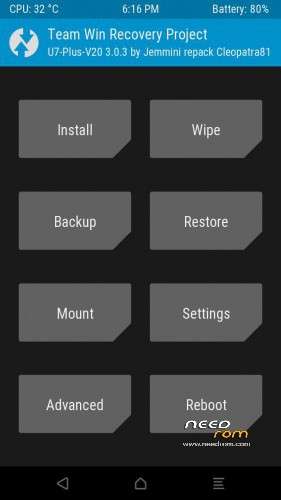
OUKITEL U7 PLUS – TWRP 3.0.3
Based on the next new stock firmware :
ro.build.display.id=OUKITEL_U7_Plus_V20.0_20161220
FOLLOW CAREFULLY all the steps at the next link :
http://www.chinaphonearena.com/forum/Thread-ROM-OUKITEL-U7-PLUS-STOCK-ROMS-TWRP?pid=60131#pid60131
※Please make a backup of your device before installing or updating ROM
Backup steps :
Check marks only on Boot, System and Data.
Restore steps :
1) Tap on "Wipe".
2) Tap on "Advanced Wipe".
3) Select Dalvik/System/Cache/Data/Internal Storage BUT NOT Micro SDCard.
4) Swipe to Wipe.
5) Return to main menù of TWRP.
6) Tap on "Restore".
Hey, i am using U7 plus from today and i want to install TWRP but i cant. Every time i plug the usb cable nothing happens at Sp flash tool and the big battery charge icon appears at my screen. My last updated official rom is V19.020161124.
I have try with many versions of TWRP and Sp flash. I have read and watched videos many times. But its not happening. I have enable OEM unlocking and USB debug.
Any thoughts?
Thank you
Alguien podria bajar la ultima rom de oukitel u7 plus para poder instalar desde el TWRP, a mi tambien se me queda congelada la pantalla y tengo que instalar de nuevo. Gracias si alguien la sube y asin poder instalar diferentes rom en este movil
Hello,
I'm sticking with Marshmallow because I need xposed, and the gains from Nougat are not greater than the losses from no xposed, I'm on Cleopatra's last/latest marshmallow update .zip and TWRP 3.0.3 from needrom. All is working fine EXCEPT… I cannot restore ANY backup from TWRP.
Majority of the time an error is 'invalid argument' to do with no system, or not mounted, can 'fix' the system or change the file system within TWRP and try to restore, then restore just system and that wont boot either.
Can flash the rom and update again and restore data and THAT boots fine but everything goes wrong once installed as I have all google removed, and microG and xposed.
Have a ported AICP rom that also isnt booting from TWRP but I dont know if thats the rom or something else, as the stock rom backup wont boot either. Have tried:
Straight restore, no wipes
restore, full wipes, reboot
full wipes, restore
full wipes, restore, dalvik
suzip, restore, reboot
restore, suzip, reboot
Reflash firmware, restore all
reflash firmware, restore data (this boots but is so modified it is unusable)
And various combinations of these. Any help greatly appreciated
Hola @Tisicore @Cleopatra Bianchi, me pasa lo mismo que a ti…si funciona el Recovery de Cleopatra, no funciona el movil normal (se queda en el logo de inicio y no arranca)…si funciona la rom oficial del 20161220, no funciona el recovery de Cleopatra. Como lo solucionaste?
thanks a lot Cleopatra for your work with this device,I want to say that this version of TWPR 3.0.3 is the only one that works in
my device.I buy a oukitel in 08-2018 as second phone,price are now very low,and the stock android 6.0 indicates the BUILD V.21,
Just how I said this is the only twrp that works in V.21 devices.Thanks again
Solo he conseguido instalarlo de la siguiente manera:
-Pon la carpeta de la rom oficial de nougat OUKITEL_U7_Plus_V17.0_20170711
en el escritorio y REEMPLAZA el recovery oficial de 8M,por el de cleopatra de 12M
-Borra checksum.ini de la carpeta de la rom y ejecuta el programa CheckSum_Gen.exe de dicha carpeta y espera a que genere el nuevo checksum
-Con SPtools flashea normalmente toda la rom,veras que aparece un color morado vamos bien,una vez flasheada ,reinicia y configura lo que quieras apaga
-Flashea de nuevo solo el recovery 3.0.3 de cleopatra,con sptools
-listo,rom y twrp funcionando ok
*si a la primera no sale el recovery intentarlo otra vez,yo lo consegui a la segunda
*si aun asi no sale flashear solo el boot y recovery de la rom y luego otra vez el de cleopatra
-
-
Only get it as follow:
-Put on windows desktop the unziped stock 7.0 folder OUKITEL_U7_Plus_V17.0_20170711
-Delete the original files: chechsum.ini and recovery.bin (8M size)
-Put in that folder te recovery.bin 3.0.3 made by cleopatra (12M size)
-Run the program CheckSum_Gen.exe (it is on oficial folder) and wait that new checksum.ini apears
-Flash the entire rom normally with SPtools ,rebot to system configure what you want and power off
-Flash the cleopatra 3.0.3 recovery via SPtools
-Done
*if do not apears twrp try again,twice reflash (only cleopatra´s recovery not all rom)
*if do not apears or system dont boot,try to flash only the .bins files before recovery.bin an after flash again 3.0.3 recovery