
- Title: UMI X2 – TouchWiz
- Listed: June, 2013
- Last modified: 06/13/2013 2:52 pm
- Version: ROM Android 4.2.1
You must be logged for ROM download.
26976 total views, 2 today
1 Total favorites
 Member Info
DESCRIPTION
ROM UMI X2 – ROM Android 4.2.1
Features ROM:
– Added support for ROOT permissions and busybox
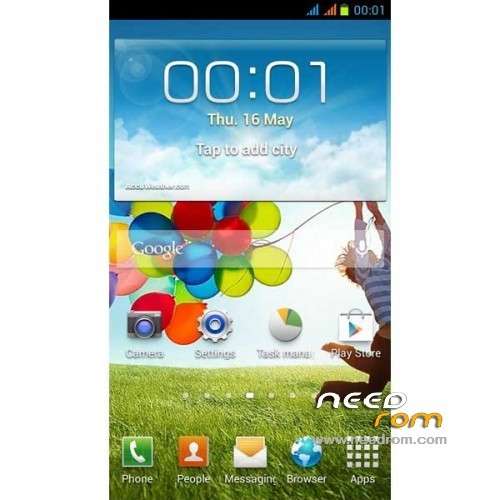
– Landscaping system icon for the Samsung S4 Style
– Landscaping dial back interface for the Samsung Style
– Landscaping call interface and context for the Samsung Style
– Landscaping material part of the system for the Samsung wind
– Landscaping electricity Samsung yellow battery icon
– Fix icon display part of the system software
– Perfect transplant Samsung TouchWiz Desktop Launcher
– Add Samsung Weather (search region Please use pinyin such as Shenzhen, write shenzhen)
– Add full Google services
– Modify the system ringtones for Samsung Ringtones
– Modify the Samsung boot animation
– Default external SD card
– Default tick USB debugging
– Add integrated PIP function similar to Samsung
– Optimized touch sensitive
– Optimization System fluency
– First start slowly please be patient
– Optimized GPS positioning, positioning faster
– Optimization of the touch screen sensitivity, enhanced pressure sensitive knowledge
– Joined Baidu input method
– Optimized graphics processing system, switch animation without Caton
– Add boot power module and optimize power
– Modify lowered WIFI search frequency to save power
– A new revision of I / O scheduling optimization parameters (more power and smooth)
– More details optimize your own experience
Language support: EN/AR/DE/EL/ES/FA/FR/HI/IT/NL/PT/RU/TH/TR/VI/CN/TW
Install ROM:
1) Download the custom ROM copied to an external SD card root directory
2) Download the recovery.img ( put in your SD card )
3) Start MobileUncle Tools ( Download on Goolge play )
4) Select Update Recovery ( choose recovery.img )
5) Mobile reboot in CWM and and follow the instructions( if recovery is in chinese look tutorial "CWM for MTK Platform" )
In the recovery mode.
– Wipe Data / Factory Reset -> delete all user data
– Wipe Cache Partition -> Wipe cache
– Advanced -> Wipe Dalvik Cache
6) Return to recovery main interface Install zip from sdcard -> choose zip from sdcard -> Select your ROM
7) Brush complete, restart the phone Patience required – first boot takes a while
※Please make a backup of your device before installing or updating ROM
Can i flash this rom on my X2 but with 6589T? Or is it only for the normal version without T?
Yes you can flash it, but it's very slow rom. wifi doesn't work and the applications are lagging.
So my advise do not flash it, of course you can try. Make first with rom manager backup of your current rom you can easily turn back.
El wifi si funciona la ROM va bien y la interfaz muy bonita.
someone can tell me a good custom rom for umi x2 turbo
can i use this rom karbonn for titanium s1