
- Title: VIBEUI V2.0 X2-CU – ROOT, GAPPS, EU boot logo, Chinese apps removed
- Listed: June, 2015
- Last modified: 06/20/2015 6:45 pm
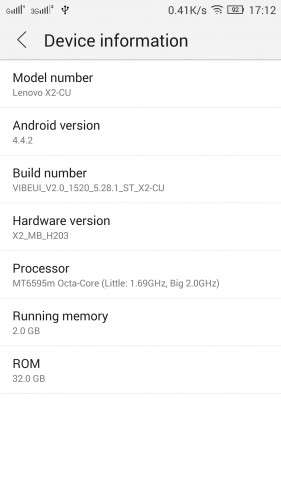
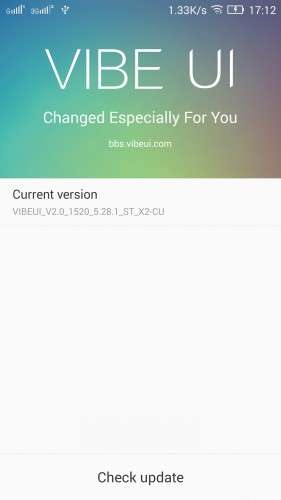
- Version: VIBEUI V2.0 1520 5.28.1 ST X2-CU
You must be logged for ROM download.
47922 total views, 2 today
30 Total favorites
 Member Info
DESCRIPTION
Warning: This firmware is suitable only for Lenovo Vibe X2-CU! I don't take any responsibility for your devices! Use at your own risk!
Changelog:
Version 3 based on VIBEUI_V2.0_1520_5.28.1_ST_X2-CU:
Official Lenovo changes from 1514 to 1520:
- Fixed the camera error propmpt: "Please insert SD Card"
- Fixed Candy Legend problem
- Improved WiFI connection success rate
- Closed the MTK Patch
My changes:
-
Rooted
- Forgot to add busybox (sorry) you can manually install it.
- Removed even more Chinese applications (can be found in Removed and changed files folder)
-
Changed the boot logo, startup and shut down animations to the EU versions
-
Added Google Apps
- Build.prop modifications – Default language is English, set to ROW region (No chineese features in many of the apps for example no location in contacts, cannot disable camera sound (EU directive) and others)
- Replaced the fonts with those from the EU version
Version 2 based on VIBEUI_V2.0_1514_5.26.1_ST_X2-CU:
Official Lenovo changes from 1511 to 1514:
-
Update the AGPS server address for faster positioning time
- MTK GPS optimizations
-
Fixed crashes in low temperatures
-
Updated system upgrade version, better IMEI acquisition strategy
-
Solved Camera bug
My changes:
- UPDATE May 5, 2015 – SetupWizard.apk problem should be fixed, the file is removed (sorry, yesterday I uploaded the wrong file)
-
Rooted
-
Added busybox 1.23.1 by Stericson
- Removed even more Chinese applications (can be found in Removed and changed files folder)
-
Changed the boot logo, startup and shut down animations to the EU versions
-
Added Google Apps
-
Build.prop modifications – Default language is English, set to ROW region (No chineese features in many of the apps for example no location in contacts, cannot disable camera sound (EU directive) and others)
Version 1 based on VIBEUI_V2.0_1511_5.22.1_ST_X2-CU:
-
Rooted
-
Removed Chinese applications
-
Changed the boot logo, startup and shut down animations to the EU versions
-
Added Google Apps
-
International Cities in Weather Widget (build.prop modification)
This ROM contains only English and Chinese Languages!!!
In the archive you will find:
-
modemdb and apdb files
-
The ROM (target_bin)
-
Drivers
-
Custom TWRP recovery
-
Flashtool
-
Removed or changed files (For Version 2+: original build.prop + All the removed apk files, If you need them for any reason or you want OTA to work)
Want to help the development?
- Register to mediafire using this link so that I can get more storage space for my projects (referral): https://mfi.re/?4mr2phs
- Or/and buy me a beer, click the PayPal button below, or send a donation to mexus (at) abv.bg
- Rate my profile and ROMs on Needrom
Installation:
1. Open flash_tool.exe from X2_flashtool_20140812(v5.1428.05.000) folder
2. In Flashtool, select the MT6595_Android_scatter.txt from the target_bin folder. Wait file to be added into Flash Tool
3. Make sure “DA DL All with Checksum” is checked in Options -> Options -> Download OR YOUR PHONE WILL FAIL TO BOOT!
4. Turn off your phone.
5. Select "Firmware Upgrade" or "Download only", but do not use "Format All + Download", because you will lose your IMEI and MAC
6. Press Download
7. Connect your phone into the computer via USB data cable.
- install driver from Drivers folder, if needed (you may have to disable Windows Driver Signature Enforcement)
- The process will start and a red progress bar will appear after, yellow, grey and green circles is displayed, the phone is successfully flashed
8. Disconnect the USB cable from the phone and turn it on. It will take few minutes for the phone to boot for first time
How to keep your data between version updates:
Not recommended! Deselect userdata and cache partitions and your data should be intact. If you exprience problems I recommend a factory reset!
Having problems with the GPS? Check this out:
http://www.androidrookies.com/2014/12/improving-gps-on-mtk-devices-especially.html
※Please make a backup of your device before installing or updating ROM
please multılang
garsonjc25 I don't see such a behavior, but It depends how much you talk. I had this phone for less than a week. Here are screenshots of my power consumption, but I've made a few short calls.
deepask54, I explaind in previous post about the multilang support. Please stop asking for it. If I have time, I'll do it. It's not a priority for me since I like using electronic devices in English (My PC, Phone and so on). For the record English is not my native language.
Thanks a lot Mexus for your improvment ! good job !!
did you check gps works good, because with mine waze crash frequently and the navigator is in delay, (bull shit compared with S3), and last is available screen sensitive control? thanks again, Ciao
PS- about language: it's a good opportunity to get english confidence
MESSAGE TO MEXUS
could you provide a procedure to flash the phone, i tried without success few error become at the end of flash and the phone does't switched on,
may be i need to move the correct scatter file somewhere, because there are two scatter files one in TWRP v2.8.4.0 recovery one in target_bin
which one has to be used?
thanks a lot for
vigo
My GPS works great, even indoors next to the window I get possition lock in seconds. I didn't understand the question on availabe screen sensitive control.
Hi Mexus, thanks a lot, this could help me a lot, because i'm not satisfy, i need a good navigator and previous S3 was perfect.
the touch screen is not so sensible, is it possible to regulate it (sensitive control) ?
I need the correct procedure to flash with your files, i don't want burn it before use
Thanka a lot
vigo
I'll post the procedure later. About the sensitivity there are just too options -> Normal touch sensitivity and Extreme touch sensitivity, when using gloves
Tnks, Mexus,
i hope will fit mine phone, the onstalled one cannot be modified, just for your reference here the rom and procedure (with lots of lack).
https://cloud.mail.r…lianxiangx2.zip pwd et825 MULTILANGUAGE (I'M USING ENGLISH AS WELL)
PROCEDURE FOR INSTALLATION : https://cloud.mail.r…c2/lenovox2.mp4
bye
Install instructions added to the description
Thanks mexus. Really appreciate your work.
New update is out. I'll update the ROM in few days
Will you be able to add multilanguage support?
NO, sorry. It will take a lot of work. I like it to be as close as possible to the original firmware. If you want the Multilanguage ROM, buy the donate one from another user. He put a lot of work into adding Multilanguage support, so I think $2 is a fair price. I may eventually add Multilanguage support but as I said it’s not my priority, I use the phone in English. And it would be harder to create new updates, because all system APKS must me decompiled, modified and recompiled.
Link to the donate version of the other user's ROM:
https://www.needrom.com/downlo.....ang-gapps-root/
It's not updated to the last update, but soon I think the OP will update it.