
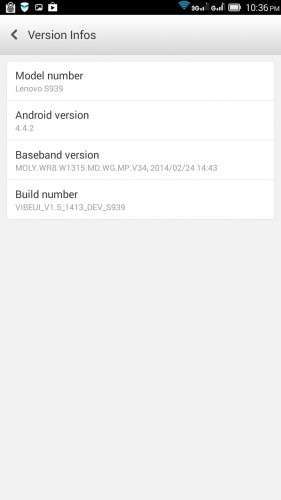
- Title: VIBEUI V1.5 1413 DEV S939 NK 5C2C Gapps CWM
- Listed: March, 2014
- Last modified: 03/30/2014 8:26 pm
- Version: Android 4.4.2
You must be logged for ROM download.
23281 total views, 1 today
1 Total favorites



 Member Info
DESCRIPTION
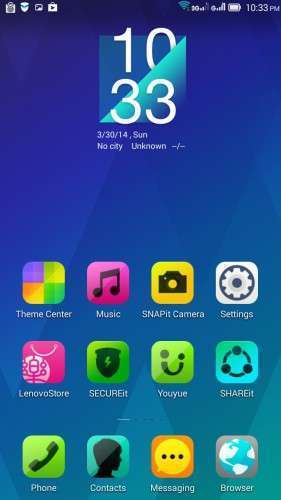
VIBEUI_V1.5_1413_DEV_S939_NK_5C2C_Gapps_CWM BETA
CWM+root+Gapps
CH/EN
Install ROM :
- Download FlashTools MediaTek SP Flash Tool V5.1348.0.100, and Click on Flash_tool.exe
- Select a the MT6592_Android_scatter.txt in ROM
- Wait file to be added into Flash Tool
- choose Options->Options>,Download>select DA DL All with Checksum
- Turn off your phone, remove the battery.
- "Press Download"
- and connect your phone into the computer via USB data cable.
- The process will start and a red progress bar will appear after, yellow, grey and green circles display
- Finish !
- You can now safely disconnect your phone and turn it on.
Español.
Instalar ROM:
- Descargar FlashTools MediaTek SP herramienta Flash V5.1348.0.100, y haga clic en Flash_tool.exe
- Seleccione un MT6592_Android_scatter.txt en la ROM
- Archivo de Espera que se añade a la herramienta Flash
- Seleccione Barra superior Options->Options>,Download>select DA DL All with Checksum
- Apague el teléfono, retire la batería.
- FlashTools "El botón Download"
- Y conectar el teléfono al ordenador mediante un cable de datos USB.
- El proceso se iniciará y aparecerá una barra de progreso roja después, amarillo, Gris y pasa a la pantalla con círculo de color verde
- Acabado!
- Ahora puede desconectar de forma segura el teléfono y vuelva a encenderlo.
By zoyB para www.movilesdualsim.com
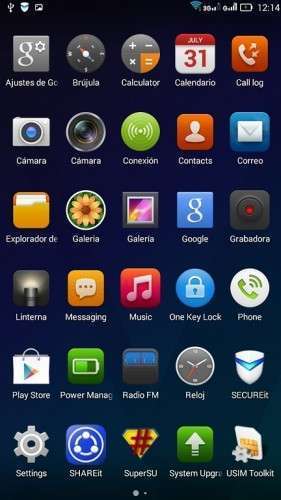
ROM_MOD_1413_DEV_S939_NK_5C2C Kit Kat
Gapps updated to 4.4.2, many APKs Lenovo deleted one launcher, root and recovery.
Install ROM :
- Download FlashTools MediaTek SP Flash Tool V5.1348.0.100, and Click on Flash_tool.exe
- Select a the MT6592_Android_scatter.txt in ROM
- Wait file to be added into Flash Tool
- choose Options->Options>,Download>select DA DL All with Checksum
- Turn off your phone, remove the battery.
- "Press Download"
- and connect your phone into the computer via USB data cable.
- The process will start and a red progress bar will appear after, yellow, grey and green circles display
- Finish !
saludos y paz.
※Please make a backup of your device before installing or updating ROM
Password pls
No leads password
great work zoyb
Why I cannot unzip the file
Greate Work ! ! …Thank you very much
good time….
I flashed “VIBEUI_V1.5_1413_DEV_S939_NK_5C2C_Gapps_CWM” on my phone.
There is one problem:
when a call comes the phone shows only 11 digit sush as: 09151111111
but when receives sms it showes: +989151111111 (Iran)
so i have to save contacts number in 2 format.
How can i fix?
Thanks
is this rom multilanguage?
Yes, CN and EN (two languages)
Hi, number problem solved:
Just enter the number of the SIM card correctly.
This ROM is the best for me up to now (24/04): CWM+root+Gapps but I have some problems:
-Proximity sensor does not turn off the screen during calls, with other apps failed to turn on display too.
-Screen does not turn on when you reach the sms. (even GO SMS)
-Backup apps failed to backup. (error with SD writing support)
I have problem to flashed it. No response
can somebody give me tutorial how to flash it?
Need your help please…..
I had trouble with”SP_Flash_Tool_v5.1348.00″.
Use” SP_Flash_Tool_v5.1343.01″ (china version), worked for me.
i have
Turn off my phone, remove the battery.
- "Press Download"
- and connect your phone into the computer via USB data cable.
But nothing happened.. what should i do??
You have to install all drivers:
1-MT65xx Preloader Drivers
2-Adb Driver (by Adb Driver Installer.exe)
(I have installed Lenovo usb driver too -win7 32bit)
If that does not work try other windows.
For problems with the flash.
Remove battery.
Push button volume + -., And power (hold)
Click to download in flastools
connect the phone to USB
Starts flashing drop buttons
or
It may be problems with drivers