
- Title: ZOPO ZP100
- Listed: February, 2013
- Last modified: 02/01/2013 3:49 pm
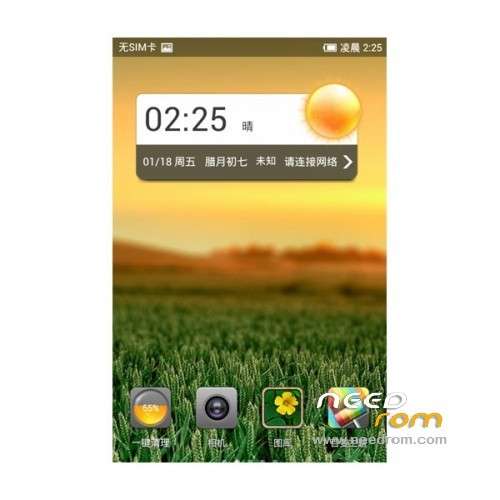
- Version: ROM Android 4.0.4 LeWa
You must be logged for ROM download.
21113 total views, 2 today
 Member Info
DESCRIPTION
ROM ZOPO ZP100 – ROM Android 4.0.4 LeWa
Features ROM :
Optimize the new version upgrades, unified system interface simplifies operational processes
New music spectrum effect, playing music, beating notes
New songs list interface increase letters retrieve strip, more convenient to retrieve songs
Add to manually add the radio, arbitrary listen to your love
Information
Repair list interface, long press to enter the excess bulk delete interface before No information interface
Repair the editing interface, dual card usage tips to follow the movement of the Send button
Fix search interface, not sort by name letters and Published
The session add contacts repair, custom name number type show abnormal
The repair into contact multiple numbers SMS session, quit after the switch to the other number, will generate a topic session
Repair search interface, slide up and down can not be recycled keyboard
The repair using SMS Picks, web extraction SMS send a message, you can not add recipients
Repair to receive the contact information in the information details, unread SMS prompt does not disappear
Repair replication the expression text messages pasted into the edit box, displayed as a character
Repair delete all the commonly used phrase, information FC
New information has been repaired, input frogs expression must now FC theme constantly
Repair New SMS, recent contacts, the number entered is deleted, Contact will flash
Repair in to receive the contact information details, return to the list of information still unread SMS
Contact
Optimize no name and no number of contacts does not support saving
The repair import contacts, number type does not exist in the field garbled
Fix the contact details screen, sometimes after clicking the Favorites button, button icons flashes twice
1 & card contacts repair phone card will be laid on card 2 shows
Repair when searching for contacts, the keyword is not highlighted
Click Repair received instant SMS details, display a blank
Call
Repair the default dialer card to card 2 into the dialer after-hours dial keys to switch from card 1 to card 2
Repair only insert card into the dialer interface dial key color card color does not match
To fix dual sim then record when only insert a single card details and search interface card color update
The repair call records search, the search to match the results did not highlight
Repair 1,867,516 attribution error
The fix come and go electric attribution to show inconsistent
Frog letter
Repair the frog letter interface, add delete topics, prompts error
The repair frogs letter interface, add themes still free
Repair into the session with frog letter even now FC
Security interceptor
Optimize intercept notification in the status bar display, and music Rana OS style unified
Repair telephone intercept under add black, white list, click the menu key missing option "Add white blacklist"
The repair automatically update the virus database version number display error
Desktop
Optimization to increase mobile icon is full folder friendly tips
Repair Drag the gadget to the desktop shortcut bar, drag other icons appear on the gadget icon overlap
Repair uninstall applications to automatically delete the corresponding widget
The time starter FC in the repair of mobile icon
Fix to add the gadget interface, thumbnail display than confusion
Recorder
Optimization recorder removal of network access
Recording attachments, repair information add recording after the prompt does not support audio formats
Security Center
Optimizing Security Center interface
Music player
New music spectrum effect, beating notes when playing music
New songs list interface increase letters retrieve strip, more convenient to retrieve songs
Repair sporadic music FC
Repair can not jump from the notification bar music notification to the music player interface
Version upgrades
Optimize the new version upgrades, unified system interface simplifies operational processes
Set up
To optimize fast boot Description
Repair set IP dialing the switch card exhaled dial IP number prefix error
English under repair, dual card setup wizard character display overlapping
Entertainment Picks
New application update upgrade tips
Download application optimization SD card full of friendly and prompt
Friendly and prompt optimized mobile traffic download application
Optimization the default download wifi
Optimize the overall interface (UI), closer to the 4.0 style
Repair use sometimes FC
The repair download and automatic installation is complete, delete the downloaded file
Repair into the details of the application program installed in the state waiting for the installation is complete, the button will not become open
Repair application details pause the download, cancel the download application list, the status is not real-time updates
Repair download Plants vs. Zombies, the progress bar shows 107%
Repair pause downloads Download application details, suggesting that the applications are downloaded
The repair application update interface can update the program does not appear the latest version of the software size
Application Details button to display a blank repair pause and cancel downloads
The repair Press HOME to return to the desktop uninstaller, into the entertainment Picks, button state does not refresh
Repair application details around the slide preview, preview often disappears
Repair full-screen browser preview, left and right to switch the preview animation
The repair application download queue, application downloads nonsequential download
Clock
The optimize timer and alarm clock to respond to the pop-up boxes, consistent with the overall style
Repair seconds after the start pause button to display the remains began
Repair stopwatch timing from 99 hours 00 minutes 00 seconds to 99 hours 59 minutes 59 seconds after the start timing
Incomplete repair add multiple cities, part of the city's clock icon
No pop-up box repair status bar interface, timer response
Le Frog account
Fix English language, music Rana account recovery contact pop-up box character overlap
Variety topic
The download theme failed repair Preview interface, the download button failure
Repair preview interface to download the theme, click the progress bar does not disappear
Repair Shuangqing online topic View details of the theme has been downloaded theme no response
The repair notification bar Download theme progress prompted disappear
The repair data storage mode, enter Changing Faces prompt error
To repair online font font prompted error, and the current font to use state error
Repair theme options, and delete topic button click effect
Virus Protection
Time to change the phone system has been repaired sporadic virus protection FC
Update the virus database should not prompt repair no network "network connection timed out"
Repair Failed to update the virus database version number is displayed as the latest version
The repair update the virus database after a killing, the virus database will be prompted to restart the phone detected the virus database has expired
Traffic monitoring
Optimize application dark theme, traffic monitoring interface font
Optimize the notification bar traffic information visual effects
Repair call other programs FC
Repair no network traffic monitoring or calibration successful "prompt is given
Repair traffic monitoring can not be properly calibrated flow
System
Protection system applications, you can not fix cleanup applications
Radio
Add to manually add the radio, arbitrary listen to your love
Repair delete a favorite radio station, favorite radio stations can not update
Repair station station there in my favorites list, click on the / next buttons can not switch to the list
Calendar
Repair plug into the native clock
ROM Install :
Download this package ZOPO TOOLS.
Extract all the files in the package to your desktop.
To unpack SP_Flash_Tool_.zip run Flash_tool.exe
Select a the in MT6555_Android_scatter_emmc.txt in Recovery with Flashtools
Click Flash_tool.exe interface Firmware-> Upgrade
Phone after taking the battery in put something
Connect the data cable
Brush finished with green circles appears
-First boot will take time.
※Please make a backup of your device before installing or updating ROM
Hello, I would like information on 'ROM installation on LEWA zopo zp100, because I can not select the Recovery MT6555_Android_scatter_emmc.txt with Flashtools.
thanks