
- Title: ZP998 starter pack
- Listed: February, 2014
- Last modified: 02/22/2014 12:15 am
- Version: 4.2.2 dated 18.02.2014
You must be logged for ROM download.
24598 total views, 2 today
85 Total favorites
 Member Info
DESCRIPTION
ZP998 starter pack
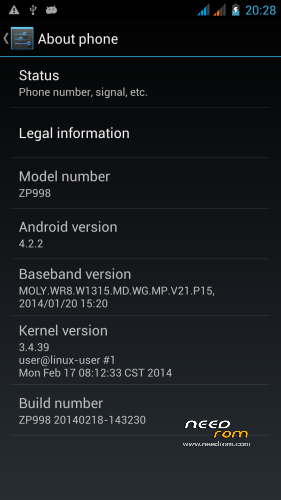
Device: ZOPO ZP998 (S1)
Chipset: MTK6592
OS version: Jelly Bean MR1 (4.2.2) Android SDK 17
ROM: ZP998 20140218-143230
Kernel: Linux 3.4.39
This ROM is flashable through SP Flash Tools. All tools you need are here. You need a computer running Windows (preferable XP), USB cable, the software provided and your phone. The instructions should be clear and commented in a way that you are able to understand what you try to do. Please read the following instructions at least one time before trying to do anything! Most questions will be answered if you understand.
This ROM was made to provide you with an easy way to get the most out of your phone. Searching the internet you will find a lot of information, which you might recognize as the same (or close to the same) as found here. The difference is that following the process here you will get a phone which works for you "out of the box", you do not have to learn details to get it running. Don't get me wrong, learning and knowing is power and I'd like to make you interested, it's just that I want to start you now  .
.
REMINDER: I'm not responsible for what you do. It's absolutely your own risk!
Before you start:
- download and install driver set to your computer (if not already done).
- download and install MTKDroidTools to your computer (if not already done).
- start MTKDroidTools and connect your phone to USB. Let the program work for a minute, it should show some info about your phone. (comment: the lower left box shows yellow or green. Both colours are fine for now and show that you connected successfully)
Flashing the ROM:
1. download the ROM file and extract this zip to a folder on your harddisk (e.g. extract to C:Zopo).
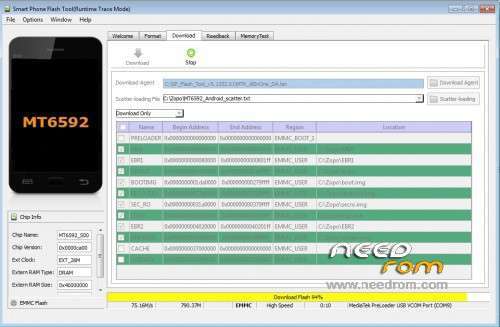
2. download SPFlashTool, install (e.g. copy it to C:), enter that folder and start flash_tool.exe.
3. select scatter.txt file: This file is located in the folder you created in step 1 (e.g. C:\Zopo\MT6592_Android_scatter.txt).
4. check if the first line (PRELOADER) is unticked.
(comment: Never flash PRELOADER if there is no need, this might brick your phone!)
5. Switch off your phone and remove battery.
6. click on the download
7. A red line may/can/will appear after a while (this depends on your computer and on your Windows version. Don't get nervous, as long as the hard disk control flickers it is fine. Be patient), changing to (probably) purple and then to yellow. Time to grab a coffee (please be patient, ok?).
8. A green circle will appear to note that the flashing process finished.
9. Disconnect the phone, reinsert the battery and restart. (comment: press
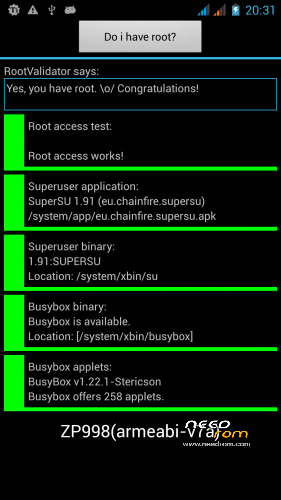
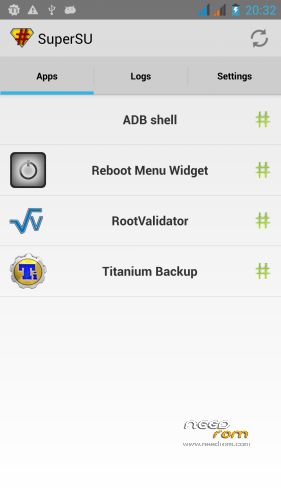
10.Congratulation. Your phone is rooted now and runs Carliv-CWM recovery.
Tests:
Find a program called "Reboot Menu" on your application start screen. Tip on it, answer the Superuser request with yes (maybe you are asked up to three times) and you will see a special shut down menu. Select Reboot Recovery and then tip Okay two times to reboot into recovery.
Carliv recovery:
You will see the Carliv-recovery menu. This is a graphical recovery, you can operate it by touching the buttons. Because we updated the operating system it is wise to "re-read" all software. Please start
Connecting to MTKDroidTools:
Start MTKDroidTools and connect your phone. After a short while (establishing the connection needs some time) you will see your phones information and the yellow box on the lower left corner. Just press Root
What you got now:
Your new ROM is same as the official ROM dated 18.02.14 (genuine ZOPO-ROM). The big difference is you got an optimized recovery (which lets you flash different ROMs "on the go" from your SD card), some nice little programs which are missing in the standard ROM and a fully working touch-operated recovery. Now you got the power, learn to use it .
What you can get:
Starting from here you might use this ROM as it is. I recommend to download at least a really good backup program (like Titanium Backup) and a ROM manager program (e.g. ROM toolbox). If you like to do more you can download alternative ROMs like Fluffy's ROM (just copy it to your SD card and flash from recovery). There is many more if you want to get the best out of your phone.
As I said in the introducion: This is a starter pack 
Credits go to numerous people who helped in making me understand, especially to Carliv, Fluffy, Alain, Tommy… Thanks guys, you're great.
※Please make a backup of your device before installing or updating ROM
Everything works fine at the very first tests I made. Even Skype works, don't understand the problem stated in the first comment. Volume is a bit low, but still useable.
Thx for the ROM!
Reply to myself:
nfortunately I found something funny: the battery indicator stays on 100% after charging. If I remove the battery and put back, then it shows correct status – until next charging.
Weird.
I just simply flashed this FW to my ZOPO 9520 (unchecked PRELOADER) and evrything went smoothly!
Now I have FW ZP998 on my 9520 with SuperUser ROOTED and all Chinese app gone!
Thank you wrp008 to let us know. As a small present: Did you find the DualSim Ringtone program in your ROM? Maybe it's useful for you. Thanks to Green Gastronome, it's so easy to have different ringtones for each SIM card…
Hi AP756
I couln't fine the DUAL SIM ringtone program. Please let me know where it is and I will be appreciated. Sounds very exciting!
It's a separate program: Open apps (if you did not alter this it's in the foot line of your screen in the middle), goto "DualSim Ringtone", start and enable (tick box on second line). You can't find that in the settings menu, because I prefer to have a standard system with addons, not a modified system
@ AP756
T_T Can't believe that .. I GOT IT !
Cheers mate!
I couldn't find it in Settings but found it in the Apps list
then I launched and enabled it
Designed ringtones separately
Guys please tell; GPS working on this or not?
GPS works better then my "old" C2, but still very inexact. It can drop the location completely when I use WAZE. But also it an be a problem of Waze maybe?
Mine worked great as well
Sygic with HUD ran smooth
Gestures are not working with this ROM.
I take this back. It's Nova Launcher not working with the gestures.
However
I got Chinese language when I boot in recovery mode.
So I wonder why this ROM did not change the lang in recovery boot.
Any opinion how to solve this
Many thanks
The only Chinese menu in this ROM – as far as I know – is the factory menu which I'm not able to translate. Are you sure you used VOL UP and POWER to get into recovery?
(- more than 95% of all computer errors are in front of the keyboard – DDDDD)
@ AP756
Nothing happened after I pressed VOL UP and POWER
but it went to recovery mode when I presses VOL DOWN and POWER
—-
I have read that most android get recovery mode when pressing VOL+ and POWER but I think some phones might be diffrent, ie. My ZOPO 9520 uses VOL DOWN
Probably ZOPO ZP998 uses VOL+ and POWER
I just think that I will never flash ROM via running zip file from microSD anymore due to Chinese lang in recov mode
wrp008, no panic. Next release of 998 starter pack is on it's way. I think I'll release it during next week. Oh, did I forget to mention: Please try again Vol+ and Power after you connected the phone to USB of a computer or mains. To enter recovery you need some external power…
Oh! Yes finally I got recovery mode in English after connecting to PC then VOL+ adn POWER
On menu, there is a choice to pick flashing ZIP firmware from SD
That great! Thanks a lot AP756
However, as my phone is ZOPO 9520, running ZP998 ROM, hence I think I can only flash the original 9520 ROM via ZIP on SD
And for the ZP998 ROM, like your ROM, I can only flash via Flashtool software (untick bootloader).
Am I right?