
- Title: ZP998 starter pack
- Listed: February, 2014
- Last modified: 02/22/2014 12:15 am
- Version: 4.2.2 dated 18.02.2014
You must be logged for ROM download.
24598 total views, 2 today
85 Total favorites

 Member Info
DESCRIPTION
ZP998 starter pack
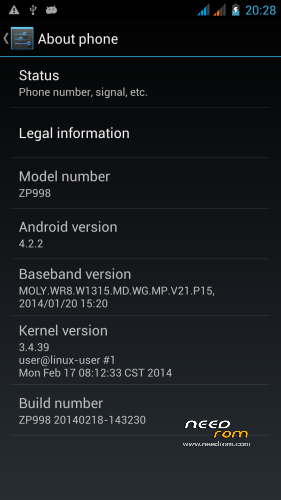
Device: ZOPO ZP998 (S1)
Chipset: MTK6592
OS version: Jelly Bean MR1 (4.2.2) Android SDK 17
ROM: ZP998 20140218-143230
Kernel: Linux 3.4.39
This ROM is flashable through SP Flash Tools. All tools you need are here. You need a computer running Windows (preferable XP), USB cable, the software provided and your phone. The instructions should be clear and commented in a way that you are able to understand what you try to do. Please read the following instructions at least one time before trying to do anything! Most questions will be answered if you understand.
This ROM was made to provide you with an easy way to get the most out of your phone. Searching the internet you will find a lot of information, which you might recognize as the same (or close to the same) as found here. The difference is that following the process here you will get a phone which works for you "out of the box", you do not have to learn details to get it running. Don't get me wrong, learning and knowing is power and I'd like to make you interested, it's just that I want to start you now  .
.
REMINDER: I'm not responsible for what you do. It's absolutely your own risk!
Before you start:
- download and install driver set to your computer (if not already done).
- download and install MTKDroidTools to your computer (if not already done).
- start MTKDroidTools and connect your phone to USB. Let the program work for a minute, it should show some info about your phone. (comment: the lower left box shows yellow or green. Both colours are fine for now and show that you connected successfully)
Flashing the ROM:
1. download the ROM file and extract this zip to a folder on your harddisk (e.g. extract to C:Zopo).
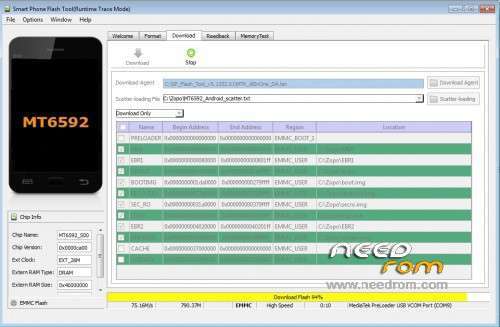
2. download SPFlashTool, install (e.g. copy it to C:), enter that folder and start flash_tool.exe.
3. select scatter.txt file: This file is located in the folder you created in step 1 (e.g. C:\Zopo\MT6592_Android_scatter.txt).
4. check if the first line (PRELOADER) is unticked.
(comment: Never flash PRELOADER if there is no need, this might brick your phone!)
5. Switch off your phone and remove battery.
6. click on the download
7. A red line may/can/will appear after a while (this depends on your computer and on your Windows version. Don't get nervous, as long as the hard disk control flickers it is fine. Be patient), changing to (probably) purple and then to yellow. Time to grab a coffee (please be patient, ok?).
8. A green circle will appear to note that the flashing process finished.
9. Disconnect the phone, reinsert the battery and restart. (comment: press
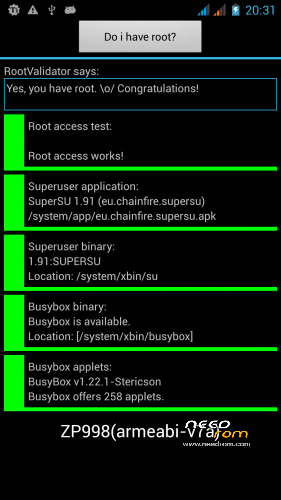
10.Congratulation. Your phone is rooted now and runs Carliv-CWM recovery.
Tests:
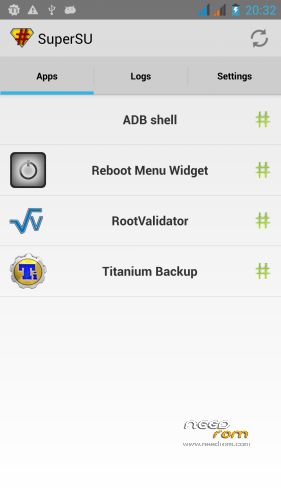
Find a program called "Reboot Menu" on your application start screen. Tip on it, answer the Superuser request with yes (maybe you are asked up to three times) and you will see a special shut down menu. Select Reboot Recovery and then tip Okay two times to reboot into recovery.
Carliv recovery:
You will see the Carliv-recovery menu. This is a graphical recovery, you can operate it by touching the buttons. Because we updated the operating system it is wise to "re-read" all software. Please start
Connecting to MTKDroidTools:
Start MTKDroidTools and connect your phone. After a short while (establishing the connection needs some time) you will see your phones information and the yellow box on the lower left corner. Just press Root
What you got now:
Your new ROM is same as the official ROM dated 18.02.14 (genuine ZOPO-ROM). The big difference is you got an optimized recovery (which lets you flash different ROMs "on the go" from your SD card), some nice little programs which are missing in the standard ROM and a fully working touch-operated recovery. Now you got the power, learn to use it .
What you can get:
Starting from here you might use this ROM as it is. I recommend to download at least a really good backup program (like Titanium Backup) and a ROM manager program (e.g. ROM toolbox). If you like to do more you can download alternative ROMs like Fluffy's ROM (just copy it to your SD card and flash from recovery). There is many more if you want to get the best out of your phone.
As I said in the introducion: This is a starter pack 
Credits go to numerous people who helped in making me understand, especially to Carliv, Fluffy, Alain, Tommy… Thanks guys, you're great.
※Please make a backup of your device before installing or updating ROM
This is an interesting rom. I get a bit more free ram and a nice set of tweaks. I think it runs a bit jaggy at times. Has anyone else noticed that? Nice job though mate. Keep it up!
Solanos, I'm still waiting to release my next (updated) ROM, every time I want to release I find something interesting to implement, so next version is not finished yet. If you have some good input I'll decide if it can go in next version
Hello mate! Nice work and the instructions are easy to follow. I think this is the best rom I've tried so far. It's stable and I get a bit more battery life than before so this is my default rom now. Looking forward to your next version
Hi!
I have problems following the flash procedure, especially on point 6.)
Which button below "welcome" should I press? The download button?
I pressed the Download button and connected the phone without Battery, but besides strange USB sounds from my windows7 pc nothing happens.
What should I do???
Yes, Download. There will be a note telling you that you did not select all parts. That is supposed to be so, please just click ok and then connect your phone. If your drivers are installed correctly I think you just have to wait a bit longer (depending on the settings of your computer anything below 2 minutes is ok). Patience is the key.
Hello again! I'm sure you know about the new official update and I was wondering if you are planning to make another rom based on the latest version.
Solanos, sorry for the late reply. Yes, there will be a new version of my starter pack, but I'm still collecting ideas and looking for some solutions. The last official update was not enough to do all the work again right now. Please be patient…
Accidentally flash the preloader… Is there a way to fix it?