
- Title: ZTE Grand S2 MIUI V5 Updated
- Listed: August, 2014
- Last modified: 11/06/2014 7:04 pm
- Version: MIUI V5 MultiLang
You must be logged for ROM download.
25021 total views, 6 today
6 Total favorites
 Member Info
DESCRIPTION
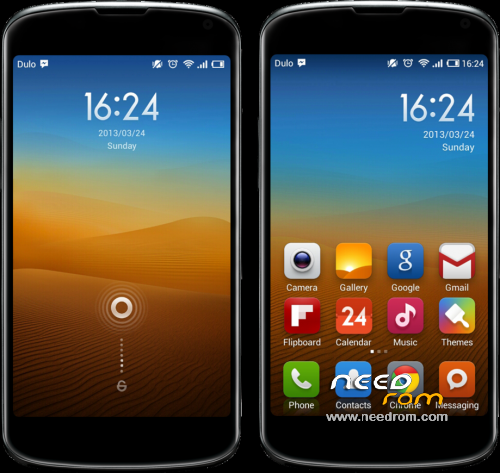
Lasted MIUI V5 Rom for ZTE Grand S II include Playstore.
#NEWS 4.11.5 Based On Gtbluesky ROM, Reduce Battery Drain, Update Camera From MiFavor UI 3.0.4, Add INTELLI3G Solve Lost 4G Problem When Phone Goes Sleep.
#NEWS 4.9.21 Optimized Kernel Stability, Optimized Charge, Reduce Battery Drain, Improve Performances, Repair Gloves Mode, Update Camera APP (but quality isn't perfect)
#NEWS 4.8.30 Fix Google Contacts Sync, Improve Performances, Fix somes font, Add EsExplorer, Delete Chinese Apps
Include all languages: English, Chinese, French, Deutsch, Spanish, Italiano, Portugues, Hebrew, Czech, Slovak…
Modded the APNS-CONF, resolve the problem of data connexion ( now EDGE / 3G / 4G works )
Install:
1/ Wipe data/factory reset, wipe cache partition and wipe dalvik cache.
2/ Install rom from your internal or external SD
3/ If you want root, go to Security Center / Permissions and agree Root
*Pour les français j'ai créé un post sur un forum si vous avez des questions
※Please make a backup of your device before installing or updating ROM
thanks for the update
Thanks for great update. I tied zour advice with MIUI theme, but still messing with original miui weather app. But no succes. I ve tried to push weather app and wether provider from hasz and from htc m8 multilingual miui rom to system, but still got error cant locate and connection error. What could be a problem?
I I'm sorry I have found the problem, weather lockscreen is added by defaut on MIUI, I have delete it by error
I will put it in my future rom
I see, thanks. I ll be waiting patiently…maybe
hi my friend you are great…but i would like to know if you fix the prob with camera,network,slow usb transfer and that weather app problem?thanks for your help
Hi, for the camera I haven't fix yet I've try many ZTE Camera APP but quality still not perfect… For slow USB, the Cache Size is in question but not only, when I try to modify it in boot.img or init.rc the changes diseaper at reboot.
I have delete Weather APP because I prefer use Weather Pro APP, but many peoples says that they want Original Weather APP, so you can use it on my new ROM.
My friend if i install this rom now…will update automatically.. and when you will fix this probs will fixed automatically or i ll have to install again the new rom that you will realese…thanks
Hi, you can install yet my rom, in MIUI Parameters you can backup all your configuration/data… So when I will make a new ROM you can Update It by recovery and restore all your data.
I'm working on a new ROM, I don't know if I will upload it yet because I have many problems with it
ok thanks you are great….:)
my friend my wipe data factory reset is in chinese…and i have no idea how to install the rom… because i dont no chinese….can you help how did you install it…thanks… i had try many ways to install but nothing…
Hi, if I understand your recovery is in chinese and it's hard for you to make anything.
You need to upgrade you Chinese Recovery to Us Recovery.
First you need to agree USB debugging
Many users can't update directly to US recovery so download it first CWM 6.0.5.0 CN, and click second choice in this app.
You will be in CWM 6.0.5.0 CN now you need to update to CWM 6.0.4.9 US, unzip it and launch "recovery.bat" type "1" and press "enter" two times.
Now you will be in CWN 6.0.4.9 US you can do everything that you want.
Good luck
my friend i dont no how…but i did the update in chinese….it is great….thanks!!!!!!!!!!!!!!!you are the best…i cant wait to test it….:)))
The rom doesnt have greek but its great(i hope at the future you will istall…thanks) the only prob its about usb charge…i hope you will fux it….thanks for your great work….best rom
Hi sorry for delay to answer you it's strange I think that I included it, can you explain what is problem with USB charge, because I had this problem before with a bad kernel. Thanks a lot