
- Title: ZTE Grand S2 MIUI V5 Updated
- Listed: August, 2014
- Last modified: 11/06/2014 7:04 pm
- Version: MIUI V5 MultiLang
You must be logged for ROM download.
25021 total views, 6 today
6 Total favorites
 Member Info
DESCRIPTION
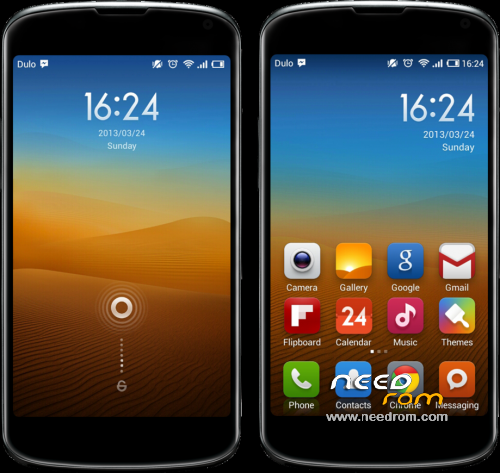
Lasted MIUI V5 Rom for ZTE Grand S II include Playstore.
#NEWS 4.11.5 Based On Gtbluesky ROM, Reduce Battery Drain, Update Camera From MiFavor UI 3.0.4, Add INTELLI3G Solve Lost 4G Problem When Phone Goes Sleep.
#NEWS 4.9.21 Optimized Kernel Stability, Optimized Charge, Reduce Battery Drain, Improve Performances, Repair Gloves Mode, Update Camera APP (but quality isn't perfect)
#NEWS 4.8.30 Fix Google Contacts Sync, Improve Performances, Fix somes font, Add EsExplorer, Delete Chinese Apps
Include all languages: English, Chinese, French, Deutsch, Spanish, Italiano, Portugues, Hebrew, Czech, Slovak…
Modded the APNS-CONF, resolve the problem of data connexion ( now EDGE / 3G / 4G works )
Install:
1/ Wipe data/factory reset, wipe cache partition and wipe dalvik cache.
2/ Install rom from your internal or external SD
3/ If you want root, go to Security Center / Permissions and agree Root
*Pour les français j'ai créé un post sur un forum si vous avez des questions
※Please make a backup of your device before installing or updating ROM
I downloaded all the 3 update versions, in order to update my zte grand s2, but they all 3 give me error " Installation Aborted" any assistance from anyone?
Hi, you need to download only the lastest firmware, if you have "installation aborted" it's probably you recovery. I think that your recovery version is "3e", if yes do this:
You need to upgrade you Chinese Recovery to Us Recovery.
First you need to agree USB debugging
Many users can't update directly to US recovery so download it first CWM 6.0.5.0 CN, and click second choice in this app.
You will be in CWM 6.0.5.0 CN now you need to update to CWM 6.0.4.9 US, unzip it and launch "recovery.bat" type "1" and press "enter" two times.
Now you will be in CWN 6.0.4.9 US you can do everything that you want.
Good luck
You don't need to do everything if you want to use CWM 6.0.5.0 Chinese you can, but 6.0.4.9 US is much easy
Hello friend, thank you very much for continuing to develop roms for ZTE Grand S2.
Every day I check the website to see if an update is uploaded to my phone, I'm glad my day today.
The aora provare same.
I hope to continue working on this phone
Thank you friend
I'm happy to see that many peaople like you use my ROM.
I took some time for this new update but the lastest problems are hard to solve.
I'll continue my work don't worry, I'm working on MIUI 6 Rom yet but it has more problems than my MIUI 5 Rom…
If you have any problem let me know.
Kind Redline,
I want to alert you that the latest version of the ROM MIUI V5 4.11.5 can not be installed into the smartphone, because an error occours (E:Error in /storage/sdcard0/root/MIUI_4. (Status 7)) when it is loaded from sd external or from internal storage of the phone … please can you help me? thanks
comchfe
Hi, I have test to re-install it on my phone and I don't give error, everything work great.
Do you have CWM recovery? if yes try reboot to recovery and wipe everyting and try again
Hello.
It's possible to update to you rom from B06 (4.3).I have CWM 6.0.4.9installed. Thanks. Merci.
Hi, yes you can update without problem to MIUI from B06
Thanks for your help. I'm a novice in this world.
No problem I hope that you like this rom
Hello.
Nice ROM, thanks, installation OK. Only a little issue. I can’t download nothing from the google market.
Some idea about?
Thanks.
I, if you have problem to download from play store you need to reflash your rom, I had this issue and I solve it like this.
@+
Hello, everything’s ok now.
Thanks for your work & your help.
If nothing goes wrong, i’ll go on with this ROM.
Hi Redline974,
First of all, thanks a lot for your work, and your help that you provided if any problems occur. I saw your message on the forum xda-developpers, and i have the same problem : i am french (as you are) , and when i go abroad (in Belgium, Germany, etc…) I have no service, so i would like to know if you finally solve the problem with MIUI 4.11.5?(I'm on 4.10.17 by hazs).
Thanks
Salut, normalement lorsque tu part en dehors de la France tu devra activer l'itinérance de données, de plus j'ai modifié le fichier "APNS" pour y ajouter ceux des opérateur étrangés. Normalement, je dis bien normalement tu devrai pouvoir faire basculer ton réseau sans aucun soucis.
Le probleme des roms Hazs et Gtbluesky est que les roms sont configurés par défaut pour fonctionner correctement en chine mais pas en dehors
Merci pour ces informations,
la ROM est vraiment bien, fluide, sans bug, vraiment je n'ai pas grand chose à lui reprocher. J'ai juste remarqué que par rapport à mon ancienne ROM, la batterie tenait un peu moins bien, je ne sais pas si c'est juste une impression. En tout cas c'est du bon boulot! J'aimerais egalement me lancer dans les creations de ROM, mais je suis encore un novice. J'avais essayer de "creer " une rom ( en fait c'était plus de l'assemblage grace à cygwin et android kitchen), mais je l'ai supprimé par erreur. Est ce reelement difficile d'améliorer une rom( de la rendre meilleur, plus stable, corriger les bugs) comme tu as pu le faire?
Salut, merci pour ton retour sur ma ROM et avrai dire pour la conso je ne pourrai pas te donner ma propre expérience car a mes débuts sous MIUI je changeait de ROM plusieurs fois dans la même journée pour mes essais.
Android Kitchen me sert peu avrai dire ce n'est qu'un raccourci pour certaines manipulations, les modification je les fais manuelement sur les fichiers, au stage où j'en suis sur ma rom il est difficil de l'amélioré d'autant plus que MIUI à un system bien particulier, par exemple le partage de connection est très difficil a faire fonctionner… Et bien cela fait des mois que je suis dessus… sans résultat…
C'est pour cela que pour ma derniere MAJ par exemple je me sert de différents fichiers que les développeur mettent au point sur les nouvelles ROM MIUI pour les associer à ma ROM.
Ou quand je galère trop comme avec le basculage 3G/4G je met un petit soft pour faire le travail ( comme dans ma derniere ROM Intelli4G )
Concernant le basculage hors de la France qu'en est t'il pour toi cela fonctionne?