
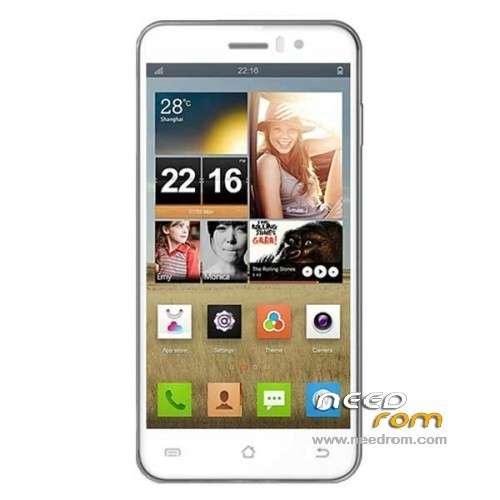
- Title: JIAYU G4 L/H/HG
- Listed: May, 2013
- Last modified: 10/26/2013 6:10 am
- Version: ROM Android 4.2.1
You must be logged for ROM download.
85605 total views, 1 today
4 Total favorites
 Member Info
DESCRIPTION
ROM Mobile JIAYU G4H – ROM Android 4.2.1
Official JIAYU G4L Version: G4L-20131023-072636 ( install with Flashtools )
—————————————————————————————————————————————————
Update official JIAYU G4H Version: G4H-20131021-172551 ( install with Flashtools )
1, the main interface and lock screen status bar transparent optimization.
2, solve some of the touch-screen virtual buttons without vibration.
3, part of the solution to upgrade the old version of the software models resulting from changes 512M RAM space issue.
—————————————————————————————————————————————————
Update official JIAYU G4HG Version: G4HG-20131022-153302 Look ROM of jgzxr
—————————————————————————————————————————————————
Update official JIAYU G4HG Version: G4HG-20130706-153833
in the new rom that you enter in the phone memory, not just the microSD card.
Touchscreen GPS, H3G and other applications are already installed and gains on tethering.
—————————————————————————————————————————————————
FIX Touch Official For Version: G4H-20130620-163509 ( thx to abaggie for tuto )
Update official JIAYU G4H Version: G4H-20130620-163509
Changelog:
1 Improved some can not wake up the phone screen, automatic shutdown problem.
2 Improved phone charger charge into some problems.
3 increase Touchscreen procedures updated separately and calibration options
4 increase in operating vibration
5 fluency and GPU optimization system optimization.
Recommended wire brush way to upgrade! After you upgrade the ROM, should be subject to a separate touch upgrade procedure to change the touch performance.
————————————————– ———————————————–
This release adds a touch screen calibration procedure, touch the upgrade process, you can improve the following questions:
1 jump screen
2 Touch allowed, offset
3. Sometimes can not answer the call.
—————————————————————————————————————————————————
Official ROM JIAYU G4H Version: G4H-20130515-202809
Language support: Multilang
Install ROM :
ROM Install : with Flashtool (you download file JIAYU G4H FL )
Unpack FlashTools, and Click on Flash_tool.exe
Select a the MT6589_Android_scatter_emmc.txt in ROM
Turn off your phone, remove the battery.
Press F9 (or hit Download button) and connect your phone into the computer via USB data cable.
The process will start and a red progress bar will appear after color purple, yellow.
And green circles display
Finish !
You can now safely disconnect your phone and turn it on.
or
ROM Install : with update on sd card (you download file JIAYU G4H SD )
Card brush, set the software package two files into the T card root directory, as shown below:
(1) upgrade package: update.zip
(2) AAAAB3NzaC1kc3MAAACBANLc2NCufBz0lBUupztiXI7rUnhY3bOojTMmGD0SR68e8kK00EM5n0ghfpaDxayZD.zip Folder
- Enter the interface as shown below, click on the system upgrade interface shown in the figure appears, click on the down arrow to the right, appearing in interface begins upgrade
※Please make a backup of your device before installing or updating ROM
Hello!
Can anyone please insert Swedish language in the ROM ?
I Can Donate/Pay for Your troubles the amount you think is fair!
Realy hope someone can help as i realy need g4 rom in Swedish.
Thanx for your time in advance!
B.regards
Christofer
Does this ROM support wired headset button control for media players? (when I push the button on wired headset it STOP/PAUSE/NEXT TRACK/etc)
Which kernel does it based?
for now all based on version official the same of your mobile
после установки происходит самостоятельное нажимание экрана так называемый фонтомные нажатия – что делать?
Can anybody port this Rom for G3?
Is this ROM for the 4GB-Version of the G4? At the moment ist G4W 20130531-190735 on my phone.
What's the difference between G3H and G4W?
hi after flash new rom still have problem.Sometimes can not answer the call.
Touch screen program update not working. said something about read error hex data..
any help
thanks
same troubles as kykykmora has. please help!
Instructions firmware:
1. Unpack the contents of the archive to your external SD-card in your phone. Extract "download.ldr" in the root of the card. (/mnt/sdcard)
2. Unplug USB cable, disable Wi-Fi, Bluetooth autorotate, GPS etc and put your phone in airplane mode. And then set the screen timeout to 5 minutes or more.
3. Go to Settings – Display – at the bottom – update software touch screen.
4. DO NOT touch the screen. Wait patiently until the whole updated is done. (Blue line) if correct it will update version 13 to version 25.
5. Now reboot your phone and then calibrate the screen, go to Settings – Display -. Put the phone on a table or completely flat surface and click "calibrate". Again DO NOT toch the screen until the end of the calibration.
6. From the root of SD-card delete the file "download.ldr".
WARNING. Updating the firmware touch screen is a dangerous procedure. All at your own risk. If you don't undertand don't upgrade.
Sorry where is download.ldr cant see in rom archive. Thanks
Download touchfirmware upgrade here:
http://bit.ly/11HnJHn
Thanks abaggie for the file and the helpful instructions! The touch is working much better now.