
- Title: ZOPO 980 & C2
- Listed: June, 2013
- Last modified: 07/29/2013 8:14 pm
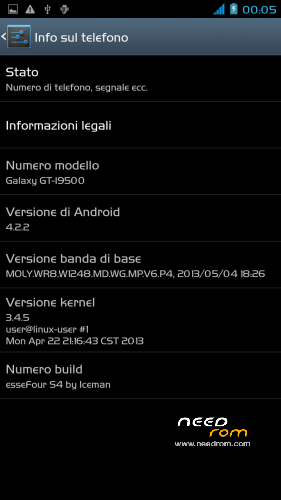
- Version: Z4 (Normal)JB4.2.2 by Iceman (touchwiz)V2
You must be logged for ROM download.
88469 total views, N/A today


 Member Info
DESCRIPTION
ROM: Z4 (Normal) by Iceman – ROM Android 4.2.2 – V2
News V.2
-Proximity Sensor Calibration deleted from settings menu–> display (not working)
-deleted the application "CentoApps" and submitted as an application user (easily eliminated)
-6/8/2013 with kernel variants made
-Open default DNS-revised schedule-revised alarm
-clock-redesigned battery percentage scale from 0% to 100%
-13mp camera and 8mp rear opening front-mounted Nova Launcher First (Classic version)
-Phone section-Magazine "Italianizzate" 99% of the voices (excluding applications)
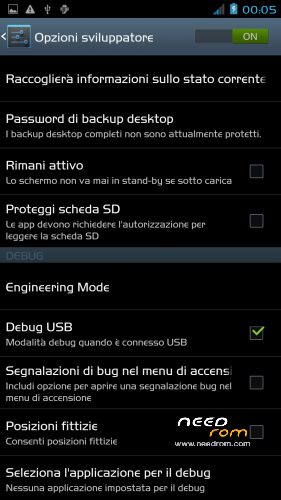
-enriched the ScanSnap quick menu new entries-added Advanced Settings (Menu–settings option > developer–> advanced settings) or from the pull-down menu (quick menu) the new Advanced Settings Menu incorporates more selectable options as required, such as:
1- Lockscreen Changes
2- Statusbar Changes
3- Battery Changes
3- Display impostazioni
6- Volume setting
7- General fixes
8- Activating and manipulating the Navbar (function ACTIVATED at FIRST INSTALLATION – if it concerns the navbar on each reboot to enable the appropriate general setting option)
Advanced menu within each entry but let me highlight:
-the ability to set the color and transparency of the Statusbar, centering on the same clock and set show/hide battery icon
-for lovers of lower resolutions the possibility of activating the NavBar with transparent, change the number of buttons and the action to be assigned to each key; choice of different themes and icons
NOTE: Uncheck quick launch
Apk and Framework: deodex-zipalign – the rom includes the root permissions
Launcher: touchwiz
Application: full S4, S-Voice
Functions: dual ring, auto-hide, touch key light duration, suspension windows, g-sensor calibration, proximity sensor calibration, engineering mode is accessible directly from developer options
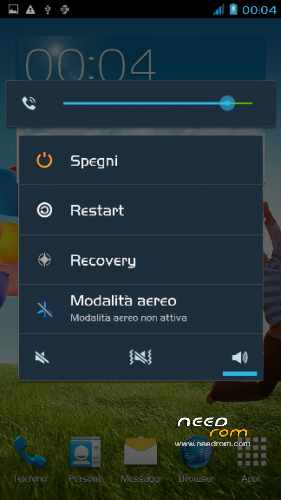
Power-menu: shutdown, restart, recovery, airplane mode
Language support: Multilang
ROM Install:
- unpack file .rar
- install the recovery (cmw or twrp) through mobileuncle
- copy file .zip in sdcard
- reboot into recovery mode (cwm or twrp)
- Perform nr. 2 Wipeall
- install from sdcard
- reboot system
Attention!
In case of problems with the camera mount the file system\lib\libcameracustom.so of his rom-stock
※Please make a backup of your device before installing or updating ROM
It’s for “normal” or B motherboard ?
Many thanks.
No. only difference in launcher: Normal with touchwiz. Classic with Nova launcher
It is for a or b version.
Version? To what are you referring to?
http://img90.imageshack.us/img.....10/68104812.jpg look thaht Mikeice.
It's important to make a ROM for this two models. Motherboards are not really the same on the both versions.
It's really functionnal on A & B C2 ?
http://img90.imageshack.us/img.....10/68104812.jpg look that please, Mikeice.
It's important to make a ROM for this two models. Motherboards are not really the same on the both versions.
It's really functionnal on A & B C2 ?
The difference lies in the fat. C2 4 GB and p980 Z16 Gb.
No problem to install the Z4 by Iceman.
The difference lies in the fat. C2 4 GB and Zp980 16 Gb.
No problem to install the Z4 by Iceman.
IIRC the difference is in the boot files, usually you change those when you flash through FlashTool, if you are flashing a zip through recovery, there should't be any problem as those updates dont touch boot files and loader
on zp980 rev. B working good
Hi there, support dual sim function??
Supports dual sim!!!
has Phatom touches ? Battery indicator Works Fine ??
Perche nr2 wipeall? Cosa dobbiamo wipare?
Si fa sempre per evitare accavallamenti. Non è un obbligo. Solo un consiglio.
Installed on c2 b version. Got the nvram error on wifi, changed back to dezmen
I am sorry.
It was enough to format with Flash Tool and install the original rom and update the nvram.
Okay. Thank you.
nvram nou win8
thx iceman!
Okay. Thank you.