
- Title: Lenovo A820
- Listed: September, 2013
- Last modified: 09/20/2013 5:40 pm
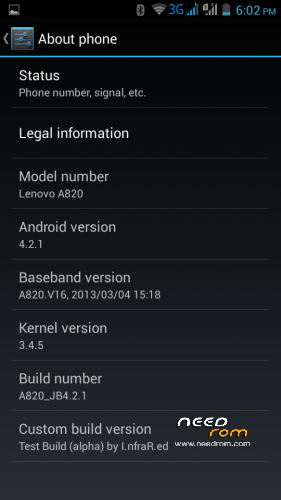
- Version: ROM Android 4.2.1
You must be logged for ROM download.
66675 total views, 19 today
167 Total favorites
 Member Info

DESCRIPTION
Update 15.01.2014
Fixed color temperature bug (please see #2).
Alpha version
Port from ZTE V987. Thanks to bruno for the base. Also thank to cloudROM and MIUI teams, their roms helped me for the final fixes. Unfortunately, it is still based on S139 kernel. I couldn't find a way to overcome the issue with messed up touchscreen and orientation. It was working on my phone only.
Don't forget this is just a test version for those who like to experiment. It would be a big luck if everything works as intended, so if you're looking for a bug-free and stable rom, then it's adviseable not to install this version before bugs are fixed.
Install through CWM/TWRP.
Needless to say – make a backup of your current system first.
Spent a lot of nights working on this and finally managed to fix everything…or almost.
Most of the things seem to work, but needs testing. It is guaranteed that won't mess up the touchscreen (verified on another A820).
The ROM is permanently rooted and multilanguage, gapps not included, but you can install from this link: http://goo.im/devs/UniqueDroid/gapps/gapps-4.2.1/gapps-jb-4.2.1-20121129-signed.zip through CWM/TWRP.
If you get installation aborted, then you don't have a proper recovery installed. Download this one http://d-h.st/QxB rename it to recovery.img, copy to sdcard and install through MobileUncleTools (you can download it from Google Play).
Working: GPS, Wi-Fi, Sensors, GSM module, camera, audio, video with h/w decoding, mount points, charging
Untested: Bluetooth (turns on, but have no device to test it with), FM radio tested, but needs headphones as antenna
Not working / known bugs:
1. MP3, but plays FLAC – replace libstagefright.so from this link http://d-h.st/Zn6 in /system/lib/, set rw-r–r– permissions and restart the phone.
2. Color temperature changing in some cases - Replace /system/app/Gallery2.apk with attached Gallery2.apk rom the zip file and delete Gallery2.odex. Reboot the phone. Playing the recorded videos directly from the Camera leads to FC, but otherwise everything seems fine. This version is unaltered in any way, but fixes the nasty color temperature bug. FC problem will be fixed in the next full release.
3. USB Tethering – disable USB Debugging from Developer options and it will work
4. Contacts binding (don't have 2 SIM cards, so unable to test)
5. Search in contacts stops at 2nd symbol
※Please make a backup of your device before installing or updating ROM
Overall im very happy with the ROM, my expiriences are:
1. Adding "dalvik.vm.execution-mode=int:fast" to build.prob makes GPS very fast
2. MP3-Fix (libstagefright.so) makes MP3 playback possible, and fixes camera crash
—-
3. WiFi hot-spot does not work. Shows as it should on phone, but i am not able to find it on my PC.
4. Anything MMS related crashes messaging app. Please post your solution
—-
Other thoughts:
5. Using MTKButtonLed, makes LED buttons light up on notifications, however it does not work with SMS, i think its because the screen wakes and then turns back off with the LEDs. (link: http://fvicente.es/wordpress/?.....p=99) (app is in english)
6. Maybe cappa72's FM-Radio-change will make playing radio without headset possible, havent tried it yet though. (link: http://forum.xda-developers.co.....d.php?t=2264398)
Cheers
Thanks
Hi, someone tested Netflix in this ROM? Is it working?
Infrared please make an updated rom with mp3 and camera fix.
MP3 fix was posted long time ago and is available for download in the description.
When will u update? It would be cool that all stuff u did on 4.1lenovo u do it here on this rom
Fix for camera and mp3 is aviable for download on xda forum lenovo a820 its posted by infrared
Fast and come with minor issues, wifi hotspot when it work that would be the best choice at the moment.
It should work if you disable usb debugging in developer options.
You are well again, infrared ?
I dont think so, when I turn off the usb debugging it still not available for wifi hotspot, there is no device I have see it.
Infra u were sick? About when will u put new updates?
I'm starting to work again on the ROMs this week.
But everyone should understand that I have a regular job during the day and also can't work every day on the roms. Everyone have a personal life, more or less. I just work when I have time or will. Sometimes it's just 30 min a day, sometimes it is longer. If I had no regular job, then it would have benn different.
infrared, we konown that.It is normal. Just ignore impatient children. You do good, FREE job. You are god man. Remember it.
@Tomecek
VERY WELL SAID DUDE . Not only working on two roms (and regular job!) but infrared also provides great support for all of us who know nothing about cooking ROM's and how to sort out our problems
 . I think more people should donate some money to infrared! more than 2500 downloads on both of his ROM's if every one of those people donate $1 infrared will have good reason to work and develop the ROM's.
so all of you instead of winging when will the next update be ready or polish language included in the rom just press "donate" button and show your appretiation!
Would it be possible to modify the ROM to allow wake-up the phone by pressing volume key ?
Thanks for your great job Infrared!
When in deep sleep, the phone can wake up with the power button only. It's a hardware realisation and it's the same on most (if not all) MTK phones.
Thanks! That was really sad news To do not use the power key each time I tried to set the phone as follows: screen backlight off: 1 minute, lock: 30 minutes. That worked in case of yours 4.1.2, each time I pressed volume (before 30 minutes time-out) the screen was enabled. In case of 4.2.1 it's not working. I can't enable the screen even if the phone is not in deep-sleep. I hope I understand correctly… the deep-sleep is enabled at the same time as the Lock. Could you please suggest how to make the 4.2.1 enabling backlight by pressing the volume (before the deep-sleep of course) ?
the wifi hotspot is not available for me, althrough I turn the Wi-Fi hotspot on, I cant find the connection for that. (in any device I have not just one) So is there anyway I can use it?
The MMS also not work when my friend send me a picture, I can use GO SMS for open it. Actually it crash when I try to open the chat history.
For MMS just download some other messaging app from Play Store.
I can recommend Messaging G Lite, and the one i use Chomp SMS.
Remember to deactivate all notifications in the original messaging app.
For WiFi hotspot you will need to wait for a fix or a update (i guess)
Best Regards