
- Title: CM 12.1
- Listed: July, 2015
- Last modified: 04/14/2016 11:35 pm
- Version: Release V22
You must be logged for ROM download.
85069 total views, 23 today
46 Total favorites
 Member Info
DESCRIPTION
original discussion (in italian):http://www.androidiani.com/forum/zte-nubia-z7/472442-rom-z7max-android-5-1-1-cm-12-1-unofficial.html
in english: http://www.androidiani.com/forum/international-users-help/474427-rom-zte-z7max-android-5-1-1-cm-12-1-unofficial.html
Hi all, after a long time I came back with a new rom 
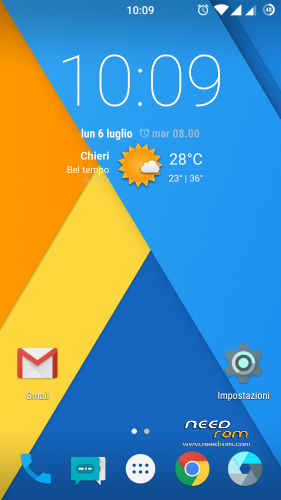
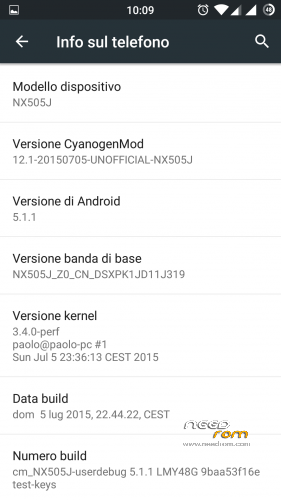
it is a (multilanguage) CM12.1 Lollipop 5.1.1 entirely compiled by me, still it as some problems but is already usable
ONLY FOR MERGED PARTITION
what's working:
camera
flash led/torch
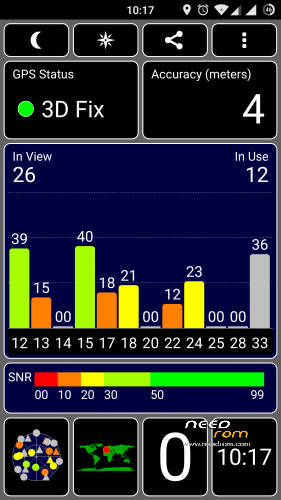
gps
wifi
dual sim
sensors
nfc (maybe)
Bluetooth
led notification/charger
FM Radio
Infrared
what's not working:
let me know
changelog:
13/04/2016 Release V22 (MD5: 4dece2c33c639e64ba0ae60be362bb2d)
- Security patch April 2016
- proprietary blobs updated from latest stock firmware 3.84
-
sync cyanogen source code (13/04/2016)
11/02/2016 Release V21 (MD5: 8879801ec683e3ca7a788c18e78a3835)
- Security patch February 2016
- proprietary blobs updated from latest stock firmware 3.77
-
sync cyanogen source code (11/02/2016)
23/01/2016 Release V20 (MD5: 73d1d880fd85320868ca031f7d35dd75)
- Security patch January 2016
- proprietary blobs updated from latest stock firmware 3.73
-
sync cyanogen source code (23/01/2016)
16/12/2015 Release V19 (MD5: 5afe185865b962b5500f0280b5ccb04e)
-
added support for the smart cover

to manage the cover I used an app created for the HTC dotcase (thanks to the author), adapting it to our device
the cover is disabled by default and for the moment there is no option to enable/disable it. if you want to enable just flash the file (without any wipe) CM_EnableCover.zip (if you have it enabled and want to disable just flash the file CM_DisableCover.zip) - kernel: added support for dotcase
- Security patch December 2015
- proprietary blobs updated from latest stock firmware 3.68
- sync cyanogen source code (16/12/2015)
16/11/2015 Release V18
-Including the latest Google security fixes of November
-updated proprietary file (blobs) from latest stock firmware 3.65
-sync cyanogen source code (16/11/2015)
26/10/2015 Release V17
-sync cyanogen source code (26/10/2015)
08/10/2015 Release V16
-source code updated to Build ID LMY48W (5.1.1_r24) (from LVY48F 5.1.1_r18)
-Including the latest Google security fixes of October 5
-updated proprietary file (blobs) from last stock firmware 3.61
-updated baseband ver 3.61 (it can be downloaded here, flash without wipe)
-sync cyanogen source code (08/10/2015)
26/09/2015 Release V15
-kernel: fix phone reboot when using usb or bluetooth mouse/keyboard
-updated proprietary file (blobs) from last stock firmware 3.60
-updated baseband ver 3.60 (it can be downloaded here, flash without wipe)
-some optimizations
-sync cyanogen source code (26/09/2015)
21/09/2015 Release V14
-Fix bug deleting photo in the gallery
-updated proprietary file (blobs) from last stock firmware 3.59
-updated baseband ver 3.59 (it can be downloaded here, flash without wipe)
-some optimizations
-sync cyanogen source code (21/09/2015)
18/09/2015 Release V13
-Fix V12 bootloop bug
-kernel: updated with the latest codeaurora patches
-fix for some selinux policy
-some optimizations
-sync cyanogen source code (18/09/2015)
15/09/2015 Release V12
-do not use, bootloop problem (link removed)
-updated app Nubia IRControl vers. 3.0.1.1011
-kernel: added some patch to wifi driver prima/pronto
-updated proprietary file (blobs) from last stock firmware 3.57
-updated baseband ver 3.57 (it can be downloaded here, flash without wipe)
-some optimizations
-sync cyanogen source code (15/09/2015)
06/09/2015 Release V11
-updated proprietary file (blobs) from last stock firmware 3.56
-updated baseband ver 3.56 (it can be downloaded here, flash without wipe)
-some optimizations
-sync cyanogen source code
29/08/2015 Release V10
-updated proprietary file (blobs) from last stock firmware 3.55
-updated baseband ver 3.55 (it can be downloaded here, flash without wipe)
-some optimizations
-sync cyanogen source code
25/08/2015 Release V9
-fix camera bug (from release V8)
-liblight: fix bug Home led always on when the navigation bar is active and charging phone
-Doubled the incall volume step (from 5 to 10)
-updated proprietary file (blobs) from last stock firmware 3.54
-updated baseband ver 3.54 (it can be downloaded here, flash without wipe)
-optimization and various modifications
-sync cyanogen source code
21/08/2015 Release V8
-bug: there is a little bug in setting preferred network type, after change all the options become gray and no longer be selected…simply go back and re-enter
-Added screenshot tile in quicksetting
-Doubled the volume step (from 7 to 14 for all volumes and 15 to 30 for the multimedia volume)
-liblight: fixed the random Home led lit up brighter than normal
-updated proprietary file (blobs) from last stock firmware 3.53
-updated baseband ver 3.53 (it can be downloaded here, flash without wipe)
-optimization and various modifications
-sync cyanogen source code
18/08/2015 Release V7
-Added option for take screenshot with 3 fingers swipe from up to down (settings->display)
-optimization and various modifications
-sync cyanogen source code
12/08/2015 Release V6
-Fix setting Preferred Network type (again)
-Added option for show/hide headset icon in Settings->Status Bar
-Added option for show/hide key navigation bar in Settings->Buttons (physical keys stay active)
-kernel: set to default intelliactive governor (instead of interactive)
-kernel: set to default westwood TCP congestion control (instead of cubic)
-optimization and various modifications
-sync cyanogen source code
07/08/2015 Release V5
-fix touch bug synaptics touchscreen
-fix recording call
-kernel: update to 3.4.108 version
-kernel: added several selinux patch
-kernel: added and updated zram support (from kernel 3.10, disabled by default…can be enable with trickster mod or similar app)
-kernel: added lz4 support
-kernel: added exfat filesystem support (for external sdcard and usb key)
-kernel: updated wifi driver
-optimization and various modifications
-sync cyanogen source code
02/08/2015 Release V4
-Added option for adjusting intensity vibration in Settings->Sounds
-Possible fix for LED Home button that occasionally lit up brighter than normal (to be tested better)
-kernel: few optimizations
-kernel: compiled with linaro toolchain 4.9 optimized for arm a15
-optimization and various modifications
-sync cyanogen source code
26/07/2015 Release V3
-Fix wrong MAC Address
-Added a option to show/hide the statusbar root icon (#) (in settings->Status Bar)
-Added a option to show/hide exclamation mark on signal strength icons when there is no Internet connection (settings->Status Bar, this change is not in real time…to force the icons upate just enable/disable wifi or enable/disable airplane mode or simply reboot your phone)
-optimization and various modifications
-sync cyanogen source code (finally has been added the option for enable/disable the data connection in settings->SIM cards)
22/07/2015 Release V2
-Fix setting Preferred Network type
-Added network speed indicator in statusbar (can be enabled in settings->Status Bar)
-Implemented 3 battery mode profiles (in settings->battery):
- balanced: governor interactive, freq min 300Mhz – max 2.45Ghz, GPU max 578Mhz (the default profile)
- power save: governor conservative, freq min 300Mhz – max 1.57Ghz, GPU max 389Mhz
- performance: governor performance, freq min and max 2.45Ghz, GPU 578Mhz
-some optimizations and changes
-sync cyanogen source code
19/07/2015 Release V1
-optimized source code (liblight) led keys (now it is almost perfect)
-kayhandler added to manage the double tap to wake (I hope in some way help to fix the SOD bug)
-added app IR stock Nubia translated into Italian, Russian, English and Chinese
-reinserted the option "prevent accidental wake-up" removed by mistake in the beta3
-fix saving settings LTE/3G/2G
-changes in various configurations and optimizations
-sync cyanogen source code
16/07/2015 beta 3
-fix led lights on menù and back button (sometimes one button still light on…I'm working on it)
-add native multiuser support
-disabled USB Mass storage connection (useless with emulated sd)
-fix USB charging option
-probable fix for mic in google search (need more tests, needed the new gapps that I have uploaded on mega tk_gapps-modular-nano-5.1.1-20150705-signed.zip)
-fix setting LTE/3G/2G (for the moment is only a partial fix, after a reboot the setting return back to default value)
-updated proprietary file (blobs) with last firmware stock 3.22
-sync cyanogen source
14/07/2015 beta 2
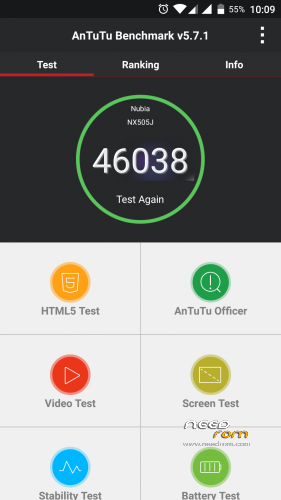
fix thermal engine: increased performance (antutu score 43000~)
status bar: fix show percentage next to the battery icon
sync cyanogen source code
11/07/2015 beta 1
added double tap to wake feature (can be enable in settings->display)
fix restart/shutdown crash
fixed an issue that sometimes the gps stopped working
enabled some compile flag for optimization
sync cyanogen source code
08/07/2015 alpha3
kernel: some tweaks
kernel: added some governor cpu
kernel: added some scheduler
kernel: added cpu voltage table
kernel: added LCD color calibration
(all kernel settings are configurable via Trickster Mod or similar app)
fix FM Radio
fix Infrared
06/07/2015 alpha2
first public release
ONLY FOR MERGED PARTITION
flash instruction:
first of all: backup all with twrp recovery
download rom and gapps
full wipe
flash rom and gapps
reboot
The first boot takes a bit 'of time
Root access can be enabled in developers options
※Please make a backup of your device before installing or updating ROM
HI PAOLO mille grazie, every Rom is better than the previous one. You made
My Z7 max Work better than with stock Rom.
Just a suggestion i think the key navigation bar Option
Does not make much sense and it uses resources (?), so maybe it would be a good idea
To post 2 downloads , 1 with, another without the Option
Thank again
Option already there, read the change log for the release
"-Added option for show/hide key navigation bar in Settings->Buttons (physical keys stay active"
Just noticed the headphone icon, very nice, good work!
Hardware nav-keys should be disabled when on-screen nav-bar is actived, cause all user defined settings about hardware keys are restored to default in this case. And it'll be very easy to be touched by accident.
I meet one difficulties while using google maps.
Google maps cannot locate my location while gps on. I checked gps status in gps toolbox, the gps works fine but not in google maps. I turned all permission on still not work. Anyone face this problem?
Gps works fine in google maps.
hey same proble here as well…
I thought It's only with me…
Seems like a bug with ROM…
Just tested, 3 Maps and GPS apps work fine, GPS lock up in seconds.
Thanks everyone response.
I download nokia here maps and have a try…Well, gps work fine in here maps…
I cannot figure out why…
Rel V4 feedback:
The radio can't use, please fix it.
Thank you for your work.
Rel V4 feedback:
When the Wifi lose connect, even the Wifi can be used, CM12.1 ROM can't connect the Wifi automaticly. We need to close and reopen ROM's Wifi switch, then can be connected. Please fix it.
Thank you for your work.
V6 Can Connect WiFi automaticly in Hong Kong, but can't in PRC.
Then switch to V6 instead of using an old version…
GPS works perfectly on everything on V6
Gps not work in google maps (apps) in V6
Google maps (web) – fail
Google maps (apps) – fail
Here maps – ok
No. It is working on maps on V6, you just have to turn it off and back on after flashing. If it isnt working for you try redownloading and reflashing rom, but dont blame the developer because it is working perfectly, i did a 70km trip yesterday using google maps on gps on v6.
Hi, pilililo2, i am not blaming the developer and dont have intention to do so, i would just like to figure out why. As i mentioned before, i checked gps can connect to satellites, but just dont work on google maps while work on nokia here maps.
I tried to redownload Agps data, set asia gps server but no luck…it is really strange. (Well…this may not relate to rom…but google maps)
Maybe what isnt working is Beidou Network satellites since youre in china, but here in Europe, normal gps satellites are working perfectly
I am in Hong Kong which do not use baidu network. Hong kong peoples are using google. Fyi.
GPS is working very well in Hong Kong.
Been testing for the last couple of days.. Not experienced any of the problems mention with Wifi or GPS location.. Infact nor a single issue.. Everything , for me anyway, seems perfect.
This Rom just keeps getting better.
Great work