
- Title: CM 12.1
- Listed: July, 2015
- Last modified: 04/14/2016 11:35 pm
- Version: Release V22
You must be logged for ROM download.
85065 total views, 19 today
46 Total favorites
 Member Info
DESCRIPTION
original discussion (in italian):http://www.androidiani.com/forum/zte-nubia-z7/472442-rom-z7max-android-5-1-1-cm-12-1-unofficial.html
in english: http://www.androidiani.com/forum/international-users-help/474427-rom-zte-z7max-android-5-1-1-cm-12-1-unofficial.html
Hi all, after a long time I came back with a new rom 
it is a (multilanguage) CM12.1 Lollipop 5.1.1 entirely compiled by me, still it as some problems but is already usable
ONLY FOR MERGED PARTITION
what's working:
camera
flash led/torch
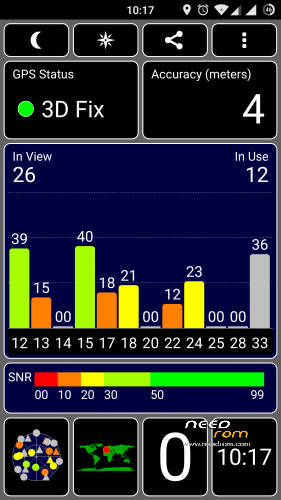
gps
wifi
dual sim
sensors
nfc (maybe)
Bluetooth
led notification/charger
FM Radio
Infrared
what's not working:
let me know
changelog:
13/04/2016 Release V22 (MD5: 4dece2c33c639e64ba0ae60be362bb2d)
- Security patch April 2016
- proprietary blobs updated from latest stock firmware 3.84
-
sync cyanogen source code (13/04/2016)
11/02/2016 Release V21 (MD5: 8879801ec683e3ca7a788c18e78a3835)
- Security patch February 2016
- proprietary blobs updated from latest stock firmware 3.77
-
sync cyanogen source code (11/02/2016)
23/01/2016 Release V20 (MD5: 73d1d880fd85320868ca031f7d35dd75)
- Security patch January 2016
- proprietary blobs updated from latest stock firmware 3.73
-
sync cyanogen source code (23/01/2016)
16/12/2015 Release V19 (MD5: 5afe185865b962b5500f0280b5ccb04e)
-
added support for the smart cover

to manage the cover I used an app created for the HTC dotcase (thanks to the author), adapting it to our device
the cover is disabled by default and for the moment there is no option to enable/disable it. if you want to enable just flash the file (without any wipe) CM_EnableCover.zip (if you have it enabled and want to disable just flash the file CM_DisableCover.zip) - kernel: added support for dotcase
- Security patch December 2015
- proprietary blobs updated from latest stock firmware 3.68
- sync cyanogen source code (16/12/2015)
16/11/2015 Release V18
-Including the latest Google security fixes of November
-updated proprietary file (blobs) from latest stock firmware 3.65
-sync cyanogen source code (16/11/2015)
26/10/2015 Release V17
-sync cyanogen source code (26/10/2015)
08/10/2015 Release V16
-source code updated to Build ID LMY48W (5.1.1_r24) (from LVY48F 5.1.1_r18)
-Including the latest Google security fixes of October 5
-updated proprietary file (blobs) from last stock firmware 3.61
-updated baseband ver 3.61 (it can be downloaded here, flash without wipe)
-sync cyanogen source code (08/10/2015)
26/09/2015 Release V15
-kernel: fix phone reboot when using usb or bluetooth mouse/keyboard
-updated proprietary file (blobs) from last stock firmware 3.60
-updated baseband ver 3.60 (it can be downloaded here, flash without wipe)
-some optimizations
-sync cyanogen source code (26/09/2015)
21/09/2015 Release V14
-Fix bug deleting photo in the gallery
-updated proprietary file (blobs) from last stock firmware 3.59
-updated baseband ver 3.59 (it can be downloaded here, flash without wipe)
-some optimizations
-sync cyanogen source code (21/09/2015)
18/09/2015 Release V13
-Fix V12 bootloop bug
-kernel: updated with the latest codeaurora patches
-fix for some selinux policy
-some optimizations
-sync cyanogen source code (18/09/2015)
15/09/2015 Release V12
-do not use, bootloop problem (link removed)
-updated app Nubia IRControl vers. 3.0.1.1011
-kernel: added some patch to wifi driver prima/pronto
-updated proprietary file (blobs) from last stock firmware 3.57
-updated baseband ver 3.57 (it can be downloaded here, flash without wipe)
-some optimizations
-sync cyanogen source code (15/09/2015)
06/09/2015 Release V11
-updated proprietary file (blobs) from last stock firmware 3.56
-updated baseband ver 3.56 (it can be downloaded here, flash without wipe)
-some optimizations
-sync cyanogen source code
29/08/2015 Release V10
-updated proprietary file (blobs) from last stock firmware 3.55
-updated baseband ver 3.55 (it can be downloaded here, flash without wipe)
-some optimizations
-sync cyanogen source code
25/08/2015 Release V9
-fix camera bug (from release V8)
-liblight: fix bug Home led always on when the navigation bar is active and charging phone
-Doubled the incall volume step (from 5 to 10)
-updated proprietary file (blobs) from last stock firmware 3.54
-updated baseband ver 3.54 (it can be downloaded here, flash without wipe)
-optimization and various modifications
-sync cyanogen source code
21/08/2015 Release V8
-bug: there is a little bug in setting preferred network type, after change all the options become gray and no longer be selected…simply go back and re-enter
-Added screenshot tile in quicksetting
-Doubled the volume step (from 7 to 14 for all volumes and 15 to 30 for the multimedia volume)
-liblight: fixed the random Home led lit up brighter than normal
-updated proprietary file (blobs) from last stock firmware 3.53
-updated baseband ver 3.53 (it can be downloaded here, flash without wipe)
-optimization and various modifications
-sync cyanogen source code
18/08/2015 Release V7
-Added option for take screenshot with 3 fingers swipe from up to down (settings->display)
-optimization and various modifications
-sync cyanogen source code
12/08/2015 Release V6
-Fix setting Preferred Network type (again)
-Added option for show/hide headset icon in Settings->Status Bar
-Added option for show/hide key navigation bar in Settings->Buttons (physical keys stay active)
-kernel: set to default intelliactive governor (instead of interactive)
-kernel: set to default westwood TCP congestion control (instead of cubic)
-optimization and various modifications
-sync cyanogen source code
07/08/2015 Release V5
-fix touch bug synaptics touchscreen
-fix recording call
-kernel: update to 3.4.108 version
-kernel: added several selinux patch
-kernel: added and updated zram support (from kernel 3.10, disabled by default…can be enable with trickster mod or similar app)
-kernel: added lz4 support
-kernel: added exfat filesystem support (for external sdcard and usb key)
-kernel: updated wifi driver
-optimization and various modifications
-sync cyanogen source code
02/08/2015 Release V4
-Added option for adjusting intensity vibration in Settings->Sounds
-Possible fix for LED Home button that occasionally lit up brighter than normal (to be tested better)
-kernel: few optimizations
-kernel: compiled with linaro toolchain 4.9 optimized for arm a15
-optimization and various modifications
-sync cyanogen source code
26/07/2015 Release V3
-Fix wrong MAC Address
-Added a option to show/hide the statusbar root icon (#) (in settings->Status Bar)
-Added a option to show/hide exclamation mark on signal strength icons when there is no Internet connection (settings->Status Bar, this change is not in real time…to force the icons upate just enable/disable wifi or enable/disable airplane mode or simply reboot your phone)
-optimization and various modifications
-sync cyanogen source code (finally has been added the option for enable/disable the data connection in settings->SIM cards)
22/07/2015 Release V2
-Fix setting Preferred Network type
-Added network speed indicator in statusbar (can be enabled in settings->Status Bar)
-Implemented 3 battery mode profiles (in settings->battery):
- balanced: governor interactive, freq min 300Mhz – max 2.45Ghz, GPU max 578Mhz (the default profile)
- power save: governor conservative, freq min 300Mhz – max 1.57Ghz, GPU max 389Mhz
- performance: governor performance, freq min and max 2.45Ghz, GPU 578Mhz
-some optimizations and changes
-sync cyanogen source code
19/07/2015 Release V1
-optimized source code (liblight) led keys (now it is almost perfect)
-kayhandler added to manage the double tap to wake (I hope in some way help to fix the SOD bug)
-added app IR stock Nubia translated into Italian, Russian, English and Chinese
-reinserted the option "prevent accidental wake-up" removed by mistake in the beta3
-fix saving settings LTE/3G/2G
-changes in various configurations and optimizations
-sync cyanogen source code
16/07/2015 beta 3
-fix led lights on menù and back button (sometimes one button still light on…I'm working on it)
-add native multiuser support
-disabled USB Mass storage connection (useless with emulated sd)
-fix USB charging option
-probable fix for mic in google search (need more tests, needed the new gapps that I have uploaded on mega tk_gapps-modular-nano-5.1.1-20150705-signed.zip)
-fix setting LTE/3G/2G (for the moment is only a partial fix, after a reboot the setting return back to default value)
-updated proprietary file (blobs) with last firmware stock 3.22
-sync cyanogen source
14/07/2015 beta 2
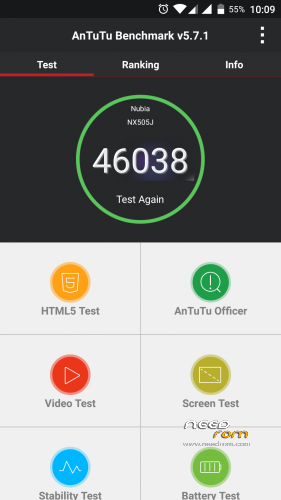
fix thermal engine: increased performance (antutu score 43000~)
status bar: fix show percentage next to the battery icon
sync cyanogen source code
11/07/2015 beta 1
added double tap to wake feature (can be enable in settings->display)
fix restart/shutdown crash
fixed an issue that sometimes the gps stopped working
enabled some compile flag for optimization
sync cyanogen source code
08/07/2015 alpha3
kernel: some tweaks
kernel: added some governor cpu
kernel: added some scheduler
kernel: added cpu voltage table
kernel: added LCD color calibration
(all kernel settings are configurable via Trickster Mod or similar app)
fix FM Radio
fix Infrared
06/07/2015 alpha2
first public release
ONLY FOR MERGED PARTITION
flash instruction:
first of all: backup all with twrp recovery
download rom and gapps
full wipe
flash rom and gapps
reboot
The first boot takes a bit 'of time
Root access can be enabled in developers options
※Please make a backup of your device before installing or updating ROM
Anyone has wifi problems with this ROM (and any other Lollipop ROM)
When I try to connect to some wifi points whitch in kitkat i could connect in lollipop it doesn't connect and it shows "saved" in wifi status.
Ciao Paolo, ti premetto che la tua è una delle migliori rom sviluppate fino ad oggi!!!! ho installato tutte le tue evolutzioni e modifiche!!!! Veniamo al quibus che si è creato con l'istallazione della rom versione cm-12.1_NX505J-20150722-Rel_V2. non riesco più a connettermi a qualsiasi rete wifi. Mi potresti dare una dritta su come fare!!! Grazie
mi sembra strano, non è praticamente cambiato nulla a livello wifi in tutte le versioni (a parte le prima alpha)
hai provato con la v3 ?
Thanks alot, ran v2 and had basicly no issues, just installed v3.
again thanks for sharing this great rom!
GREAT ROM, GREAT SUPPORT… GRANDE PAOLO!!!
You should flash one of the stock ROM that uses merged partition, V3.22 is the latest.
You need to dowload the ROM and PC flash program from Nubia web site/Forum, unzip the ROM in a directory and install/run the PC application. The program is in Simplied Chinese, I am not sure if they have English version to switch to. Follow the on screen instructions, load your unzipped ROM and flash it. If you are lucky, in 6 to 7 mins, your phone will reboot. After another 5 to 10 setup, you should boot into stock 3.22 .
To flash CM ROM, first download TWRP recovery OTA V2 for Z7max, it can be found inside Nubia Z7max forum. It is a Simplified Chinese PC application too and one of the option inside is to flash TWRP recovery.
Reboot you phone and get into TWRP recovery, do a factory reset, flash CM ROM and reboot.
It is very important that before flashing 3.22 stock ROM, backup your phone files since ALL data inside phone partitions will be erased ! Also remove your external SD memory card for safe too.
Good luck, you need it.
My suggestion is :
If you cannot read Simplified Chinese, don’t have Simplified Windows and never flash your phone before, DO NOT do it !
about call bug/sod bug (sleep of death)
I'm working from 2 days to find a solution but unfortunately it seems that the problem is only present in models that have the Synaptics touchpad (my phone has the cypress touchpad and doesn't have this bug)
for those who have the bug can solve (temporarily) by disabling the double tap to wake
Meanwhile, I continue to look for a solution to permanently fix
Thanks for your works, keep it up.
Oh, I had flashed lwang CM, stock up to 3.22 and miui ROMs before yours, they don’t seem to have this bug.
Is SOD the bug where screen is on but touch doesn't register? If so, doube tap to wake is one of my favorite settings that I will have to lose.
How do I know the touch panel? And again, on v.3 red circle lights dim, but sometimes suddenly begins to shine brightly, it’s a mistake?
you can check which touchpad you have via adb shell with the command: ls -l /data/tp/easy_wakeup_gesture
if return:
shell@NX505J:/ $ ls -l /data/tp/easy_wakeup_gesture
lrwxrwxrwx root root 1970-02-13 12:09 easy_wakeup_gesture -> /sys/bus/ttsp4/devices/main_ttsp_core.cyttsp4_i2c_adapter/easy_wakeup_gesture
you have the cypress touchpad (like me)
if return something like:
lrwxrwxrwx root root 1970-02-13 12:09 easy_wakeup_gesture ->
/sys/device/f9924000.i2c/i2c-2/2-0022/input/input0/wakeup_gesture
you have the synaptics touchpad
Thanks for the tip, paolothlw8: I tested my device and am glad to report that I have the same touchpad (cypress).
Ciao Paolo, volevo dirti che ho istallato anche l'ultima versione (cm-12.1_NX505J-20150726-Rel_V3) ma il problema WIFI rimane.
Ti spiego meglio: in pratica lo zte z7 MAX mi rileva la rete wifi CORRETTAMENTE ma non riesco poi ad eccederci segnalandomi un problema di autenticazione. Ho verificato però che andando nel dettaglio delle impostazioni del mio smartphone nella sezione WIFI, vengono assegnati tutti i parametri compreso il MAC Address ad eccezione dell' IP che rimane invece sul parametro 000.000.0.0.
Ho fatto la prova anche con altri dispositivi, tutti si connettono senza problemi alla mia rete domestica.
Paolo ti preciso, rispetto a tutto ciò che ho scritto sopra, che riesco però a connettermi al routerino Voda con cui navigo meravigliosamente.
secondo te come potrei risolvere l'arcano!!
Intanto ti ringrazio immensamente già solo per avermi risposto precedentemente.
Grazie
sicuro di aver scritto la password giusta ?
sul router che tipo di protezione ha la rete ? se ha wpa2 prova a impostare wpa, se ha wpa prova wpa2…se per caso è wep (ma dubito) cambialo subito in wpa/wpa2
prova anche a cambiarei il canale di trasmissione (non salire oltre al 11 per sicurezza)
il fatto che al router vodafone si collega senza problemi mi fa pensare più a un qualche tipo di configurazione che piuttosto al wifi che non funziona.
[Update] Thanks again for this nice rom. I wont list the nice features because almost everything on this ROM is.. wait for it … legendary
I am now on V3 after incremental updates, and these are few thoughts after using it for 1+ week as my main phone/rom.
- At the begining I had slow battery charging, but it's back to normal after clearing battery stats and letting the phone die to 0% and shuts down, now charging normally. Also i feel (not sure if it's a placebo) that battery life is better after this.
- I used to miss palm to turn screen off, but not any more, now I got used to double click status bar or home button to turn screen off
- I am still missing 3 finger swipe for screenshot , using buttons is not as convenient
I found couple of bugs:
1- Two network icons appear in the status bar, even if only 1 SIM is active , and the other is deactivated. This is confusing, I think only 1 icon should appear if only 1 SIM is active
2- One time the GPS icon stayed on after disabling the GPS, but I couldnt replicate.
3- Something is still fishy about the dual SIM management, here are what I think to be bugs at different scenarios:
i- Starting with SIM1-ON (WCDMA only), SIM2-ON ( GSM only): When i switch SIM2 Preferred network type to (CDMA only) it does change for a moment then go back to (GSM only), I have to change it one more time , and this 2nd time it works
ii- Preferred network type (LTE): works more like WCDMA/LTE preferred. It would more usefull if it's LTE only, similar to WCDMA only behaviour
iii- Activating/Deactivating a certain SIM, disconnects the other one: I cant recall if this was the behaviour on stock rom. I think it shouldnt affect the other SIM connectivity. Or if it's confirmed change the option to (WCDMA/LTE preferred) instead
iv- Each time I switch from LTE to WCDMA only or vice versa my network sends me internet configuration messages. This wasnt the case on stock 1.64. I am not sure if it's a 3.22 modem/kernel issue or ROM issue.