
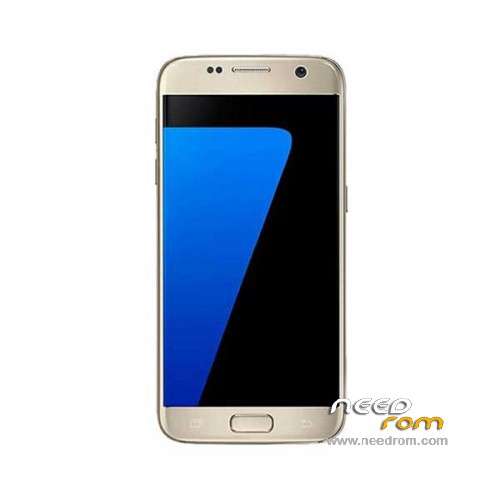
- Title: HDC S7 SM-G930F
- Listed: May, 2016
- Last modified: 05/24/2016 4:59 pm
- Version: ROM Android 5.1
You must be logged for ROM download.
67783 total views, 3 today
51 Total favorites
 Member Info
DESCRIPTION
ROM Phone HDC S7 SM-G930F – ROM Android 6.0 ( Real 5.1)
ONLY MT6580
ROM 2 – Official HDC S7 SM-G930F version: S205_EN_SK_V0.0.5 – full_hexing6580_we_l-user 6.0.1 LMY47I
—————————————————————————————————————————————————————————–
ROM 1 – Official HDC S7 SM-G930F version: S205_EN_V0.1.1 – full_hexing6580_we_l-user 6.0.1 LMY47I
Gapps not include – No Rooted
Language support : Multilang
Install ROM:
- Unpack FlashTools, and Click on Flash_tool.exe
- Select "scatter-Loading" and search MT6580_Android_scatter.txt in ROM
- Wait file to be added into Flash Tool
- Select "Download Only" or if upgrade "Firmware upgrade"
- Turn off your phone, remove the battery (if the battery is removable) and replace it after some seconds (and don't turn on the phone).
- Press “Download” button to start
- and connect your phone into the computer via USB data cable.
- The process will start and a red progress bar will appear after color purple, yellow.
- And green circles display
- Finish !
- You can now safely disconnect your phone and turn it on.
※Please make a backup of your device before installing or updating ROM
thanks
yesss….worllkk
also just for the record, the real rom version isn't 5.1…. it is 5.0.1. you can see the real version by looking in the apps , at the calendar sync or other core gapps. syncing gapps are version 5.0.1. Also two infos for those who want to root it.
1. if you lose the google contacts sync apk, extract it from the rom from the system.img and just install it back and give it permission when it will ask.
2. you can root and upgrade later by using the app named "flashfire".
so using the 2nd tip we dont need a custom recovery. but i haven't tested xposed yet. if someone test it, post the results. the rom version as i said is propably 5.0.1 not 5.1 if we consider the gapps version.
Mine is "MT6595". Can I flash this rom?
No you can’t. This one is for 6580.
Hi all. Using flashfire I tested xposed and it’s working great. Xposed for armv7 sdk 22. So yes rom version is 5.1 ,although in settings it sais build 5.0.2 , but the real rom version is 5.1. So we don’t need a custom recovery unless some dev out there build a custom rom.
And later after we root I tested to install update using flashfire and it worked that too. Download the update find it in dota app in the system and copy it in a easier directory. Open flashfire choose to flash ota and the rest will be done by flashfire. So all have fun rooting it and improving it without any fear that you will later need to format it. Of course always keep in mind to have a system backup with flashfire before you start any testing.
Sorry. Fota app not dota. Dictionary fault auto correction. Too bad we can’t edit our post and we need to post a again.
Also shame on them who created the rom. Using a modded version of Android webview to force their ads in…. If anyone wants to get rid of all stock app pop up ads then edit the framework-res.apk file from your device, de-compile it, and change the value of the config_webViewPackageName resource variable. It should be located at /res/values/strings.xml within the .apk. Once you’ve done this, you would need to re-package everything and push the new .apk to your device, replacing the old one. Or whoever did what I said in earlier post and installed xposed, use the webviewgoogle module.
no puedo flashearlo alguien que me ayude expliqueme bien (el problema fue que le di a actualizar sistema al s7 y se reinicio y salio "sin comandos" de hay no pasa ya me meti al recovery mode y no puedo hacer nada le doy en los wipe y nada ayudenme me gusta mucho este celular.
I can not flash it someone help me explain to me well (the problem was that I gave to upgrade system to s7 and reboot and left "without Commands" there does not pass and got to mode recovery and can not do anything I give in the wipe and nothing ayudenme I really like this phone.
sin comandos, power y volume +
best tutorial for all phones is this .
Power and vol+ to reboot and keep device manager open and look at COM & LPT. You must be fast. You will see your phones recognized as Vcom only for 1 second. That 1 second is the moment you start the sp flash tool.
Que tal un saludo a todos mi celular s7 sm g930F no pense que se dañaria el software asi que no sabia que mtk era lo desarme y mire es un mtk6572 mi pregunta es si flasheo con esta rom para mtk 6580 intente buscar una rom para mi s7 con el procesador antes mensionado pero no lo encuentro..por su ayuda gracias..