
- Title: HUAWEI G520
- Listed: April, 2013
- Last modified: 09/17/2013 2:30 pm
- Version: ROM Android 4.1.2
You must be logged for ROM download.
60078 total views, N/A today
6 Total favorites
 Member Info
DESCRIPTION
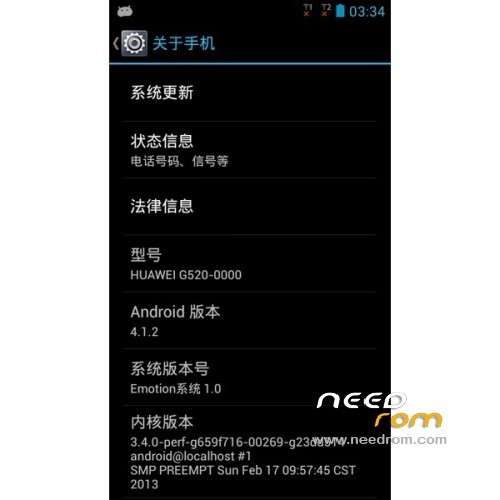
ROM HUAWEI G520-0000 – ROM Android 4.1.2
Update Official Version HUAWEI G520-0000_EmotionUI_1.0_V100R001C17B196
Changelog:
—————————————————————————————————————————————————–
Update Official Version HUAWEI G520-0000: G520-0000_EmotionUI_1.0_V100R001C17B190 ( I don't know changelog )
Official Version HUAWEI G520-0000: G520-0000_EmotionUI_1.0_V100R001C17B180
The following versions can upgrade to this version
G520-0000 V100R001C17B172
G520-0000 V100R001C17B175
G520-0000 V100R001C17B180
ROM install :
Step one: Prepare an SD card, it is recommended to use Sandisk, Kingstone, or Kingmax, size is recommended that more than 1G.
Step Two: Formatting SD card (optional).
The step three: copy a large package path UPDATA.APP to the SD card dload UPDATA.APP.
Step four: Check the root directory of the SD card you dload UPDATA.APP.
Step 5: SD card into the phone is switched on in the main screen, press the Menu key, the system updates -> SD card upgrade -> confirm -> upgrade, backup data, select the backup data; upgrade.
Step Six: The upgrade process progress bar shows after the finish of the pending progress bar, the phone automatically restart.
or
Step one: Prepare an SD card, it is recommended to use Sandisk, Kingstone, or Kingmax, size is recommended that more than 1G.
Step Two: Formatting SD card (optional).
The step three: copy a large package path UPDATA.APP to the SD card dload UPDATA.APP.
Step four: Check the root directory of the SD card you dload UPDATA.APP.
Step Four: cell phone turned off, insert the SD card, while pressing the volume up button + volume down key switch button, the phone automatically enters the upgrade mode, and then begin the upgrade in Figure
Step Five: After the progress bar to go full fixed, the phone will automatically restart If you do not manually remove the battery.
※Please make a backup of your device before installing or updating ROM
Can anyone, please help. My phone has been soft bricked after putting the ROM
https://www.needrom.com/mobile...../huawei-g520-5/
I downloaded the ROM above to flash the phone using the method given above but it stucks in the middle and doesnt go further.
Please help
Hi! Russian?
Do you have install cwm?
Установелный CWM?
hi, the rom of this page.. change de language chino,english to spanish ?? mm i need spanish lenguage ..
look for Vroot v1.40 i tested in Huawei Ascend G520-0000 China unicom work 100% and is very simple to use
http://bbs.mumayi.com/forum.ph…..id=2013847 (Chinese language)
I updated my phone with that version and now it's all in Chinese, I need a version in Spanish or international.
conseguiste la rom en español para ese bicho mi pana?
did you find that rom with spanish language?
Hi all,
I think I have managed to brick my g520-0000
Currently, when booting I always get a green screen with two squares - one blue one red. I cannot boot neither in fastboot mode nor recovery. Thus I try to format/reset the phone using the update.app method. I have tried a series on ROMs including the above and I always get (the hex codes are copied from internet and may not be the same as mine… I can provide mine but later today…):
filename = /mmc1/dload/update.app
call RCV_MODULE_END_EVENT failed, module = CRC
CMD=0xf,moduleaddr = 0xe8000000, len_tmp=0x1e2
This happens at ~30-35% of the pink progress bar. It gets stuck and I have to hard reset (battery or remove charger). Is my mobile dead? Should I make it a frisbee? Any help/suggestions would be highly appreciated.
Andreas
Hi all, I have a problem with my Huawei G520-0000 (DualSim Chinese), I tried putting on one of the rom Xiaomy this page but an error occurred and cel me it was like in the following image
another thing is that I dropped several roms but is just as moving image and no more than one quarter the progress bar installation
hope you can help me, thank you very much.
Sorry, no pictures I attached them
Hi all, I have a problem with my Huawei G520-0000 (DualSim Chinese), I tried putting on one of the rom Xiaomy this page but an error occurred and cel me it was like in the following image
http://www.htcmania.com/pictur.....;pictureid=3855
another thing is that I dropped several roms but is just as moving image and no more than one quarter the progress bar installation
http://www.htcmania.com/pictur.....;pictureid=3856
hope you can help me, thank you very much.
after uppaking 1st part appear failed. why?
I need this version to revivie the bricked phone because of malwares applications installed on the phone
G520-0000 V100R001C17B197
Anyone know where to download this firmware except Baidu or any proper account on Baidu because I can't download from it
tienes play store?
buenas tardes sres! me dirijo na ustedes con la necesidad de pedirles AYUDA tengo un huawei MOD: G520-000 el cual lo compre por internet y al encenderlo me prende pantalla fondo verde con un recuadro ROJO y uno AZUL, por otra parte cuando intento prenderlo por vol+/vol- y power (modo recovery) me prende en pantalla ROSA, les pido por favor ke me ayuden a recuperar mi equipo ya bque no tengo mucho conocimiento en el ramo (reparaloaqui13613@gmail.com) +584127435422