
- Title: LENOVO Z90-7 ROM update Android 5.1 Multilingual, Google Service, ROOT
- Listed: August, 2015
- Last modified: 08/12/2015 11:46 pm
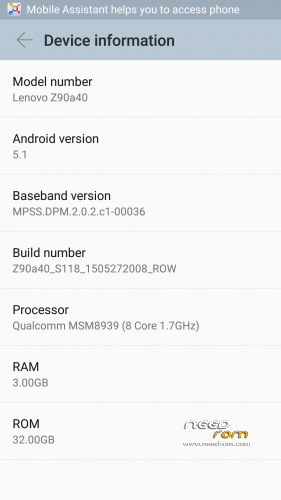
- Version: Z90a40 S118 1505272008 ROW
You must be logged for ROM download.
39421 total views, 3 today
19 Total favorites
 Member Info
DESCRIPTION
UPDATE – S208 ROW rooted here:
After start there is some info about google play movies & tv is not working, so you need to update all google stuff via play store.
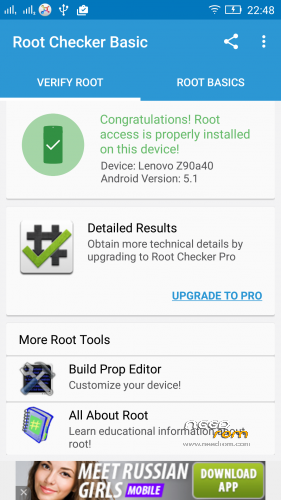
This is original release of Z90a40_S118_1505272008_ROW for z90-7, i've only added root, no other changes.
1. Unzip the ROM to a folder of your choice.
2. Install MiFlash.exe after installation, restart your PC
Warning Windows 32bit preference.
3. Start the MiFash software and select the folder or the ROM has been decompressed (you must see this)
ROM Officiel Android 5.1
4. The phone must be turned off, no SD card in your phone and unplug your PC, once off the phone only supported on the Volume Up button after 3 seconds connect your device to your PC with USB and 2 seconds release the Volume up button.
5. Press the Refresh button MiFlash software, your device will be seen.
6. Press the flash button, wait for the message operation completed successfully.
After start you should run SuperSU application, wich will prompt you that binaries needs to be updated, it works as update in "normal" way (no custom recovery available yet).
Enjoy rooted Vibe Shot with ROW firmware!
※Please make a backup of your device before installing or updating ROM
+1 alllllllllllllright my friend…
hi,
i would like to thank you for publishing your rooted firmware here.
However, i ran into some problems with it when i tried replacing super su free with super su pro.. my phone boot looped and i am unable to run miflash anymore because its is already ROW firmware
I tried renaming the zip file as update.zip and install it from recovery but it fails.
you have any suggestions that i can try before i go back to the manufacturer?
appreciate all the help i can get =d thanks in advance!
so its no good idea to install super su pro. thanks for letting me know
what you may want to try instead of installing pro is to go to super su free settings and enable psuedo pro. got it to wok this time! good luck!
je super!!!!!!!!!!!!!!!Thank You
hello, i'm using z90a40 model not z90-7, can i flash this ROM?
So you have installed the International ROM right? Yes you can flash this ROM!
Hello is it possible to install the rom from sd card?i installed the official international version and i dont have signal. i am not able to find the phone in Device Manager in Ports and not able to put it in download mode or recovery since it vibrates once and then again and turns on!! do you have any idea??
ROM is excellent, increases battery life, but I was wrong and I walked in the mixer-audio files (I was too little volume on your Bluetooth headset), and I was no sound on the phone
How can a resettlement because the volume + button MiFlash not get in?
please help me…
i finished the flashing smoothly. but, now im stuck with the phone keep telling me "CAN NOT SKIP: This device starts after an untrusted factory reset, you are required to have network connection to verify your google account credential previously associated with this device" even after filling in my email and password.
Hi man , which rom is latest?
Hi, the latest one is S240. I will upload it after some testing.
i installed S240 but not rooted…How can ı root this????
It is rooted for sure. Check it again.