
- Title: LineageOS-OREO-8.1 Lenovo P70a
- Listed: November, 2019
- Last modified: 05/11/2020 3:32 pm
- Version: OREO-8.1
You must be logged for ROM download.
17109 total views, 1 today
 Member Info
DESCRIPTION
Notice to all users;
In some countries of the world Google and providers no longer want ROUTed phones, because they cannot place commercial advertisements. They cut your data, or don't allow you access your contacts or other things.
Commercial dictatorship, here we are!!!
In my opinion, this is the best OREO ROM for this phone.
2 Lineage-OREO-8.1-new applis updated
2.1 2020-05-NewOreo-NovaBackup
UnRAR and Copy NewOreo-NovaBackup on internal or SD card and install with Nova Setting.
Keep or delete the apps you like or not. Click on gray Apps not installed and install from Playstore
If you have ROM Marshmallow (6.x) or higher, use TWRP 3.X, if not, use TWRP 2.X to install this ROM and flash after TWRP 3X. Flash TWRP with Sp Flash Tool.
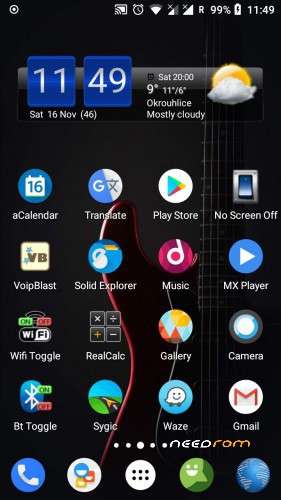
Ready to use as is, no need to add something.
Gapps installed, ROOTed Magisk.
Everything works perfectly. I'm not sure for USSD, you have to test. Some say it works well.
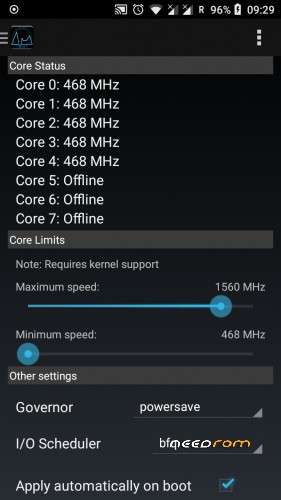
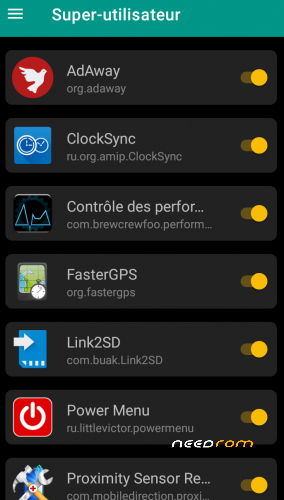
Start application "Performance Control" and set maximum speed 1560 instead 1690 for better stability and lower battery consumption.
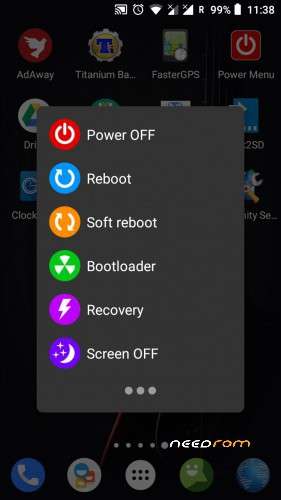
If SIM signal is weak, start "Power Menu" and click Soft reboot.
On first start, maybe all apps are not rooted; Start Magisk / superuser and check unchecked apps.
Network setting:
Go to System setting / Network and Internet / Mobile network / Advanced / Preferred network type / 4G auto.
LTE or 4G can run only on SIM 1 (Hardware)
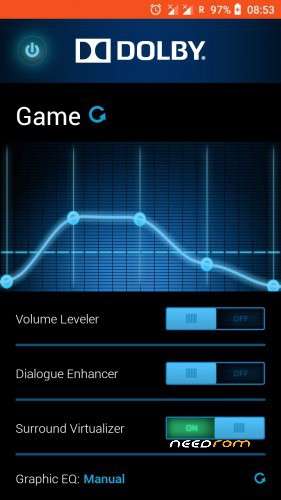
Dolby setting:
First click choose function, second click, adjust volume by frequency.
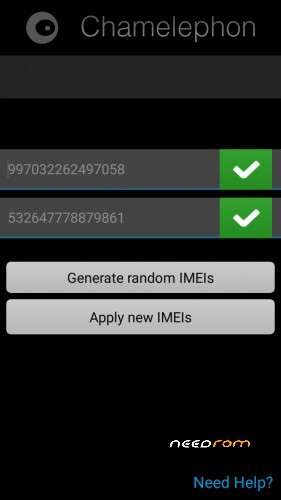
Use Chamelephon to change IMEI if it is different from your usual IMEI, written on the phone's battery.
New ROM does not make a new phone, so do not dream.
IF YOU HAVE A BRICKED PHONE
This process works in all cases if the phone has the correct herdware.
Download Lenovo P70a Stock ROM and TWRP Rcovery:
https://mega.nz/#!E9cTiYrb!62r3RZ0o4NX8-Wq8I1CXH4W3UXOVK2j6pvRsLnCtQ5M
Download SP Flash Tool:
https://techprolonged.com/download-sp-flash-tool-all-versions/
Look here how to use Sp Flash Tool"
https://forum.hovatek.com/thread-159.html
If Stock ROM installed start the phone and wait end of install (long).
Switch off the Phone and install TWRP Recovery 2.8.8.6 .
Boot in TWRP Recovery (Go to Wipe / Advanced Wipe / Cache / Dalvik-ART Cache / System / Data) and install the ROM from here, Needrom.
If ROM installed start the phone and wait end of install (long).
Switch off the Phone and install TWRP Recovery TWRP_3.2-2018.
Reboot the Phone.
When use SP Flash tool, start download, plug in USB after, phone switshed off.
In the extreme case, if you have problem with Sp Flash Tool, with the same scatter file-(Stock ROM), format the phone and repeat all.
In this cas you loos IMEI, but with Chamelephon you write it back.
Before asking questions, follow the instructions above. I tested everything and it works well every time.
※Please make a backup of your device before installing or updating ROM
Yes, finally Android 10 for P70.
WTF !
Please mod Android Q with some help from Indianrapist.
My time is limited but I’m ready to help.
Happy New York to Vladimir and all others, hope productive co-operation in development for Android 10.
Nice ROM, nice description. Thank you very much, sir.
I found 1 problem. The phone is unable to see (and connect) the Wi-Fi network which does not broadcast it's name (SSID), even if the phone has the SSID and password of that network stored in Wi-Fi settings – stored networks.
Is there any fix of this bug please?
If I understood correctly.
In your case you erase this SSID and start searching again, and it works again.
I think there is no mistake.
If SSID was not broadcast, it is normal that we cannot connect. It's like an email, you need a name and a password.
It's possible to turn off SSID broadcasting in the Wi-Fi AP (so called hidden SSID). This is useful when you want to "hide" the Wi-Fi network. In this case the client device (e.g. phone) does not detect the name of that network and you have to add the network manually in the client device (in Android: settings - Wi-Fi - +add network - fill in SSID, security type, password - save) to connect to the AP. After this procedure the client device shows the network and it's SSID normally as if it broadcast the SSID and automatically connects to the network.
The problem in this ROM is the thing that after procedure of manual adding of the network with the hidden SSID, Oreo do not show that network in a list of available networks and you have no way to connect (autoconnect) to it.
I do not understand how can we add a SSID of a WiFi which we do not know its name.
When I want to go on WiFi, I scan the existing WiFi and add the password if I have it. The WiFi already visited remain memorized and autoconnecten or leave me the choice of SSID which I want to connect. I never did anything else and I am not able to answer anything else.
If you want to connect to WiFi with hidden SSID and you know the name, it may be possible that this does not work.
I do not know and I don't find that important..
If you are the owner of the Wi-Fi AP (e.g. Wi-Fi router), you know the SSID and password. Then you can set to no-broadcasting of SSID in the administration of that AP. The network has the SSID, but it's not broadcasted, so anybody who doesn't know it's SSID can't try to connect to it, that network is nearly invisible for him (Android device doesn't show any network with hidden SSID. Windows device shows the hidden network or something similar but you still need at least to know the SSID (and a password if it has one) to be able to connect to it).
I see this way of connecting the phone is not important for you but for me it's a problem and at least the user pryxen has the same problem.
The stock ROM (4.4.4) has no problem with that way of connecting but it is quite old OS, so I see I have to look for another custom ROM for my P70. Do you have any recommendation for people like me for another good stable custom ROM (android 6,7 or8) usable for daily use, please?
Thank you for your time and a goodwill, sir.
More complete ROM which I used before is Marchmallow 6.0.1from Zormax:
https://mega.nz/#!J9E0DYob!aDR.....a6m4vUqRG4Bse84
For me this ROM have only on problem, run slow for me.
You can try MIUI ROMs from Needrom on this Page:
https://www.needrom.com/catego.....o/serial-p/p70/
Problem is the same like Marshmallow or vorse.
I can not do better
“I can not do better”
Yes you can, if you’ll start developing Android 10 with the help from indianrapest.
Yes, it's my problem for this rom, it can't detect the hidden wifi connection in my workplace.
Here are all information about Android 10 ROM for Lenovo P70
https://www.getdroidtips.com/l.....-17-lenovo-p70/
Wait an see.
I knew some qualified dev can make that
did you already test it sir vlad?
What should i test ?
You should test either Android Q or your brains
Don't spam.
No spam. Just a relevant reply to your arrogant comment.
Vladimirovich
WTF !
Vladimir
NO WTF !, read the above.
Vladimirovich
Why are you so intrusive and especially to say nothing.
It is not a discussion of different ROMs, but of a certain ROM.
If not I don't give a damn about your opinion.