
- Title: Martabak OS v4.0
- Listed: April, 2016
- Last modified: 04/18/2016 6:17 pm
- Version: Android 6.1
You must be logged for ROM download.
17961 total views, 1 today
16 Total favorites




 Member Info
DESCRIPTION
Hey Guys,
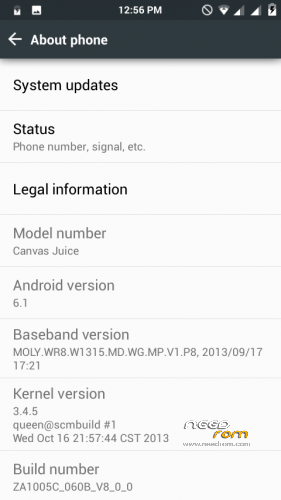
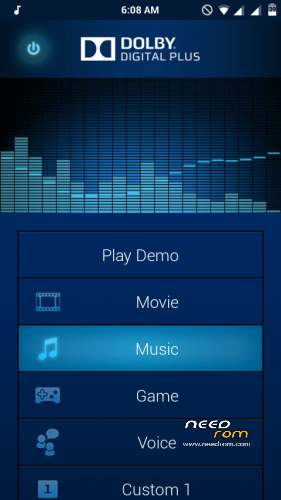
Today i'm presenting the best ever CUSTOM ROM for Micromax Canvas Juice A177, Martabak OS v4.0. This is the CyanogenMod for MediaTek 6572 based A177. Fully customizable. Dynamic Status Bar, Center clock. Custom battery style, Dolby Digital Plus, and Many more. You have to try it to know it's full feature.
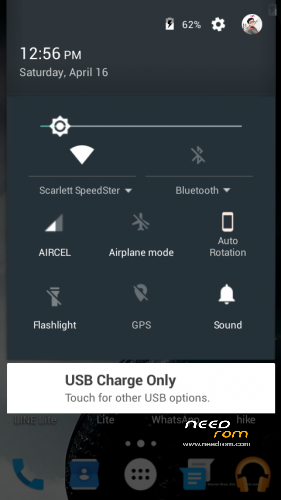
Please try it. You will like the pure Marshmallow UI and The Notification Panel. I'm damn sure.
ADVICE : I strongly recommend to flash the GApps also along with the ROM
It's Totally Bugless
If you have any problem. Comment below.
CREDITS : Allah SWT, Nabi muhammad SAW, Maaad Reborn and Closed, Adi Aisheteru Reborn @xda, Potato inc, Sullivan, Muhammad Nur Fu'ad {Alliv}, Christian Huangal, Alice Margatroid, Alliv rom, LollyFox rom, Amber L rom, Dll, FMD Devs, Jeff Rivera, Aljhun Mejorada Bumaya, Iann's, Klark Luis Peralta, Van Freniere, Alice Margatroid, Wani X Arif, Saddam Sam, Thakur Sahil Dadwal.
FLASHING PROCEDURE :
1) Go to CWM (or any custom recovery) and Wipe Data, Cache, Dalvik Cache & System.
2) Next Select Install zip from sdcard, Select Choose Zip from sdcard and Select "Martabak OS V4.0 for MMX A177.zip" and Select yes.
3) Then again select Install zip from sdcard, Select Choose Zip from sdcard and Select "Gapps-Martabak-OS-v4.0.zip" and select yes.
4) After both of the installation completes, Select Reboot System Now. It will take some time for the first boot. Stay Calm.
EXTRA : If the Google Boot Logo doesn't appear it self, then simply download and flash the "Google Boot LOGO.zip" and reboot!
Enjoy Guyz!
※Please make a backup of your device before installing or updating ROM
The ROM is food but there are some bugs. The status bar has got some problem. When I try to pull it down then system ui stops. I have to do it again and again to pull down the status bar.
What ? i'm on this ROM right now. and it has no bugs bro! Try to re-flash it.
Can i install apps above android 4.2 in this rom???
Bcz i want use fitness app.
I didn't used it yet! Try it.
There are few things which I want to ask and tell!
1) I was pretty scared as this was my first ROM that I was installing… and it is pretty good. I was happy!
2) Why is this using nova launcher?
3) Is this a real marshmallow OS ? like… can I install marshmallow apps?
4)There is no data connection option in notification bar
5)When I turn on App Bar.. most of the things stop working… idk why… so I have to remove my battery!
6) The camera quality has only 2. options- 1M and 4M
8 ) when I open WhatsApp my notification bar turns white
9 When I turn on battery percentage..On pulling down notification bar it shows 2 battery percentage
10)Overall it is a good work… but with a few minor bugs. And ya… there are not much themes and wall papers!!
That's the point. it is on stock Martabak settings.You have to explore and customize it. Search in the Martabak OS Interface in settings.
1 Example :- For status bar white problem, Go to Martabak OS Interface in settings >> Status Bar >> Dynamic Status Bar >> Check both Dynamic Status bar color & Darkening.
You have to find these by exploring it like cyanogenmod.
2) There is no real Marshmallow or Lollipop Or Kitkat ROM for A177 because this device doesn't suppourt KK, LP, or MM kernal. all ROMs are themed and re-enginered. but all these are based on JB 4.2.2
3) Did u never you the Stock ROM Camera ? In camera settings Set Preview size to Standard (4:3) then the picture size will show 5MP.
4) In Notication bar tap to the signal icon Turn on the cellular data.
5) Go to battery in setting turn of the battery percentage, then Go to Martabak OS Interface in settings >> set the battery style to icon with percentage, and set the Percentage text color and Bolt Charging color to black.
6) Wallpapers – can't you download it yourself ?
These are not bugs. this is your dumness, that you are not smart enough to use ROMs like these.
not everything would be infront of your mouth, you have to find it your self.
Well…. i tried to sort out all the problems. Most of them automatically disappeared!
only problem is camera. I found a patch on internet but that dosent seems working for me…
can u do soething for camera?
Dude it's like the stock camera.. In camera settings Set Preview size to Standard (4:3) then the picture size will show 5MP.
BEST ROM EVER…PERFECTO…THANX ANUPAM BRO..
Welcome.
how can i get engineer mode in this rom
Try to Flash this…
https://www.mediafire.com/?tt6.....44xuuhnlferw
link is not working fix it ..
I checked properly and it's working fine.
Link not working. It's showing that it is blocked.
link is working properly
Link is not working bro. Fix it