
- Title: Martabak OS v4.0
- Listed: April, 2016
- Last modified: 04/18/2016 6:17 pm
- Version: Android 6.1
You must be logged for ROM download.
17962 total views, 2 today
16 Total favorites




 Member Info
DESCRIPTION
Hey Guys,
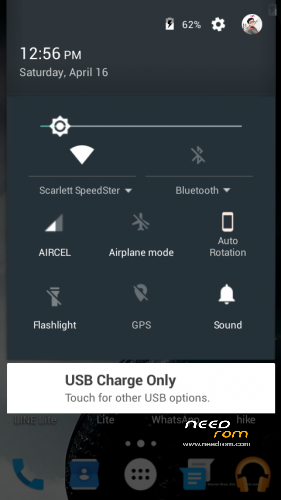
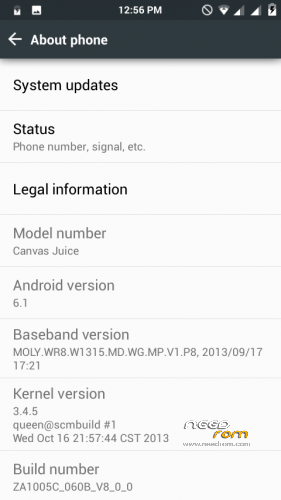
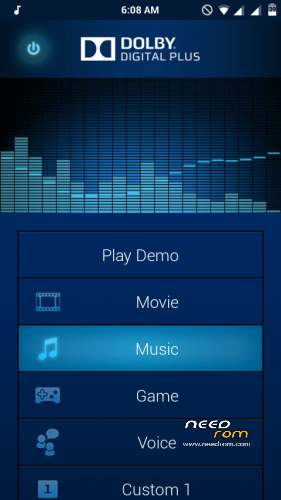
Today i'm presenting the best ever CUSTOM ROM for Micromax Canvas Juice A177, Martabak OS v4.0. This is the CyanogenMod for MediaTek 6572 based A177. Fully customizable. Dynamic Status Bar, Center clock. Custom battery style, Dolby Digital Plus, and Many more. You have to try it to know it's full feature.
Please try it. You will like the pure Marshmallow UI and The Notification Panel. I'm damn sure.
ADVICE : I strongly recommend to flash the GApps also along with the ROM
It's Totally Bugless
If you have any problem. Comment below.
CREDITS : Allah SWT, Nabi muhammad SAW, Maaad Reborn and Closed, Adi Aisheteru Reborn @xda, Potato inc, Sullivan, Muhammad Nur Fu'ad {Alliv}, Christian Huangal, Alice Margatroid, Alliv rom, LollyFox rom, Amber L rom, Dll, FMD Devs, Jeff Rivera, Aljhun Mejorada Bumaya, Iann's, Klark Luis Peralta, Van Freniere, Alice Margatroid, Wani X Arif, Saddam Sam, Thakur Sahil Dadwal.
FLASHING PROCEDURE :
1) Go to CWM (or any custom recovery) and Wipe Data, Cache, Dalvik Cache & System.
2) Next Select Install zip from sdcard, Select Choose Zip from sdcard and Select "Martabak OS V4.0 for MMX A177.zip" and Select yes.
3) Then again select Install zip from sdcard, Select Choose Zip from sdcard and Select "Gapps-Martabak-OS-v4.0.zip" and select yes.
4) After both of the installation completes, Select Reboot System Now. It will take some time for the first boot. Stay Calm.
EXTRA : If the Google Boot Logo doesn't appear it self, then simply download and flash the "Google Boot LOGO.zip" and reboot!
Enjoy Guyz!
※Please make a backup of your device before installing or updating ROM
I have already installed custom ROM dark lollipop on my Micromax a177 can I install another custom ROM
अनुपम भाई इसमे सिम सिग्नल को कलर में करो जैसा a177 में है और wifi भी कलर में करो टाइम, बैटरी, सभी कलर में करो। बाकी सब सही है।
Boot logo.img को micromax a177 की ही कर दो ताकी मोबाइल on करने पर वह micromax a177 ही लगे बस केबल OS change करना चाहिए थी, और अपडेटेड google gapp रखने थे।
मेरा कहने का मतलब है कि जो micromax के नए फ़ोन आ रहे है उनमें marshmallow 6.1 OS है बिल्कुल वैसा ही लगे। ये नहीं लगे कि मोबाइल micromax और ON OFF करने पर या अंदर सेटिंग्स में देखने पर वह कोई और ही मोबाइल नजर आये। जिससे खुद में बड़ा बुरा लगता है जैसे में कोई fake मोबाइल चला रहा हूँ।।। भाई थोड़ा भावनाओं का ख्याल रखो।।।।
hello sir
क्या आप मिक्रोमक्स का कोई भी लेटेस्ट फ़ोन जो android version 6.1 या 7.0 या 8.0 OS पर चल रहा हो उसकी stock rom को micromax a177 के लिए custom rom में बदलना जानते है, अगर आप यह कर सकते हो तो आप एक अच्छे मोबाइल rom devleper हो,
अगर आप किसी update version maicromax फ़ोन की stock rom को micromax a177 के लिए बना पाए तो मुझे जरुर messsage करे सबसे पहले मै ही अपने मोबाइल पर इसे install करूँगा,
thank u
hello sir
Do you know how to convert for Micromax A177 into custom rom any latest Micromax phone running android version 6.1 or 7.0 or 8.0 OS, if you can, then you are a good mobile rom devleper ,
If you could make an update version of maicromax phone for the stock ROM for micromax a177, then I will mess up the message first, firstly I will install it on my mobile,
thank u
How to download
Guys tell how I download this rom