
- Title: MIUI V9 7.10.20 shared SD
- Listed: October, 2017
- Last modified: 10/27/2017 2:50 pm
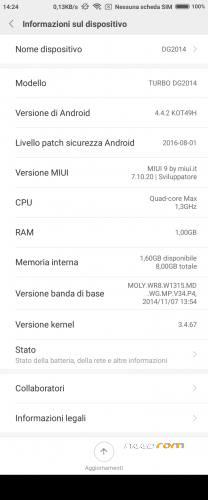
- Version: Android 4.4.2
You must be logged for ROM download.
23018 total views, 2 today
9 Total favorites
 Member Info
DESCRIPTION
This custom ROM is made following the perfect guide written by saginesh here: external link.
You need TWRP custom recovery to install this ROM. Use my TWRP present into dowload links.
Kernel is from Doogee stock rom KitKat version R13 with patched LK.BIN, if your display show only random lines after flash this rom, use SPFlashTool to download to phone only the original LK.BIN from Doogee stock rom R13.
WARNING 1: if you flash this rom over on another rom type (not MIUI) do a clean install, that mean you manually must wipe /data and /cache before install this rom.
WARNING 2: select English language for first time initialization, when initailization finish, change to your local language. This is because MiCloud initialization crash with other language see here for more info.
WARNING 3: never execute proposed OTA update, they arent' for DG2014 but for Xiaomi Redmi Note 3G.
MIUI V8 6.11.03 with shared SD
MIUI V8 6.12.01 with shared SD
This update (and all the nexts, i think) must be loaded with TWRP recovery only on previous version 6.11.03 with Shared SD.
Before update is mandatory you change recovery module with my proposed TWRP 2.8.7.0. Recovery present inside 6.11.03 is not able to run SuperSU installation.
If you have already loaded on phone :
1- my rom 6.11.03 with Shared SD (flashed via SPFlashTool),
2- my TWRP 2.7.8.0
You can run upgrade for this and newer version from recovery as normally.
From now on, the base of this my miui rom will be Xiaomi Redmi Note 3G rom from MIUI.IT, because xiaomi.eu has stopped to release weekly update for Redmi Note W. This mean this rom is no more multilanguage, but it is only English, Chinese and Italian
MIUI V8 6.12.22 with shared SD
Same as above, this update can be installed only if you came from my 6.11.03 with shared SD (or from 6.12.01)
MIUI V8 7.01.05 with shared SD
MIUI V8 7.02.09 with shared SD
Same as above, this update can be installed only if you came from my previous versions, from 6.11.03 and following
MIUI V8 7.03.23 with shared SD
Same as above, this update can be installed only if you came from my previous versions, from 6.11.03 and following
MIUI V8 7.05.04 with shared SD
Same as above, this update can be installed only if you came from my previous versions, from 6.11.03 and following
MIUI V8 7.05.25 with shared SD
Same as above, this update can be installed only if you came from my previous versions, from 6.11.03 and following
MIUI V9 7.09.14 with shared SD
New MIUI V9.
Same as above, this update can be installed only if you came from my previous versions, from 6.11.03 and following
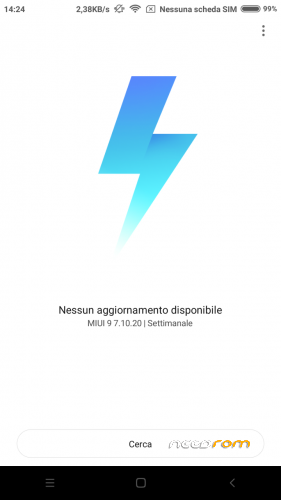
MIUI V9 7.10.20 with shared SD
Same as above, this update can be installed only if you came from my previous versions, from 6.11.03 and following


※Please make a backup of your device before installing or updating ROM
Warning for Italian users, and maybe also for others languages:
On first startup, during initial configuration, select English language, otherwise onetime initialization will fail.
put MIUI V7 6.02.25, in RECOVERY choose apply update from sdcard installation aborted writes. What's the problem?
haker47alex use a custom recovery like THIS
è rootata?
yes, is a developer version.
there is standard miui root permission manager, if you don't like it, install SuperSU.
I try to install and everything works fine, i'm italian and the rom is already in italian, after first boot a lot of processes start crashing and the sistem is not stable, i don't find the first installation language, where is?
if you start from another ROM type (not MIUI) you must do a clean install, that means you manually wipe /data and /cache before install the rom.
To solve your problems now, execute a factory reset, you will loose all your programs and data, but the rom will work fine and stable, and you will see the initial configuration (choice english as said before)
Is it with dual sim 3g patch ?Audio settings working?
there is the app "Dual Sim Control" via WSM tool, as in rom for A104, that i copied from.
what audio setting ? in setting menu:yes, dirac config:yes.
I have a problem
mobile internet work only (2G) on second card slot and I can't change it
Thanks. Everything works for me. And, if somebody don´t like virtual Home/Menu keys, there I googled how remove it:
Navigate With Root Explorer To /system/build.prop File And Open It With Text Editor.
Find Line : qemu.hw.mainkeys=0 - Delete It And Save Changes To build.prop File.
Reboot Device.
Working for me, but I had reroot phone with iRoot.
thanks for reply.
i insert virtual key in my rom because the hardware key of my phone are broken. It is a common problem fo this phone model.
use of MIUI integrated root manager is a bit different respect SuperSU or other manager:
first run the app that want root priviledge, system tell you no root available, close the app, go to Security/Permission/Root, now the app name is the list, turn on root permission for the app, run again the app.
this rom works fine, it's a little bit heavier than others, but the hardware (especially the touchscreen) works better. I saw the new cyanogen 4 mtk6582 rom on mtkroms, are you able to port it on the dg2014? it would be massive, finally cyanogen on mtk!!! i ask you because you did this perfect work with miui
THERE MANY LINK IN DESCRICTION
WHICH ONE I HAVE TO DOWLOAD?
maybe the last. 6.03.10 stay for: 2016 march 10
hi caber i have a problem
the google keybord crash and i can't digit nothing
fixed on new version 6.03.17.
for who want still use the older versions, remove file GoogleKeyboard.apk in folder /system/app inside the zip.
Unfortunately the battery on the latest version keeps much worse. What is the reason?