
- Title: Z7 MAX V3.89 ComboRom V28
- Listed: August, 2016
- Last modified: 11/06/2016 2:25 pm
- Version: 5.1.1 V3.89
You must be logged for ROM download.
31369 total views, 2 today
18 Total favorites
 Member Info
DESCRIPTION
12-11-2016 Updated V28.3 based on 3.89
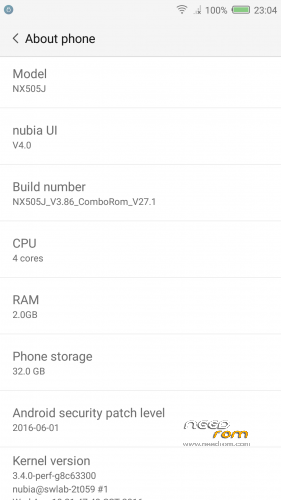
ComboRom 28 for Nubia Z7 Max NX505J based on stock 3.89 (Multilanguage)
+++ONLY FOR MERGED PARTITION+++
md5: fb1f29db880db95ebb5ea87416062325
Features:
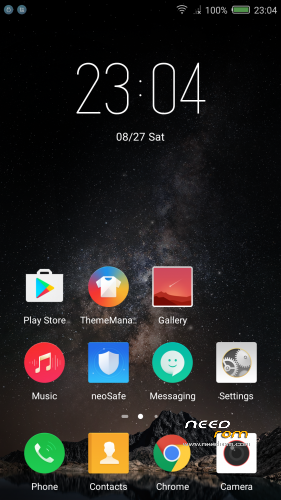
- NubiaUI 4.0 - NeoVision 6.0
- Safety Update to June 2016
- Gapps installed (basic package)
- ROOT (Powered by SuperSU)
- Added some useful app (eg. Reboot – Change Font Style)
- Added Italian language (and multi-language support) in the framework
- Removed App and Chinese capabilities
- Miscellaneous amendments to facilitate the use of the ROM
- Translated ringtones
- MULTILANGUAGE***
Changelog 3.86 – 3.89
- NeoVision 6.0 ( clone camera, and other function…)
- Pocket mode
- support for FLAC format music
- Solved bug with Gapps
How to install:
- Make a TWRP backup first*
- Download the zip of the ROM in the internal memory
- Go into TWRP recovery
- Wipe cache, cache and Dalvick Wipe data. (ONLY WIPE CACHE AND DALVICK CACHE IF YOUR PREVIOUS ROM WAS A COMBOROM)
- Then install the ROM ZIP
* When you do the backup just Data - System – Cache – (Boot optional)
*** I'm available to add languages in the ROM if not available, or in case you want to modify your language, I pass to you strings.xml, you translate and I will do a patch ***
12/11/2016 Update 28.3 available ONLY FOR COMBOROM V28 (available via OTA)
Changelog:
28.3->28.2
- Solved bug on bluetooth
28.2->28.1
- Solved a bug on phone number location
- Added Ita translation of theme app
How to install the update of ComboRom:
A- Search the update on settings -> other settings -> OTA update (please remove clear cache when OTA update ask for it) or:
1- Download the update and put on your internal storage
2- Go to recovery
3- Install Zip and select the update
—NO WIPE—
____________________________________________________________________________________
Previous Rom V27 still available on the link
Update 27.1 available ONLY FOR COMBOROM V27
Changelog:
- Added the possibility to change font style (Settings -> Screen)
- Added OTA updates for ComboRom
How to install the update:
1- Download the update and put on your internal storage
2- Go to recovery
3- Install Zip and select the update
—NO WIPE—
※Please make a backup of your device before installing or updating ROM
update fails…kindly help
Please use twrp recovery… with stock recovery it doesn't work.
Please also check md5 of downloaded file….
Update fails… seems to generic this error, please give more information.
So far awesome ROM.
If you can add nubia eye verification and VOLTE features, the ROM will be best.
Please remove nubia account if possible.
This Rom is the best for this Device,
Bought you a Beer grazie
Thanks
pesa1234 any slolution for bluetooth issues?
Tanks
At the moment no. I still try to solve it…
Gmail is not working and I cant synchronize my emails.
Yes, it is a Gmail app problem. I suggest to use outlook.
I am also very please to add the Polish language.
If someone would like to add a language please give me by PM your email and I send you the strings to translate. I know only english and Italian…
Hi Pesa1234.
I have just bought and recieved a Nubia Z7 Max for my son. I'm looking for a rom with a french translation. Yours seem to be perfect. I'd gladly help if this is not translated yet.
I have a request : could you give me some link about the merged partition, or some info how to procede from stock to install your ROM.
Thank you,
oliwek
when I write "some info to procede from stock", it's because I don't see anything about a merged partition in your install process
(
How to install:
- Make a TWRP backup first*
- Download the zip of the ROM in the internal memory
- Go into TWRP recovery
- Wipe cache, cache and Dalvick Wipe data.
- Then install the ROM ZIP)
Thanks
It is written on top Only for merged partition.
To merge partition is necessary to use Nubia updater. You can find here on needrom. Rom 3.22
how to enter engineering menu Nubia z7 max?
No engineer menu on this phone. There are hidden menu from Keyboard, but nothing like mtk phones. What you need to do?