
- Title: Z7 MAX V3.89 ComboRom V28
- Listed: August, 2016
- Last modified: 11/06/2016 2:25 pm
- Version: 5.1.1 V3.89
You must be logged for ROM download.
31375 total views, 8 today
18 Total favorites
 Member Info
DESCRIPTION
12-11-2016 Updated V28.3 based on 3.89
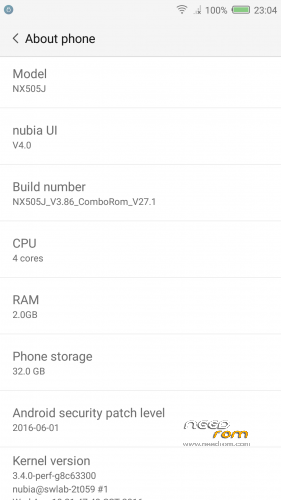
ComboRom 28 for Nubia Z7 Max NX505J based on stock 3.89 (Multilanguage)
+++ONLY FOR MERGED PARTITION+++
md5: fb1f29db880db95ebb5ea87416062325
Features:
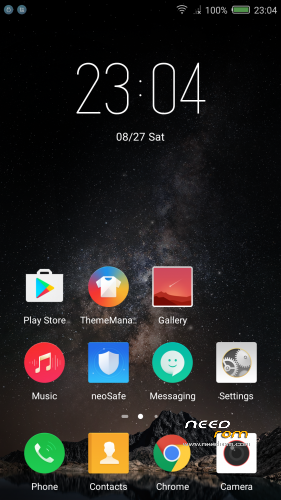
- NubiaUI 4.0 - NeoVision 6.0
- Safety Update to June 2016
- Gapps installed (basic package)
- ROOT (Powered by SuperSU)
- Added some useful app (eg. Reboot – Change Font Style)
- Added Italian language (and multi-language support) in the framework
- Removed App and Chinese capabilities
- Miscellaneous amendments to facilitate the use of the ROM
- Translated ringtones
- MULTILANGUAGE***
Changelog 3.86 – 3.89
- NeoVision 6.0 ( clone camera, and other function…)
- Pocket mode
- support for FLAC format music
- Solved bug with Gapps
How to install:
- Make a TWRP backup first*
- Download the zip of the ROM in the internal memory
- Go into TWRP recovery
- Wipe cache, cache and Dalvick Wipe data. (ONLY WIPE CACHE AND DALVICK CACHE IF YOUR PREVIOUS ROM WAS A COMBOROM)
- Then install the ROM ZIP
* When you do the backup just Data - System – Cache – (Boot optional)
*** I'm available to add languages in the ROM if not available, or in case you want to modify your language, I pass to you strings.xml, you translate and I will do a patch ***
12/11/2016 Update 28.3 available ONLY FOR COMBOROM V28 (available via OTA)
Changelog:
28.3->28.2
- Solved bug on bluetooth
28.2->28.1
- Solved a bug on phone number location
- Added Ita translation of theme app
How to install the update of ComboRom:
A- Search the update on settings -> other settings -> OTA update (please remove clear cache when OTA update ask for it) or:
1- Download the update and put on your internal storage
2- Go to recovery
3- Install Zip and select the update
—NO WIPE—
____________________________________________________________________________________
Previous Rom V27 still available on the link
Update 27.1 available ONLY FOR COMBOROM V27
Changelog:
- Added the possibility to change font style (Settings -> Screen)
- Added OTA updates for ComboRom
How to install the update:
1- Download the update and put on your internal storage
2- Go to recovery
3- Install Zip and select the update
—NO WIPE—
※Please make a backup of your device before installing or updating ROM
Trovato Bug con app di messaggeria tipo Skype e whatsup.
Bisogna tenere sempre aperire le app a mano e lasciarle in background per ricevere messaggi e chiamate, ho provato anche ad impostare con Neosafe che vengano avviate in automatico all accensione , ma non funziona lo stesso.
Anche l irda non viene riconosciuta.
Forse sono il solo ad avere questi problemi?
You're not, I have the same problem. This ROM is very lazy, doesn't want to check for notifications in general.
Hi all!
First things firts – great ROM:)
But I've got one issue – on status bar I've got symbol of location always on – is there a way to disable it from status bar?
Greets:)
Hello, I'm also having the same problem.
Hello! Thanks for the great rom and the effort!
Only problem I have is that i dont get notifications from Viber, without opening the app before. Is there a solution for this?
Hi sdomam, did You solve your problem?
Try this – go to neoSafe app ->permission->power-on speedup->find on the list of forbidden aplication Viber app and mark it to green
why i cannot update 28.3, i have used both ways ( ota and manual ) but it still v.28.0 in about
Hi, thanks for good ROM. Question if you dial any number like 88888 shows Chinese account number or not ?
@pesa1234 send mi strings.xml and i will try to translate this into Polish
pio.witek at gmail.com
I bought the phone and it currently has android 5.1.1 as shown here:
Will flashing this rom make many changes?
http://imgur.com/a/jsOqh my current version.
Existe versão em portuguès/Brasil?
Sim, mas a tradução está incompleta
Hi, this ROM doesn't seem to be willing to check for notifications. Gmail and Skype for example are only refreshed for new message after they are opened. I gave permissions in Neosafe, App Notifications and sycing just doesn't work. I'll have to look into one of the other CM ROMs, because stock ROM is more trouble than its worth…
Oh, and I also applied the YouTube fix that ROM author was sharing in the comments. It didn't help.
for the notification bug !!!!
1. open neosafe app -> notification manager-> app permission-> application -> whatsapp, line, etc. allow everything !!!!!
2. open settings -> notification-center-> app notification-> whatsapp, line skype, etc. allow everything !!!
3. finally open the task manager with holding the home button-> slide down the messenger app, its lock the app.
i hope this works, because for me its help^ ^.
br
skycrow67
P.S @pesa1234 thank you for the great rom everything works perfect.
Hey, yeah I figured it out that I also had to whitelist apps in order for them to remain working and receive notifications. But Gmail is still not willing to sync, I just use Outlook instead. Good ROM, thanks…