
- Title: W450 Firmware
- Listed: May, 2014
- Last modified: 12/28/2014 2:50 pm
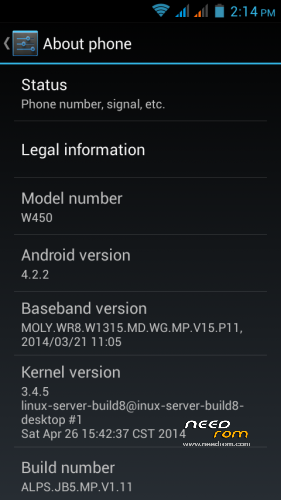
- Version: Android 4.2.2
You must be logged for ROM download.
32522 total views, 1 today
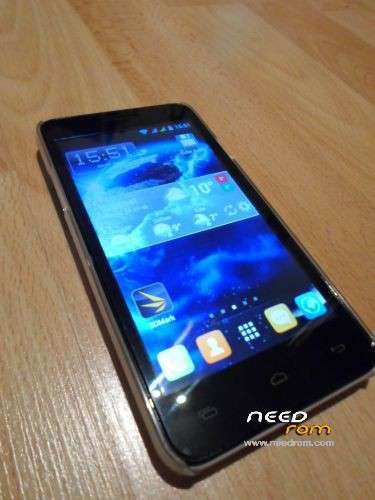

 Member Info
DESCRIPTION
UPDATE (12.28.2014)
Firmware with the newest, 07.23 kernel.
Thanks to SoCr@Te for uploading the original.
I have been using this modded fw for about five months, so i think share it 
The stock firmware same as the firmware with 04.26 kernel, the only difference is in block device layout: the preloader partition is bigger (maybe standardization )
This modded firmware (SP Flash Tools and drivers NOT included) has the same preferences as my previous fw's, and has some upgrades:
System:
- added SuperSU v2.40, Advanced Task Killer, CM Security, Terminal Emulator, WellBrightness, Total Commander
- default launcher is Apex
recovery:
- Aroma File Manager was integrated in system, can run it from recovery (Carliv/Aroma File Manager)
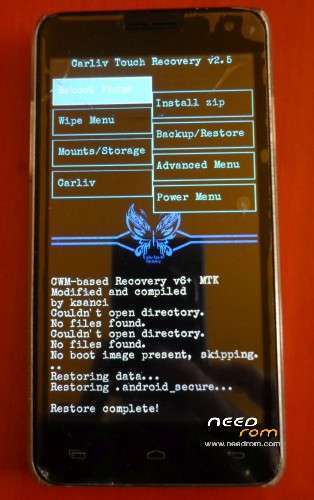
- modded Carliv Touch Recovery v2.5 with Back button (switchable in Advanced menu/Toggle touch control) and tar+gzip is the default format. Working good without external SD card.
Other:
- no gps.conf because it is useless in W450 (and many other) firmwares. Use the Engineer Mode/Location/Location Based Services for settings. Engineer Mode: call *#*#1478963#*#* in dialer.
- GPS working perfectly with external gps antenna (something like this: https://www.youtube.com/watch?v=C2oNmuNePls
Or use bluetooth gps receiver.
You have to flash with Firmware Upgrade option!
Enjoy!
UPDATE (08.29.2014)
If your touch digitizer not working with CTR, there is a quick workaround for it (for CTR2.5, maybe not working with earlier versions):
In the recovery go to the Mounts/Storage with vol down key and select it with power key.
Select mount /data, then select umount /data and the touch screen begins to work
Swipe left for go back menu.
I am working on back button, but have some problems
UPDATE (08.15.2014)
There is two types of touch screen for the W450. One of them bottom buttons lighted by the LCD, the other type not.
This latter type not working with the Carliv Touch Recovery most of cases.
I am working on it, if you have this type of TS, could use another recovery.
UPDATE (07.17.2014)
The problem with the new stock firmware is that the aiding of GPS (agps) not working.
There is a new version - MNL_VER_13120501ALPS05 - MNL file (system\xbin\libmnlp_mt6582) for GPS in the P11 stock firmware but it seems to be not suitable for this firmware. (?!?!)
Solution: must be change the mnl file to an older mnl. The fix contains an earlier version (MNL_VER_13071801ALPS05) of this mnl.
I repacked the fixed firmware too and uploaded it.
And I made a patch for fixing it for those of you who upgraded the phone already.
The patch (W450_P11_agpsfix.zip) installable over CWM recovery.
The other thing:
I am very sorry but i made a mistake in the P9 firmware. I deleted a system file so the Local Based Service in Engineer Mode is disabled. 
I made an another CWM installable fix (W450_P9_ksanci_fix.zip) to resolve this issue.
I apologize for any inconvenience, hope you enjoy these fixed firmwares.
******************************
UPDATE (07.13.2014)
Thanks to SoCr@Te for stock ROMs!
Changes same as the previous firmware (see below) and some more:
- kernel date 26. apr. 2014
- baseband: P11
- system: some update and CM Security added to the system apps
- recovery: Carliv Touch Recovery 2.5: gzip supported backups, you can change the default format to gzipped tar so the backup size is much smaller. And new font: Special Elite from Astigmatic. Thanks for him!
If you doesn't make complete firmware upgrade and update the system partition please wipe cache and dalvik cache after download and before restore your datas!
———————————————————————————————————————————–
Old:
Thanks gleam2003 for his firmware backup with newest baseband and kernel!
I made this upgrade from that backup.
This is a stock-like upgrade except china apps, and not contains any additional applications.
baseband: newest (on may. 7. 2014)
MOLY.WR8.W1315.MD.WG.MP.V15.P9, 2014/02/25 16:40
kernel: newest (on may. 7. 2014)
3.4.5 (linux-server-build8@inux-server-build8-desktop #1 Thu Feb 27 14:58:31 CST 2014
The .zip file contains:
- SP_Flash_Tool_5.1343.01
- VCOM drivers
- firmware upgrade
Modifications:
- boot and system: unsecured adbd, you have full root access from everywhere, anytime.
- recovery: CWM based Carliv Touch Recovery v2.3, compiled by me, thanks master @Carliv for source code
- system: r/w remountabled, P9 baseband, rooted with SuperSU v1.94, all chinese apps removed, updated google applications, gmail added, gps.conf added (optimized for Hungary  ), bootanimation changed to Solar Flare by TheMasterBaron.
Flash:
Unzip the files, install the vcom driver (if not yet), run Flash Tool. Choose scatter file. Power off your phone (Quick boot must be disabled in Accessibility menu!). Choose Firmware upgrade or Download (see next session), click on Download button and plug in your usb cable and flash will be start. If not, try unplug and replug again.
UPGRADE:
IF YOU HAVE OLDER FIRMWARE (width any kernel version from 2013) YOU HAVE TO CHOOSE FIRMWARE UPGRADE!
ON FIRMWARE UPGRADE YOU WILL LOST ALL OF YOUR DATA! (including internal storage and SD but except your external SD card)
MAKE BACKUP FROM YOUR USERDATA FIRST!
UPDATE:
If you have kernel dated feb. 27, 2014 already, you may choose Download and select only boot, recovery or system images, as you wish.
Or if you only want the new (P9) baseband and don't want upgrade your older kernel, choose my previous rom.
After rebooting you could restore your user data from backup.
The cache and Dalvik suggested to wipe after restore!
THE GPS, TOUCH SCREEN ISSUES ARE HARDWARE ISSUES, THERE IS NO FIX BY SOFTWARE OR FIRMWARE!
Enjoy and sorry for my english 
※Please make a backup of your device before installing or updating ROM
Hi, i'm using the MIUI 4.4.25. If i want to install this rom, what should i do? "Format and than Update" or directly "Download"?
Thanks for all!
Hi!
Neither. You have to choose Firmware upgrade, because the MIUI rom uses the older kernel.
Or you can flash my previous update with the 'Download' option.
perfect rom baterry its very long durability
Thank you ksanci! So, i don't must do "Format" before "Firmware -> Upgrade" right?
Ps: i'm using the 4.5.9 MIUI, and I have not had any problems after the calls, so it's no an hardware issue: what do you think about it?
Hi!
The flash tool making format before firmware upgrade.
I do not use MIUI, so i do not think anything But i know some people who using MIUI and there is black screen issue too.
But thinking about a 4.5.9 MIUI cwm installer for the W450 with new kernel.
on this rom gps doesnt work, and i dont see in uncle mtk option location only ygps
Wroted: THE GPS ISSUE ARE HARDWARE ISSUE.
And as i wrote, the gps.conf optimized to Hungary. You have to modify it to your country for faster AGPS.
Use a blutetooth external antenna or make an external monopole antenna, and your GPS will be working perfectly without AGPS too…
You are right, sorry, it was fixed.
However the gps is working.
Download EPO here.
http://ge.tt/api/1/files/4kklv.....1/blob?download
Copy or extract to SD card, after copy to dat/misc EPO.DAT EPO.MD5 and delete MTKGPS.DAT
This way work for shure.
GPS and bluetooth not working after upgrading to this ROM. Help please
Wroted yet: the gps.conf file optimized to Hungary. Please modify it to your country.
And before somebody asks: there is no way to make good gps settings for all of the world…
The GPS is bad in most of the W450 phones. Working EXCELLENT before upgrade? I think not.
The bluetooth working for me, i have no idea why not for you. Check the settings.
see my post with patch
Hi, I have problem with this ROM, phone reboots itself. Do you know why?
If you made everything as i wroted, it must to work.
preciso de ajuda fui atualizar e acabou aparesendo menssagen de erro agora meu celular nao liga mais me ajuden
pleas help-me helpme please my fhon noting start
excelent
This patch fix GPS download install via Recovery
This cwm patch put files that already exists in firmware with same version and content except the hungarian ntp server datas.
You can set the ntp servers according to your country from this site: http://www.pool.ntp.org/en/
But i think the W450's firmware not using gps.conf. This file missing from the original stock firmware. The settings reachable over Engineer Mode: open dialer and dial *#*#1478963#*#*
There is the Location menu, use that for settings. You can save the profile but this is not the gps.cfg.
The gps fix video above maded without any gps.conf…