
- Title: W450 Firmware
- Listed: May, 2014
- Last modified: 12/28/2014 2:50 pm
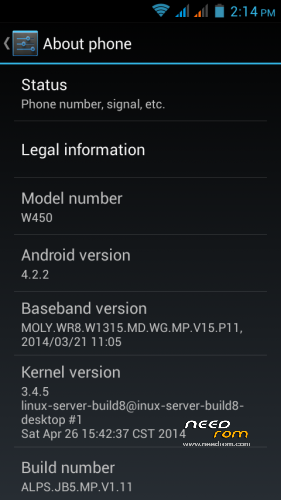
- Version: Android 4.2.2
You must be logged for ROM download.
32523 total views, 2 today
 Member Info
DESCRIPTION
UPDATE (12.28.2014)
Firmware with the newest, 07.23 kernel.
Thanks to SoCr@Te for uploading the original.
I have been using this modded fw for about five months, so i think share it 
The stock firmware same as the firmware with 04.26 kernel, the only difference is in block device layout: the preloader partition is bigger (maybe standardization )
This modded firmware (SP Flash Tools and drivers NOT included) has the same preferences as my previous fw's, and has some upgrades:
System:
- added SuperSU v2.40, Advanced Task Killer, CM Security, Terminal Emulator, WellBrightness, Total Commander
- default launcher is Apex
recovery:
- Aroma File Manager was integrated in system, can run it from recovery (Carliv/Aroma File Manager)
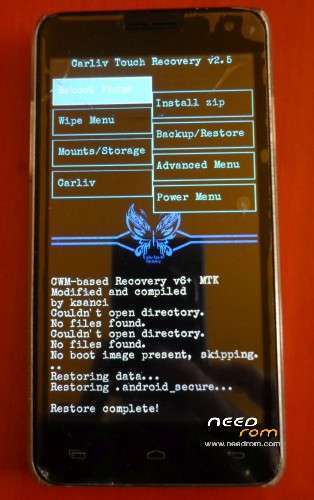
- modded Carliv Touch Recovery v2.5 with Back button (switchable in Advanced menu/Toggle touch control) and tar+gzip is the default format. Working good without external SD card.
Other:
- no gps.conf because it is useless in W450 (and many other) firmwares. Use the Engineer Mode/Location/Location Based Services for settings. Engineer Mode: call *#*#1478963#*#* in dialer.
- GPS working perfectly with external gps antenna (something like this: https://www.youtube.com/watch?v=C2oNmuNePls
Or use bluetooth gps receiver.
You have to flash with Firmware Upgrade option!
Enjoy!
UPDATE (08.29.2014)
If your touch digitizer not working with CTR, there is a quick workaround for it (for CTR2.5, maybe not working with earlier versions):
In the recovery go to the Mounts/Storage with vol down key and select it with power key.
Select mount /data, then select umount /data and the touch screen begins to work
Swipe left for go back menu.
I am working on back button, but have some problems
UPDATE (08.15.2014)
There is two types of touch screen for the W450. One of them bottom buttons lighted by the LCD, the other type not.
This latter type not working with the Carliv Touch Recovery most of cases.
I am working on it, if you have this type of TS, could use another recovery.
UPDATE (07.17.2014)
The problem with the new stock firmware is that the aiding of GPS (agps) not working.
There is a new version - MNL_VER_13120501ALPS05 - MNL file (system\xbin\libmnlp_mt6582) for GPS in the P11 stock firmware but it seems to be not suitable for this firmware. (?!?!)
Solution: must be change the mnl file to an older mnl. The fix contains an earlier version (MNL_VER_13071801ALPS05) of this mnl.
I repacked the fixed firmware too and uploaded it.
And I made a patch for fixing it for those of you who upgraded the phone already.
The patch (W450_P11_agpsfix.zip) installable over CWM recovery.
The other thing:
I am very sorry but i made a mistake in the P9 firmware. I deleted a system file so the Local Based Service in Engineer Mode is disabled. 
I made an another CWM installable fix (W450_P9_ksanci_fix.zip) to resolve this issue.
I apologize for any inconvenience, hope you enjoy these fixed firmwares.
******************************
UPDATE (07.13.2014)
Thanks to SoCr@Te for stock ROMs!
Changes same as the previous firmware (see below) and some more:
- kernel date 26. apr. 2014
- baseband: P11
- system: some update and CM Security added to the system apps
- recovery: Carliv Touch Recovery 2.5: gzip supported backups, you can change the default format to gzipped tar so the backup size is much smaller. And new font: Special Elite from Astigmatic. Thanks for him!
If you doesn't make complete firmware upgrade and update the system partition please wipe cache and dalvik cache after download and before restore your datas!
———————————————————————————————————————————–
Old:
Thanks gleam2003 for his firmware backup with newest baseband and kernel!
I made this upgrade from that backup.
This is a stock-like upgrade except china apps, and not contains any additional applications.
baseband: newest (on may. 7. 2014)
MOLY.WR8.W1315.MD.WG.MP.V15.P9, 2014/02/25 16:40
kernel: newest (on may. 7. 2014)
3.4.5 (linux-server-build8@inux-server-build8-desktop #1 Thu Feb 27 14:58:31 CST 2014
The .zip file contains:
- SP_Flash_Tool_5.1343.01
- VCOM drivers
- firmware upgrade
Modifications:
- boot and system: unsecured adbd, you have full root access from everywhere, anytime.
- recovery: CWM based Carliv Touch Recovery v2.3, compiled by me, thanks master @Carliv for source code
- system: r/w remountabled, P9 baseband, rooted with SuperSU v1.94, all chinese apps removed, updated google applications, gmail added, gps.conf added (optimized for Hungary  ), bootanimation changed to Solar Flare by TheMasterBaron.
Flash:
Unzip the files, install the vcom driver (if not yet), run Flash Tool. Choose scatter file. Power off your phone (Quick boot must be disabled in Accessibility menu!). Choose Firmware upgrade or Download (see next session), click on Download button and plug in your usb cable and flash will be start. If not, try unplug and replug again.
UPGRADE:
IF YOU HAVE OLDER FIRMWARE (width any kernel version from 2013) YOU HAVE TO CHOOSE FIRMWARE UPGRADE!
ON FIRMWARE UPGRADE YOU WILL LOST ALL OF YOUR DATA! (including internal storage and SD but except your external SD card)
MAKE BACKUP FROM YOUR USERDATA FIRST!
UPDATE:
If you have kernel dated feb. 27, 2014 already, you may choose Download and select only boot, recovery or system images, as you wish.
Or if you only want the new (P9) baseband and don't want upgrade your older kernel, choose my previous rom.
After rebooting you could restore your user data from backup.
The cache and Dalvik suggested to wipe after restore!
THE GPS, TOUCH SCREEN ISSUES ARE HARDWARE ISSUES, THERE IS NO FIX BY SOFTWARE OR FIRMWARE!
Enjoy and sorry for my english 
※Please make a backup of your device before installing or updating ROM
Uhhh, i checked the agps in original firmware…
Attention!
There is a bug or something in the original stock firmware so the aiding for GPS (AGPS) not working! (For me. The epo file and agps data be downloaded correctly but not used for fixing position)
The previous (P9) firmware working perfectly, use that, but do not upgrade to this (p11) firmware yet! (or leave the system untouched)
I am searching the bug.
Ok, i fixed the issue. And unfortunately i found an another bug in my previuos – P9 – firmware.
Fixed too, see the description.
hi – the gps was working fine (came yesterday from my seller.. i don't know which version…) . i wanted to update – so i updated to the P9 and now it doesnt work.
anyway of fixing that? sorry for my english and for being a newb.
Hi! There is not enough information… I think that phone had newer firmware already!
Did you do backup the original firmware?
Maybe the GPS – and others – working good in the newer W450 phones.
The upgrade was at Firmware upgrade mode in Flash Tool or just Download?
Try Firmware Update now…
Hello, ksanci. You can compile the kernel 3.4.67 from source?
Hello!
No, and not planning this.
Why not allow facility with CWM to restore? Each can
have the freedom to do what hi wants.
Hi, i have a question, Can i change the p11 to p9?
Sorry for the late answer.
Of course yes, if you know which file must be changed.
Hi,
I changed my broken touch to a new type.The new Touchscreen was recognized only after software update but phone does not have proximity sensor installed so display stay blank after making a call.Can you please help how to fix this problem?
Thanl you!
Same situation on my side. Phone is from 2013, but I was forced to update the W50 to latest firmware (Baseband P11 – 2014/03/21, Kernel 3.4.5 – 26.04.2014) because the new touch not-lighted didn't work with old firmwares.
The new ROM is fine with 3 drawbacks:
- battery seems to drain faster than fw with P7 baseband or V5 MIUI
- screen goes off on calling and it never comes back after call if you don't press enter button ( phone don't have proximity sensor)
- CVM recovery used until now is not working (Cannot mount E:…)
I used ksanci recovery from this post. On recovery, touch is not working on my phone (but I can use vol+/- and power to navigate) and unfortunately there is no option to go back to previous menu. Can this be added ? Or somebody can modify the attached recovery to work with latest W450 fw ?
And the recovery image:
Download file
There is a workaround for touch screen. Read the last update in description.
The black screen issue is a common, maybe hardware problem in W450, there is no truly solution for it yet.
I use now Carliv Touch Recovery v2.3 (MTK6285 android_4x_wet_jb5 W450) Compiled by ksanci (v0.4). Unfortunately the trick with mount/data and unmount/data don't make the touch start working. Do you made this on same version of recovery ?
Related to black screen issue, I see on web a lot of programs that do different things after call ends (return to home, vibrate, display log message)… But I cannot find a program that have option to turn screen on after call. It is not possible to do this without proximity sensor ? Just turn screen on at end of call…
I confirm that with this recovery touchscreen works with mount/umount data workaround.
Thanks ksanci.
Download file