
- Title: UMI ZERO OFFICIAL
- Listed: June, 2015
- Last modified: 06/14/2015 7:55 pm
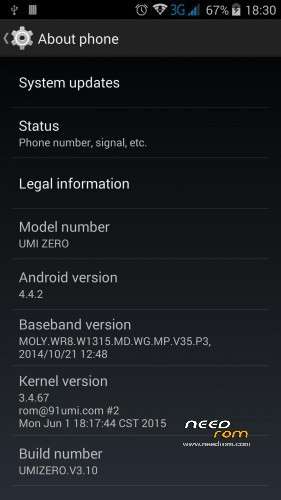
- Version: v3.10 Android 4.4.2
You must be logged for ROM download.
27179 total views, 2 today
13 Total favorites
 Member Info
DESCRIPTION
Hi,
I have tried almost all type of roms with no luck.This one seems to work.Official ROM by UMI.06/01/2015 v3.10
No reboots,good battery life,solid warming,no issues yet .
You can use Rootjoy as your official ROM flashing solution.Always make a full backup,before you start the flashing process.!
Only for Offical ROM update /Don't use this if you have custom ROM installed /
1.Download Rootjoy
2.Plug your Phone and allow connection
3.Create a full backup of your phone
4.Flash your mobile device
***Warning ***
Your device data wil be deleted permanently.Do it at your own risk !
***If you have custom ROM you can get an error that your mobile doesn't supported anymore***
If you are not familiar with flashing process please find previous ROM's posts, where you can find more detailed description about the "how to ",and also you can find answers in the comments for the upcoming issues.
Enjoy !
Useful tweaks for :
AUDIO
1.download mobile uncle tool
front speaker fine tuning :
http://www.instructables.com/id/How-to-increse-speaker-volume-on-android-smartphon/
rear speaker audio tuning:
open mobile uncle tool –>engineering mode (MTK)—>Hardware testing/audio—>loudspeaker mode–>> type:media–>set level 0=120 (level1=130,level2=140..etc ) increase the number on different levels as you wish, till max level 14 =230
don't use 255 value max level ,you might damage your speaker .
now adjust your media volume levels from low to max..reset your values if you feel it to harsh
GPS
Zero produced for Chinese market,so you should personalize your gps settings to your country.
what you need is:
1.turn your wifi on
2.download the following tools from playstore :
mobile uncle tool,mt gps ,faster gps ,total commander (or root explorer )
3.open mobile uncle tool
find power gps search on main screen
select GPS SET
reboot your machine
4.open faster gps
select your continent,select your country
go to advanced settings select intermediate_pos type the value :1
select accuracy_thres value:500
enable wiper value=1
at the ntp server you should find your country's ntp sever /in my case hu.pool.ntp.org/
you can check here whether it was set properly http://www.pool.ntp.org/en/
supl_no_secure_port value=3425
supl_port=7275
DEFAULT_AGPS_ENABLE=TRUE
DEFAULT_USER_PLANE=TRUE
DEFAULT_SSL_ENABLE=FALSE
reboot your machine
5.open total commander
select file system root
/system/etc you should find your gps.conf file
select and select edit file
you should find the following settings more or less,check everything there :
NTP_SERVER=yourcountry.pool.ntp.org
NTP_SERVER=eu.pool.ntp.org /<–this is an extra row if you travel alot in europe added by me in totalcmd/
XTRA_SERVER_1=http://xtra3.gpsonextra.net/xtra.bin
XTRA_SERVER_2=http://xtra2.gpsonextra.net/xtra.bin
XTRA_SERVER_3=http://xtra4.gpsonextra.net/xtra.bin
DEFAULT_AGPS_ENABLE=TRUE
DEFAULT_USER_PLANE=TRUE
DEFAULT_SSL_ENABLE=FALSE
SUPL_HOST=supl.google.com
SUPL_PORT=7275
SUPL_NO_SECURE_PORT=3425
DEBUG_LEVEL=3
ENABLE_WIPER=1
INTERMEDIATE_POS=1
ACCURACY_THRES=500
6.open mt gps
download epo
7.go to open air,and turn data connection to ON
8.open mobile uncle tool
engineer mode–>engineer mode mtk–>location–>YGPS–>information–>hot–>wait 3 sec–>full–>wait 3 sec–>AGPS restart —>go to satellites tab–>now wait till red spots turn to green first fix could take more than 5 minutes
9.if fixed ,start your gps app
※Please make a backup of your device before installing or updating ROM
@Donty:Yes,you can update from recovery.
Highly recommended to roll back to your original recovery image version.
You can switch back to your original image like this:
( my recommendations is nice to have a secondary option to upload files to your SD for the worst case )
)
1.Download original recovery file :https://www.needrom.com/downlo.....ad/umi-zero-2/ CWM and copy to your sd and the ROM as well
/good to copy to your built in SD, sometimes there is a problem to mount the external SD /
2.download rashr from playstore
3.open the recovery image from the phone with Rashr
4.select reboot into recovery after Rashr opened a file
5.when you are in recovery mode select install from zip
That's it.I hope it helped.
Hi Retekeger, Sorry for not getting back to you. I never saw your reply nor got a prod via email for it. I was on 3.06 from the OTA version already.
Can I update with this rom in the same way, I don't need Rashr for the update just for getting back to the original image? Anyhow will try and see how it goes!
Thanks!
hi guys,
i solved my problem with audio…..with audiofix i had an improvement but i found online a file that set 180 as value in the engineer mode even if 160 in the maìximum….in this way the audio is really good……sorry for my english but i don't speak english so good
hey mat_kb_24: cann you provide a link or send this file? I am as well not satisfied with volume, would be great to get it.
..never mind ,I got it..thanks the feedback, enjoy your phone
hi, averything is well with this new rom installed via recovery
BUT : the sensitivity of the screen is now too low. is it possible to increase, or should i flash again?
Hi ,
I recommend you to flash it again,deleting cahce ,dalvik cahce ,etc…If you don't want to go over a process,this app can be a good fix for that,but i would say it is not a gentle way honestly..https://play.google.com/store/.....reenbooster.com ,no one reported a same issue..please leave a feedback how it worked…
Installed new ROM… looking good, in fact its best room as of yet.. had EMUI 3.0 it was awful.. I have a feeling this battery life will be poor.. it is already 66% only been off charge for 45 mins.. usually when battery says 60% on my phone it turns off..calibiration is completely off! anyway of calibrating battery and improving it? how do i find out if my battery has gone weary or its ok? Thanks!!
Hi ,I suggest you to flash it again ,for me it seems some settings remained from EMUI and made some conflict with your current version,or you installed an app wich using too much battery.Try to test it without any installed app.In idle mode my phone till the end off the the day still got 60-70%,so after 45 mins remaining 66% is more than strange..
hi
tried to upgraed to 3/.10
my device crashed and lost its imei no.
now Im on 3.09 and the tootjoy dont let me to try and upgrad to any of the other roms.
can ou guys help?
Not qualitative translation into Russian. Not all is translated.
@Urimax:check this post : on 06/18/2015 @ 3:27 pm