
- Title: UMI ZERO OFFICIAL
- Listed: June, 2015
- Last modified: 06/14/2015 7:55 pm
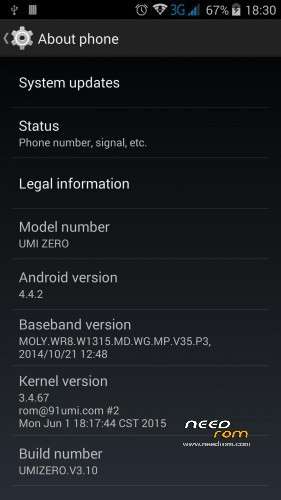
- Version: v3.10 Android 4.4.2
You must be logged for ROM download.
27181 total views, 4 today
13 Total favorites
 Member Info
DESCRIPTION
Hi,
I have tried almost all type of roms with no luck.This one seems to work.Official ROM by UMI.06/01/2015 v3.10
No reboots,good battery life,solid warming,no issues yet .
You can use Rootjoy as your official ROM flashing solution.Always make a full backup,before you start the flashing process.!
Only for Offical ROM update /Don't use this if you have custom ROM installed /
1.Download Rootjoy
2.Plug your Phone and allow connection
3.Create a full backup of your phone
4.Flash your mobile device
***Warning ***
Your device data wil be deleted permanently.Do it at your own risk !
***If you have custom ROM you can get an error that your mobile doesn't supported anymore***
If you are not familiar with flashing process please find previous ROM's posts, where you can find more detailed description about the "how to ",and also you can find answers in the comments for the upcoming issues.
Enjoy !
Useful tweaks for :
AUDIO
1.download mobile uncle tool
front speaker fine tuning :
http://www.instructables.com/id/How-to-increse-speaker-volume-on-android-smartphon/
rear speaker audio tuning:
open mobile uncle tool –>engineering mode (MTK)—>Hardware testing/audio—>loudspeaker mode–>> type:media–>set level 0=120 (level1=130,level2=140..etc ) increase the number on different levels as you wish, till max level 14 =230
don't use 255 value max level ,you might damage your speaker .
now adjust your media volume levels from low to max..reset your values if you feel it to harsh
GPS
Zero produced for Chinese market,so you should personalize your gps settings to your country.
what you need is:
1.turn your wifi on
2.download the following tools from playstore :
mobile uncle tool,mt gps ,faster gps ,total commander (or root explorer )
3.open mobile uncle tool
find power gps search on main screen
select GPS SET
reboot your machine
4.open faster gps
select your continent,select your country
go to advanced settings select intermediate_pos type the value :1
select accuracy_thres value:500
enable wiper value=1
at the ntp server you should find your country's ntp sever /in my case hu.pool.ntp.org/
you can check here whether it was set properly http://www.pool.ntp.org/en/
supl_no_secure_port value=3425
supl_port=7275
DEFAULT_AGPS_ENABLE=TRUE
DEFAULT_USER_PLANE=TRUE
DEFAULT_SSL_ENABLE=FALSE
reboot your machine
5.open total commander
select file system root
/system/etc you should find your gps.conf file
select and select edit file
you should find the following settings more or less,check everything there :
NTP_SERVER=yourcountry.pool.ntp.org
NTP_SERVER=eu.pool.ntp.org /<–this is an extra row if you travel alot in europe added by me in totalcmd/
XTRA_SERVER_1=http://xtra3.gpsonextra.net/xtra.bin
XTRA_SERVER_2=http://xtra2.gpsonextra.net/xtra.bin
XTRA_SERVER_3=http://xtra4.gpsonextra.net/xtra.bin
DEFAULT_AGPS_ENABLE=TRUE
DEFAULT_USER_PLANE=TRUE
DEFAULT_SSL_ENABLE=FALSE
SUPL_HOST=supl.google.com
SUPL_PORT=7275
SUPL_NO_SECURE_PORT=3425
DEBUG_LEVEL=3
ENABLE_WIPER=1
INTERMEDIATE_POS=1
ACCURACY_THRES=500
6.open mt gps
download epo
7.go to open air,and turn data connection to ON
8.open mobile uncle tool
engineer mode–>engineer mode mtk–>location–>YGPS–>information–>hot–>wait 3 sec–>full–>wait 3 sec–>AGPS restart —>go to satellites tab–>now wait till red spots turn to green first fix could take more than 5 minutes
9.if fixed ,start your gps app
※Please make a backup of your device before installing or updating ROM
Hello all, I do have a Umi zero since december and it was working pretty good on v3.10 until i try the android cryptage in android security. The cryptage was well done but when my screen turned off, I can not switch it on ! the screen stayed black… because of that I decided to reinstall the rom via rootjoy but that was not working and my phone is no without any rom. I have only the rootjoy recovery menu, but it not detected my sd card with the rom file and I can't wipe data I have a emmc error … so that's why I need your help ! The phone is now block on zero screen when i try to start it normally Hope you know the solution ? Thanks in advance
hi,
does anyone have kodi working on this phone?
I have issues with touch screen.
i have downloaded ROM 3.10, how can I instruct rootjoy to point to my downloaded rom?
it stopped at "Installing Recovery Files"
"please root your phone, check the root authority allow"-
What shld I do?? pls help
for AUDIO rear speaker audio tuning:, open mobile uncle tool –>engineering mode (MTK)—>Hardware testing/audio—>loudspeaker mode–>> type is RING OR SPH2?
is there a way to fix wifi hotspot ? it seems not working. I even tried to install 3rd party hotspot app but still not working
pls help me !!!