
- Title: AOSP 4.2.2 iwewni mod by dcplx1
- Listed: June, 2014
- Last modified: 04/29/2015 1:39 pm
- Version: V.05 p770 4.2
You must be logged for ROM download.
31938 total views, 4 today
7 Total favorites
 Member Info
DESCRIPTION
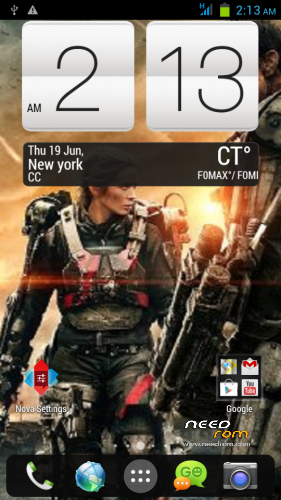
-Fully customized Nova Launcher backuped settings
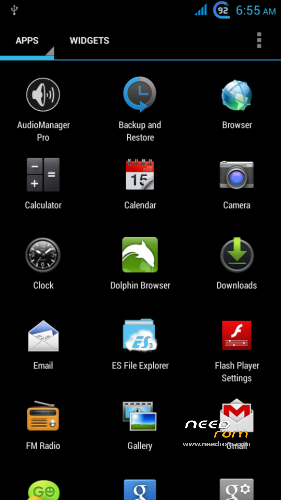
-Modified Preinstalled apps
-change bootsplash,bootanimation,shutanimation
-change default Wallpaper on framework-res and SystemUI
-add init.d tweaks
-Default Language in First Setup to English
-Deodexed,Zipaligned
-Added Xposed Framework
On first boot Setup your phone
Setup Homescreen:
1.On Nova Launcher Homescreen tap Nova Setings>Backup and Import>Restore or Manage Backups
-tap Hmscrn2 then OK Tap all widget, check checkbox create.
2.Nova Setings>Dock>Dock Style>then press Back button twice
Setup Settings:
1.On homescreen tap Menu buttons choose Settings>More>Mobile Networks>Data Connection> choose OFF Network Mode>tap provider choose GSM only.
2.Settings>Display>check checkbox Auto Rotate scroll down Battery Style>check Charge Animation twice> Goto SYLES tab choose desired battery icon.
3.Settings>Audio profiles> tap adjustment icon in General>check Vibrate scroll down uncheck Vibrate on touch and Screen lock sound.
Setup Language and Keyboard
1.Settings>Language & input> uncheck Spell checker
2.Tap Xperia keyboard adjustment icon>Personalization Guide choose the ff.
-Full keyboard extra
-never want to have any words or letters replaced
-tap forward arrow 3 times
-check checkbox Period and comma keys and smileys
-uncheck Vibration on keypress
-Done
3.Keyboard appearance>Keyboard Skins>Select Black keyboard
Setup GPS
Settings>Location Access>GPS satelite to ON both checkbox checked
Settings>Security>Screen lock>choose Pattern – to avoid screen getting pressed when in pocket.
Settings>Security>scroll down uncheck checkbox Verify apps.
Setup Xposed framework
1.Find Xposed Installer icon in app drawer
2.choose Framework>Install/Update grant superuser then choose reboot
3.Xposed Installer>Modules tap 2 Modules checkbox
4.Xposed Installer>Framework>Soft reboot
5.Customize your tweaks in Gravitybox and Xblast app
※Please make a backup of your device before installing or updating ROM
Thx bhabe…
Ok I have not compared by apps folder I based my compare by framework, lib, xbin, and other root android files. I also know full changelog what you did in your v26 rom xD, I like your 4.2.2 rom but phone gets very hot sometimes like playing games, music, and heavy usage that’s why I decided to build from iwewni source rom.
Thanks buddy.
Some people here are just selfish and give low star rating without even reporting if the rom have any problems, gud luck with it.
Some experiences using this rom is installing more xposed modules will lag phone when playing music.
@rbarat
I’m not saying to people move to my rom, I build this cause I can’t find other rom that I like, if you really want to see proof its different I use “Winmerge” windows app and compared both system folders side by side, starting with the Build.prop its totally different.
Nevermind
I forgot to put Xuie xposed module, if you want listview animations just download and activate the module
My settings:
Wave and Bounce
Add exeption to Nova launcher
Where is the P770 M8 version ?
I'm quite like its Feedblink.
Calendar Widget is able to add to homescreen but no events show although the sync works.
It should be included flashlight app.
Are you stopping this project?
I removed HTC M8 version bcoz, bootanimation is broken, dialer and settings is not like the one of the scrnsht of HTC one m8 port of s920 also framework-res is stock aosp and not themed like in scrnsht of s920, so I deleted it, I might find original version of M8 and just replace apps and frameword
But problem now is bootscreen shows blackscrn after some secs. of animation, launcher must be bugged starts immediately on startup xD =P
can you add more screenshoot?
i need more view of setting,notification bar and many more.
i hope you can help
is there any patch to make the p770 use external sd as internal storage? the 3.5g fix can't allow me to install many games in it.
rbarat rom provide a perfect led notification but he didn't continue on p770 anymore .
can this rom include the led notification patch also?
https://www.dropbox.com/s/vavz.....77v3.0.apk?dl=0
use external sd as internal storage . 2GB .ok. i dont good at English