
- Title: KitKat Factory v1 for ZP998 (Komu K8)
- Listed: June, 2014
- Last modified: 06/29/2014 1:50 am
- Version: v1 final
You must be logged for ROM download.
39076 total views, 5 today
1 Total favorites

 Member Info
DESCRIPTION
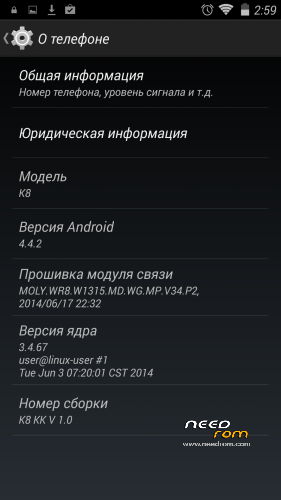
This is a factory ROM for ZP998 from a 100% Italian clone, Komu K8, a real KitKat v1 release.
No colorants, no preservatives, no ads – you just add what you want yourself.
Features:
- Real 4.4.2 KitKat, release ver. 1.0 (2014-06-28);
Root is easily done by flashing this zip through modded recovery:
https://yadi.sk/d/Fjyv4lM2VNrSK
Download rar archive, extract it (password is 123), put 4.4Root.zip on your sdcard and flash with recovery.
Xposed Framework is working, but it is not included, to keep ROM factory clean. Get it from official xda source (Xposed need root to be installed):
http://forum.xda-developers.com/xposed/xposed-installer-versions-changelog-t2714053
install, activate, reboot, and download modules, i.e. GravityBox KK
Primary partition size can be modded, just get EBR1 and EBR2 files from here:
http://forum.xda-developers.com/showthread.php?t=2455850
put these two files to the FIRMWARE folder, overwriting old files, and flash.
You may need to reboot once or twice and reset to factory settings, if partitions size is different from that in your old system!
Modded Recovery for KitKat can be found here:
https://www.needrom.com/mobile/recovery-twrp-2-7-1-0-for-zopo-zp998/
Download it, extract recovery.img, put it into FIRMWARE folder and flash.
This ROM is intended to be flashed with SP Flash Tool (included), all internal memory is lost! (IMEI intact).
Please read included manual carefully before upgrading! Use "Upgrade firmware" and NOT "Download only" in SP Flash Tool!
※Please make a backup of your device before installing or updating ROM
Okay, first of all, I want to thank you for sharing. You don't need to go through the extra steps of flashing a recovery, just replace the stock one in the firmware folder. Then you can flash SuperSu normally via zip to root. Titanium Backup doesn't work but everyone with half a brain cell just creates a flashable zip and restores his apps via recovery. The black screen gestures don't work or am I just too stupid. Double tab wake works but no drawing gestures?
You need to upgrade your touch firmware. I had problems with 0×33,a and with 0×36 all wake gestures work like a charm!
flashable zip don't work also ?!! Since from any recovery after 1 min phone reboots ?!!
Am i the only one who can't swipe in twrp recovery ??
Cover your Zopo light sensor with a thumb.
This makes touchpanel work better in TWRP.
I have already said this.
Believe me, this works!
well im gonna make a recovery flashable rom off it since i cant flash it with flashtools
keeps getting error PMT change
fluffy! READ THE FLASHING MANUAL! there is a clear message about how you should flash this ROM!
GPS antenna mod manual:
https://yadi.sk/i/u6hxI6KZVYSb.....c
Thanks
Thanks a lot. I will try GPS with KK and if no good i will mod the antenna
How is it with Sygic or Tomtom or other soft ? Because there is a difference with GPS Test and Sygic for me. GPS give me 5-6 satellites. Sygic also but in Sygic every 4-5 seconds, all satellites disappear …


Titanium backup 6.1.5.6 works very good for me.
I’ve backup all+data from my last Rom.
I’ve tried the GPS just 5 kms, maybe it is little better but not sure
I think lot of people forget to choose Firmware upgrade in Flashtool
is there a way to remove the big 3G icon from the taskbar?
I mean Statusbar
@doperst
"Cover your Zopo light sensor with a thumb"
NOT working.. must use TWRP GUI..(Manager)..
Very strange i'm the only one with swipe problems in recovery ?
same here. TWRP turns to be a pain when you need to swipe the slider from left to right
can someone do a step by step?
@warezjunk
Sometimes I had the problem with older recovery
But with the new 2.7.1 KK I no have…. Wait and see