
- Title: KitKat Factory v1 for ZP998 (Komu K8)
- Listed: June, 2014
- Last modified: 06/29/2014 1:50 am
- Version: v1 final
You must be logged for ROM download.
39077 total views, 6 today
1 Total favorites

 Member Info
DESCRIPTION
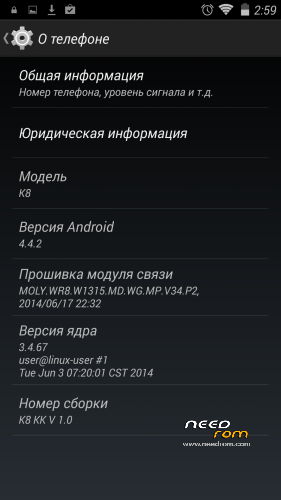
This is a factory ROM for ZP998 from a 100% Italian clone, Komu K8, a real KitKat v1 release.
No colorants, no preservatives, no ads – you just add what you want yourself.
Features:
- Real 4.4.2 KitKat, release ver. 1.0 (2014-06-28);
Root is easily done by flashing this zip through modded recovery:
https://yadi.sk/d/Fjyv4lM2VNrSK
Download rar archive, extract it (password is 123), put 4.4Root.zip on your sdcard and flash with recovery.
Xposed Framework is working, but it is not included, to keep ROM factory clean. Get it from official xda source (Xposed need root to be installed):
http://forum.xda-developers.com/xposed/xposed-installer-versions-changelog-t2714053
install, activate, reboot, and download modules, i.e. GravityBox KK
Primary partition size can be modded, just get EBR1 and EBR2 files from here:
http://forum.xda-developers.com/showthread.php?t=2455850
put these two files to the FIRMWARE folder, overwriting old files, and flash.
You may need to reboot once or twice and reset to factory settings, if partitions size is different from that in your old system!
Modded Recovery for KitKat can be found here:
https://www.needrom.com/mobile/recovery-twrp-2-7-1-0-for-zopo-zp998/
Download it, extract recovery.img, put it into FIRMWARE folder and flash.
This ROM is intended to be flashed with SP Flash Tool (included), all internal memory is lost! (IMEI intact).
Please read included manual carefully before upgrading! Use "Upgrade firmware" and NOT "Download only" in SP Flash Tool!
※Please make a backup of your device before installing or updating ROM
Thank you, doperst! First KK rom that I got working properly. Flashed it, updated proper recovery, then applied root provided. Everything I need is working great, including TB restore from my last (JB) rom. Thanks for sharing this rom together with all essentials!
Cheers mate. Glad to hear that.
its simple but it took me all night and half of the morning,the people here knows how to do it but refused to help, flash back to stock, use this method(http://www.plusdroid.com/Bloga.....es-and-tablets/) to get imei back.
then root the phone, install root explorer go to data/nvram/md/nvramnvd_imei and copy mp0b_001 to your memory card.
then install kitkat, after that copy the file to the same directory.
rebot and you will get and error. dont worry, just click ok(many times lol) and go to setings, time and date and disable auto time.
and voila its done
why i have only 5gb in my internal memory? where are the other 7gb? and why onli 888mb in system?
Hi, how is made the root with, could you give me the steps, thanks.
Root is easily done by flashing this zip through modded recovery:
https://yadi.sk/d/Fjyv4lM2VNrS.....K
Download rar archive, extract it (password is 123), put 4.4Root.zip on your sdcard and flash with recovery.
Oh man… Please google for it, it is not that hard!
Something like this should help you: https://www.youtube.com/watch?.....v=IlAVk7qaEJ4
only me or the battery takes more time to charge and lasts less?
Yes the battery takes a lot of time.
And if you use your phone… Your battery no charges.!!
I was 51% before charging then I plug in the charger. Now after 30 minutes I have… 49%!! I loose 2%. Because I use the phone same time
And yesterday in my car I had 100% before the trip and only 30 % at the arrival… With the charger plugged in!!
Try better charger. Cheap inferior chargers fail to deliver enough power to compete with 8 cores
I have zopo charger and try other ones
Can someone tell me how to root the phone??
Please explain how to flash the recovery.img into firmwire.Using flash tool along with the Download Only option?
Root is done by installing 4.4root.zip with mod.recovery. You should be familiar with the process, otherwise you risk bricking your phone. Recovery can be flashed with SP Flash Tools. If you already have KitKat flashed, use "Download only" mode and only place one (1) checkmark on "recovery", do not flash anything else. You should point to the right recovery file, ofcourse.
Ok I just found it.You need to have the phone connected to the PC via usb and hold the vol up+power button in order to get into recovery mode.
anyone who use this rom, could u please uploading framework-res.apk for me,,, got bootloop when false renaming the framework,,, thanks in advance
https://yadi.sk/d/Vtzikp2cWH8h.....v
Everything works like a charm! Except the GPS. No fix at all. Tried YGPS in Mobileuncle tools, no fix and in the information tab i get Status: Unavailable. Any guesses?
Nevermind I found a fix! In marsapa's KK rom v3 another member posted this solution:
For those who are having GPS issues, try this:
On settings , location based service have at least have selected the antenna.
On dialpad *#*#3646633#*#* or mobileuncle tools\engieneer mode.
Select locaion based services, disable the A-GPS , so that only the GPS antenna work.
In GPS tab select full and then turno on. Go outside, and wait like 5\10 mins. It will lock.
After all this it will be fully functional.
My advice, after locking the first time, download faster gps , put you location and then do the same bove except do not disable AGPS.
Tried with sygic and it actually is work great!
So if you have any gps issues follow these steps first. Thanks again minimind!!
I had no fix at all with 4.2.2 and 4.4.2 brought me stable fix. GPS antenna mod made GPS reception even better.
Try setting your region and country with FasterGPS from Google Play, https://play.google.com/store/.....d=org.fastergps (root necessary), and try this software: https://play.google.com/store/.....psim.gpsstatus2