
- Title: CyanogenMod Update
- Listed: January, 2016
- Last modified: 05/20/2016 10:15 am
- Version: CyanogenMod 12.1
You must be logged for ROM download.
227776 total views, 50 today
243 Total favorites
 Member Info
DESCRIPTION
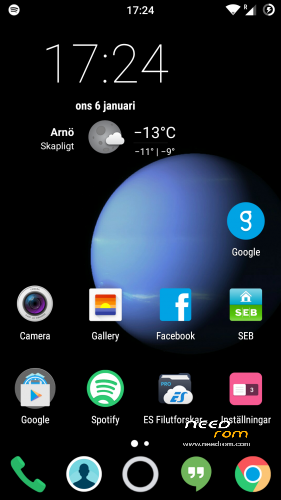
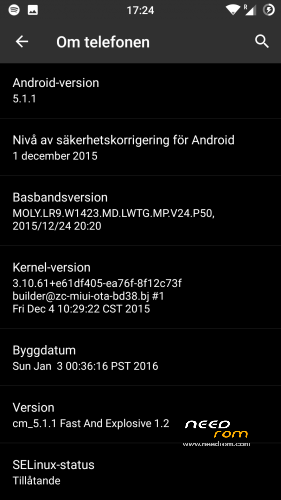
This is CyanogenMod 12.1 for xiaomi redmi note
Change log Fast and Explosive Update 5.2 Clean CM (Latest)
New build and a stable one 
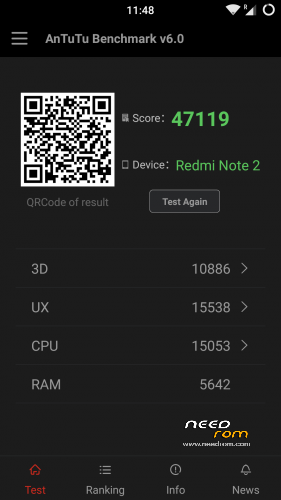
Battery friendly rom and kernel
Latest Gapps
FM-Radio (You need to factory reset your phone for it to work or just start music player once and push play then close the app and open FM-Radio and it should work.)
Clean CM
security patch update
This is the best build so far
Change log Fast and Explosive Build 4.0
New build 2016-03-14
new camera libs
Gapps updated
4G/LTE Optimized
New Modem
Camera apk moddded
Change log Fast and Explosive Build 3.7
Settings is now fixed so all the buttons are working
Maybe more, but i don´t remember
Change log Fast and Explosive Build 3.6
New libs for whole ROM @Coremainia ROM is now even faster!!
faster focus in camera
xposed deleted
uploading separate install for xposed framework
Change log Fast and Explosive Build 3.5
New Build 2016-02-21
kernel optimized by @Coremania
4G lock implemented
Faster and more explosive
Change log Fast and Explosive Build 3.2
New kernel and again optimized by @Coremania
added intelli3g.apk for xposed
added disable su idicator for xposed
some installer faults removed
some camera libs updated, can´t see any difference  Working on it..
Change log Fast and Explosive Build 3.0
New Build
The new kernel for this build has been optimized by @Coremania for battery and snappines (It`s a merged boot.img and it`s for testing)
Also @Coremania managed to do some magic so we can enjoy gestures in future updates
Busybox updated
Different framework
I did my best trying to fix the crazy bluetooth bug. If it`s not working now i can`t do it!!
I can recomend the DEEP DARKNESS theme by Manuel Moellmann
Enjoy
Install
Download zip file to sd
Reboot to TWRP
Factory reset
Wipe cash
Install zip
done
Enjoy CM!!
※Please make a backup of your device before installing or updating ROM
Hi, Daniel, thank you for this wonderfull Rom, it's nearly perfect
Does anybody else have problems with Nokia Here guiding voice (it's just missing) and pulling down the notification bar (sometimes it's difficult to pull down)?
Thank you very much
I can't insall after 88% >>>failed to read command:<<<< 1.9 thank
Try to download the .zip file again, it’s probably damaged.
Before flash any zip file, you should check it out. Just try to open it with x-plorer, root explorer… by default. If it cannot be opened, it's damaged
1.9 i didnt notice any difference for clear motion. Furthermore sometimea wake up with power button not wworks. Rest of the things going fine. Thankyou so much
Hi everyone, just want to ask, anyone here using miband & been able to use smartlock to unlock their phones?
My miband is already listed as online & trusted device but somehow, it never works…
ps: I'm on 1.7…
I don’t have a miband but smartlock works, I tried smartlock with the GPS function (so when I am at home, I don’t need to put in my code xD)
Smartlock with other devices like the miband should also work (in the description it says as long as it is connected (up to 100m via bluetooth) you won’t need to insert your code)
I tried something similar with my laptop as the trusted device and for me it worked.
I'll have to try again, with miui it works, with cm, any build/version, it hasn't work so far with miband…
Been using miband for a month, and and smart unlock works perfectly. I use 1.7 too.
@apinhidayat, just to check with you regarding miband smart unlock:
- I started with miband app open sesame! which paired the device & lead to settings lock screen
- from lockscreen, under smart lock, set mi as a trusted device.
Anything missing?
Will try again to.
Can it help us with BT problem??? https://jira.cyanogenmod.org/p.....6/comment/84785
https://yadi.sk/d/mxEMmBSanDF8.....b
or it's for CM13 only?
I check it out @Sprusmus and i called in sick today so i have time to fix buetooth today I hope! Maybe it's not working for all, but it's tricky cause i really don't have any Bluetooth issues at all. I'm switching libs and apks, check all permissios for Bluetooth and see how it works for you.
Daniel, why dont add in the status bar option for "turn on/turn off" Data connection (mobile internet)? It's really bad every time to go in sim card settings, and then i can turn on/off my data conncetion. Thank you, you are the best man
Clearmotion dont work 1.9
Engineering mode dont work
Daniel, where are files to improve sound output?
clearmotion work in 1.9, only for videos played with hw supported player, engineermode is missed on all cm builds,
daniel uses dolby in his roms, you can´t get better
I am using MX player on HW mode. I need to improve sound VOLUME
Not correct, he using Sony effect!
Bukakow is correct I see the lib files and the right commands in build prop but yes it does not work in 1.9 the rest of the build is really solid tho! good batery to !!