
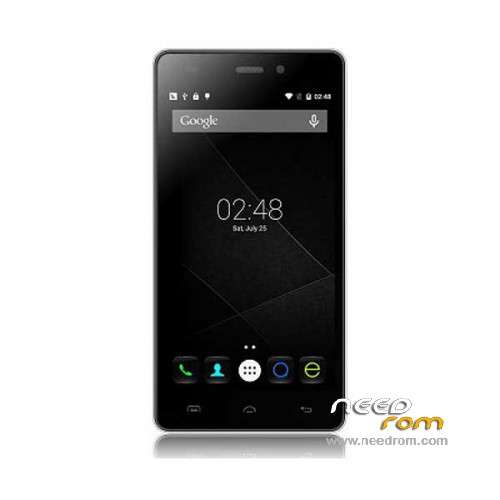
- Title: Doogee X5 Pro
- Listed: December, 2015
- Last modified: 07/04/2016 11:33 pm
- Version: ROM Android 5.1
You must be logged for ROM download.
42829 total views, 2 today
30 Total favorites
 Member Info
DESCRIPTION
ROM Mobile Doogee X5 Pro – ROM Android 5.1
ONLY MT6735M
ROM 1 – Update Official ROM Doogee X5 Pro version: DOOGEE-X5pro-Android5.1-R17-2016.07.01 – t93bm-dg-a37-33pgu-hd-128g16g-fdd137820-bom68 – full_hct6735m_35gu_l-user 5.1 LMY47D
ATTENTION this ROM is not compatible with ROM 2
————————————————————————————————————————————————————————————————
ROM 1 – Update Official ROM Doogee X5 Pro version: DOOGEE-X5pro-Android5.1-R12-2016.01.15 – t93bm-dg-a37-33pgu-hd-128g16g-fdd137820-bom68 – full_hct6735m_35gu_l-user 5.1 LMY47D
ATTENTION this ROM is not compatible with ROM 2
————————————————————————————————————————————————————————————————
ROM 2 – Official ROM Doogee X5 Pro version: DOOGEE-X5pro-64+8-Android5.1-2015.12.21 – t93bm-dg-a37f–33pgu-hd-64g8g-fdd137820-dg- full_hct6735m_35gu_l-user 5.1 LMY47D
ATTENTION this ROM is not compatible with ROM 1
————————————————————————————————————————————————————————————————
ROM 1 – Official ROM Doogee X5 Pro version: DOOGEE-X5pro-Android5.1-R09-2015.12.01 – t93bm-dg-a37-33pgu-hd-128g16g-fdd137820-bom68 – full_hct6735m_35gu_l-user 5.1 LMY47D
Gapps include – No Rooted
Language support: Multilang
Install ROM:
Install with SP MDT:
1). Turn off the smartphone. Cable is not connected to the computer.
2). Remove the battery and insert it again
3). Connect your phone to a computer cable. The operating system detects a new device
4). Disconnect the cable from the computer.
5). Run SPMultiPortFlashDownloadProject.exe
6). Choose File> Open File Agent download and specify the file MTK_AllInOneDA.bin (it is in the folder SP_MDT).
7). Click Scatter File and select the MT6735M_Android_scatter.txt file (it's in the folder with the rom).
8). Click "Start all".
9). Connect your phone to a computer cable. The program should see and blink. If the phone is not detected, then unplug it from the computer,
remove and insert the battery (if the battery is removable) and reconnect it to the computer.
10). After (OK) click Stop and disable any phone.
11). Completed.
※Please make a backup of your device before installing or updating ROM
Please, I r11 version, download the update via OTA package to r12 and then I'll update package unpacking and then it ends up buzz bug installation package and does not update. Do not know what to do, or can put only one package on r12 to download? Thanks…
Thanks to you.
good and great work, waiting for doogee dg550 nex rom
ROM 1 R12 worked for me, but I needed Flashtool from here: https://www.needrom.com/downlo.....3-megthebest-5/ to flash the firmware.
Flash SPMDT told me, there was a port conflict.
Tanks your
Hello everyone. I have a pro x5 doogee 2/16 with branch name t93bm-dg-a37-33pgu-hd-128g16g-fdd137820-bom68 with r09, ota update does not find me to r12. I update with flashtool to r12 I risk ruining smartphone. Thank you.
buenas tardes.
como se pone esta rom??
tommy i had r09, aslo didn't had r12 OTA, updated with this one and everything is ok
Hi SoCr@Te,
I officially have been DOOGEE-X5pro-Android5.1-R09-2015.12.01 before update to DOOGEE-X5pro-Android5.1-R12-2016.01.15 with your rom files.
I wonder that why we not received the R12 update with OTA? How and where did you get this R12 update (DOOGEE-X5pro-Android5.1-R12-2016.01.15)?
No problem at all and no remarkable change on R12.
Thanks!
I succeeded at updating to r12 from r09 using ROM 1 – Doogee X5 Pro – Update R12 on win10 home. I've installed the win8 driver off Pack-SPMDT-v3.1544.00.00 but had to use SP_Flash_Tool_5.1532.00.000_Windows for the actual flashing since SPMDT didn't work.
Also, I've installed TWRP and used it to install the latest UPDATE-SuperSU-v2.65-20151226141550.zip to root my phone.