
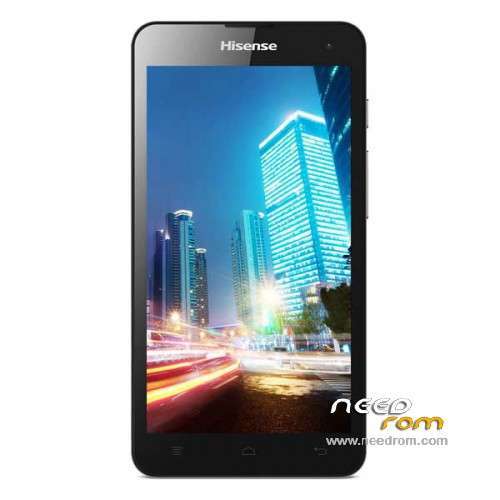
- Title: Hisense u971
- Listed: December, 2014
- Last modified: 02/13/2016 2:15 am
- Version: ROM Android 4.3
You must be logged for ROM download.
65290 total views, 8 today
31 Total favorites
 Member Info
DESCRIPTION
ROM Mobile hisense u971 – ROM Android 4.3
ROM 2 – Official ROM u971 Version: HS-U971_W1002.6.04.00.ZA00
QPST
1.Connect your phone to PC and let the driver install
2.Install QPST
3.Open QPST Configuration -> Add new port -> Select the com port of your device -> exit
4.Go to Start -> All Programs -> QPST eMMC Software Download open the tool -> Check program boot loaders -> Browse for the device com port
5.Click Load XML def and browse for u971ae_2.xml in folder ROM
6.Click Load Patch def and browse for patch0.xml in folder ROM
7.Check the search path 2 and browse for the folder ROM
11.Now click download, wait for the download to finish (it never finish but it also detects for a new driver, and that’s important)
and it will search for the new hardware found, install the driver
——————————————————————————————————————————————————
ROM 1 – Official ROM u971 Version: U971-SW-W969.6.02.02.00
Gapps include – no Rooted
Language support : Multilang
Install ROM :
Install with U971.cmd
※Please make a backup of your device before installing or updating ROM
I did and it downloaded 50% the turned off and became dead.What can I do?
No power,No fastboot.It is a big problem as if my telephone was damaged and dead
Yes it happened to me it should still read as diag mode 9006 and retry
if all the files are proper and it reads diag mode even if it shows the yellow maker in device manager it will flash still. if miflash still detects the phone just flash again. Dont panic.
QPST should still read the phone. flash the program boot loaders only. and retry. phone should be in download mode for it to work
http://postimg.org/image/4qmoo.....x2xn/
http://postimg.org/image/4nl5t.....xlev/
Both qpst and miflash does not read my phone but miflash read com only but it gives error as in the picture,please help
update the driver to diag 9006 and try again. send me screen shot of miflash advanced screen.
http://postimg.org/image/5vf35.....enz5/
http://postimg.org/image/bva3p.....hrk7/
http://postimg.org/image/g8o4k.....6jbx/
Flash programmer is wrong thats why you getting error.
the file should be MPRG8x10.mbn see my image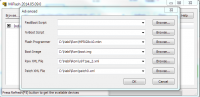
yeah,you're right but I disabled driver signature and the same problem
You almost there you need to just get the device in the right state and it will be a success. Allways check the miflash settings are all in order. drivers for the phone make sure you got the right ones. try this. using qpst if it can read the phone. switch device to DLOAD and try flash. if it fails try below.
change flash programmer file = MPRG8x10.mbn.
boot image = 8x10_msimage.mbn
uncheck program MMC. and click download. disconnect phone reconnect and try again
if possible lets do this over skype or team viewer. i want to actully get this done quickly