
- Title: JIAYU G4
- Listed: May, 2013
- Last modified: 08/25/2013 4:01 am
- Version: ROM Android 4.2.1
You must be logged for ROM download.
69678 total views, 4 today
1 Total favorites
 Member Info
DESCRIPTION
ROM JIAYU G4 – ROM Android 4.2.1
Update 08/24/13 V6S:
1, based on 0818
2, the default authorization management, kernel root / increase busybox instruction set / merge odex / open run-parts
3, merge odex, streamlined system
4, reserved for google services and comes back up
5, curing rebooter, freshness Mother Input Method
6, the annular charge 1% display
7, speed optimization
8, canceled 24 hours after the system displays segmented
9, v4 comes Acoustic Sound +
10, RE Manager freely uninstall
11, exquisite call interface
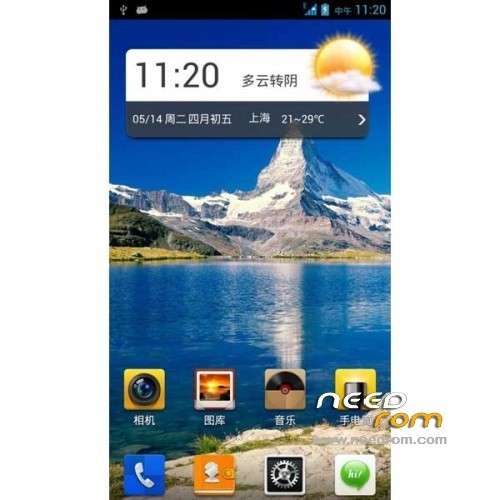
12, the status bar transparent + network speed
———————————————————————————————————————–
06/30/13 V5S:
1, glamor exquisite call interface
2, learn MIUI and Huawei ring material (no need to leave too much of these tones)
4, init scripts under
3, time-phased: dawn / morning / afternoon / evening / night
5, double v4 audio + comes with FullSound
6, full-screen camera with native camera coexistence (respective binding Gallery)
7, fonts for Microsoft elegant black, comes with document management, while RE manager freely uninstall
Integration update:
1 Integration FC Patch
2 The status bar directly pulled sunny 75% transparent UI (with speed display)
Even a lot of tutorials, relative to the jar, people do not want to bother to get apk, after all, I did not g4, do not get not how.
3 double version of opaque and transparent
Language support: Multilang
Install ROM :
Unpack Tools, and Click on Flash_tool.exe
Select a the MT6589_Android_scatter_emmc.txt in TOOLS ( or Recovery CWM 6.0.3.2)
Turn off your phone, remove the battery.
Press F9 (or hit Download button) and connect your phone into the computer via USB data cable.
The process will start and a red progress bar will appear after color purple, yellow.
And green circles display
Finish !
You can now safely disconnect your phone and turn it on.
or
CWM
Step 1: Download the custom card brush ROM copied to an external SD card root directory
Step 2: the shutdown state. While holding down:
Power button + volume button + volume key to enter the recovery mode of Brush, Clear user data and cache, and then enter the card brush
Options Brush can.
Step 3: Brush complete, restart the phone
※Please make a backup of your device before installing or updating ROM
Hey guys, the ROM from Spain group fix the 3g problem. I have tested this for several days withou an issue…
Make i installit for Advanced version G4?? G4HG?
turkish language?
Thanx for the rom mate!But no greek???
Hello, is this version for G4 Turbo? Thank you
how to disable transparent status bar, so not transparent?