
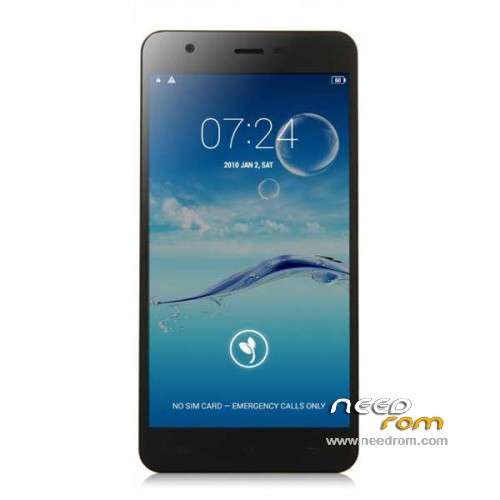
- Title: JIAYU S3
- Listed: January, 2015
- Last modified: 05/08/2015 7:28 pm
- Version: ROM Android 4.4.4
You must be logged for ROM download.
259211 total views, 8 today
217 Total favorites
 Member Info
DESCRIPTION
ROM Phone JIAYU S3 – ROM Android 4.4.4
ONLY MT6752
Update ROM 1 - S3S 20150507-083407- mt6752_h560_s3s_jyt_cc_128-24_kk_lte_5m-cs_tphone – KTU84P – Advanced – 3G Ram – no gapps – Multilang
Install Flash or OTA
———————————————————————————————————————————————————————————
Update ROM 2 – S3 20150430-131240 – mt6752_h560_s3_jyt_cc_kk_lte_5m-cs_tphone – KTU84P – Basic – 2G Ram - no gapps – Multilang
Install Flash or OTA
———————————————————————————————————————————————————————————
Update ROM 1 – S3S 20150411-154516 – mt6752_h560_s3s_jyt_cc_128-24_kk_lte_5m-cs_tphone – KTU84P – Advanced – 3G Ram – no gapps – Multilang
Install Flash or OTA
———————————————————————————————————————————————————————————
Update ROM 2 – S3 20150411-155027 – mt6752_h560_s3_jyt_cc_kk_lte_5m-cs_tphone – KTU84P – Basic – 2G Ram - no gapps – Multilang
Install Flash or OTA
———————————————————————————————————————————————————————————
ROM 4 – S3SW 20150314-141844 – mt6752_h560_s3sw_jyt_cc_128-24_kk_lte_5m-cs_mul_tphone – KTU84P – Advanced – 3G Ram – gapps – Multilang
———————————————————————————————————————————————————————————
Update ROM 2 – S3 20150319-073039 – mt6752_h560_s3_jyt_cc_kk_lte_5m-cs_tphone – KTU84P – Basic – 2G Ram - no gapps – Multilang
You've a Tuto for install
———————————————————————————————————————————————————————————
Update ROM 1 – S3S 20150127-151447 – mt6752_h560_s3s_jyt_cc_kk_lte_5m-cs_ldata_tphone – KTU84P – Advanced – 3G Ram – no gapps – Multilang
Update ROM 2 – S3 20150204-161147 – mt6752_h560_s3_jyt_cc_kk_lte_5m-cs_tphone – KTU84P – Basic – 2G Ram - no gapps – Multilang
Update ROM 3 – S3W 20150205-141543 – mt6752_h560_s3w_jyt_cc_kk_lte_5m-cs_mul_tphone – KTU84P – Basic – 2G Ram - gapps – Multilang
———————————————————————————————————————————————————————————
ROM 3 – S3W 20150123-225823 – mt6752_h560_s3w_jyt_cc_kk_lte_5m-cs_mul_tphone – KTU84P – Basic – 2G Ram
ONLY WCDMA
Gapps include – No Rooted
Language support: Multilang
———————————————————————————————————————————————————————————
Update ROM 2 – S3 20150120-121651 – mt6752_h560_s3_jyt_cc_kk_lte_5m-cs_tphone – KTU84P – Basic – 2G Ram
———————————————————————————————————————————————————————————
Official ROM JIAYU S3 version :
ATTENTION Two version :
ROM 1 – S3S 20150113-142450 – mt6752_h560_s3s_jyt_cc_kk_lte_5m-cs_ldata_tphone – KTU84P – Advanced – 3G Ram
ROM 2 – S3 20150117-172407 – mt6752_h560_s3_jyt_cc_kk_lte_5m-cs_tphone – KTU84P – Basic – 2G Ram
Gapps not include – No Rooted
Language support: Multilang
Install ROM :
- Unpack FlashTools, and Click on Flash_tool.exe
- Select a the MT6752_Android_scatter.txt in ROM
- Wait file to be added into Flash Tool
- choose Option->USB Model,click USB Model
–> Choose Option->DA DownLoad All->Speed->High Speed, click High Speed
- Turn off your phone
- "Press F9 (hit Download button)" OR " if upgrade ROM Firmware->Upgrade "
- and connect your phone into the computer via USB data cable.
- The process will start and a red progress bar will appear after color purple, yellow.
- And green circles display
- Finish !
- You can now safely disconnect your phone and turn it on.
※Please make a backup of your device before installing or updating ROM
For ROM 2, it gives error Rom scatter file is invalid. Anyone knows what is wrong?
please..how to save and restore IMEI
with jiayu apk…. install , open : tools ROMs/backup tools/backup/restore IMEI
Let's use TWRP Recovery 2.8.4.0 This tool allows you to backup / restore Nvram partition that stores the IMEI. To install through Flashtool.
*#4634# window popup just type imei no.
thank you for all
1. I' m kind of stuck after I accidentaly erasing the OS completely in my Jiayu S3 (2/16GB). Then, using TWRP, [FlymeOS V1 TF] installed fine. But i just didn't like the UI. So I tried to install [ROM 3 - JIAYU S3 - Update 02/05/2015], but I couldn't as it is a .RAR file. So how do you install it ? What I did was, download it, extract it and zipped again as .zip, then adb push on internal storage. Then tried to install it with TWRP but no luck. What should I do?
2. Also, when executing "format" in flashtool, how long should it take on the Jiayu S3 (2/16GB). It doesn't seem to stop. If I cancel it, do I damage any partition?
1. This firmware (ROM 3 – JIAYU S3 – Update 02/05/2015) need to install from the program Flash Tool (Via TWRP not be installed).
Install Update ROM 3 – S3W 20150205-141543 :
- Unzip the firmware file to a folder with Flash Tool.
- Run FlashTools
- Select a file with the scatter MT6752_Android_scatter.txt in folder containing ROM.
- Wait file to be added into Flash Tool
- Turn off your phone
- Select Download only from the dropdown menu (NOT!!! Format All + Download!!!).
- Push the button DOWNLOAD
- and connect your phone into the computer via USB data cable.
- The process will start and a red progress bar will appear after color purple, yellow. (If the process does not start, you need to install the drivers and repeat.)
- And green circles display
- Done!
- You can now safely disconnect your phone and turn it on.
2. DO NOT executing "format" in flashtool, it will erase Nvram section, which contains critical information (including IMEI).
Hi everyone, the number of the build of my s3 is 20150204-161147 it si possible to install the Rom 3 or not?
Thank you
yes, it possible to install, or, you install the google apps with jiayu apk
@Zakerr: you mean UPDATE ONLY, NOT DOWNLOAD ONLY
Exactly Download only or Firmware upgrade (myself flashing in Download only mode and all completed successfully)
Hi there, when using SPFlash and clicking in download, it nevers connects to the phone nor initiates the process!!!
Hi have tried with phone on, off, with and without battery.
Can someone help me
1. You need to install the drivers.
2. The smartphone must be switched off.
3. Do not remove the battery.
Hi all,
After installing the rom on my s3 3 jiayu advanced, all went well with Flashtools, the progress bar is turned green and the download was Ok, but for more opportunity to start the phone or load and n 'is recognized by Windows, someone would have an idea for the resurrected or is it that it's over for him.
Thank you for your help.
Did you installed the right ROM.? I understand that you have the advanced 3GB so the rom to be installed iis ROM 1?
Hi there, when using SPFlash and clicking in download, it nevers connects to the phone nor initiates the process!!! I have tried with phone off, with battery. I had already install drivers for s3,
Can someone help me
must be a driver problem. get sure the drivers are installed correctly. also you need to turn off the phone, press download and then connect.