
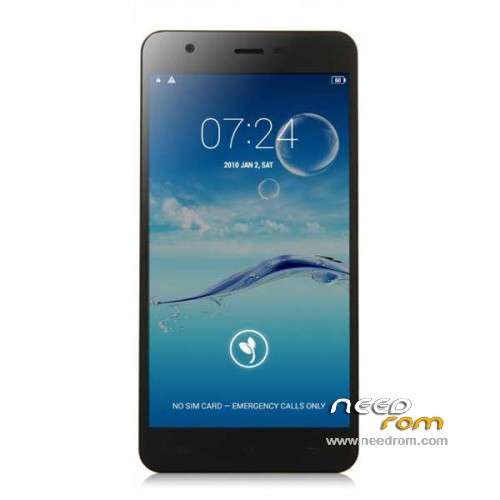
- Title: JIAYU S3
- Listed: January, 2015
- Last modified: 05/08/2015 7:28 pm
- Version: ROM Android 4.4.4
You must be logged for ROM download.
259216 total views, 13 today
217 Total favorites
 Member Info
DESCRIPTION
ROM Phone JIAYU S3 – ROM Android 4.4.4
ONLY MT6752
Update ROM 1 - S3S 20150507-083407- mt6752_h560_s3s_jyt_cc_128-24_kk_lte_5m-cs_tphone – KTU84P – Advanced – 3G Ram – no gapps – Multilang
Install Flash or OTA
———————————————————————————————————————————————————————————
Update ROM 2 – S3 20150430-131240 – mt6752_h560_s3_jyt_cc_kk_lte_5m-cs_tphone – KTU84P – Basic – 2G Ram - no gapps – Multilang
Install Flash or OTA
———————————————————————————————————————————————————————————
Update ROM 1 – S3S 20150411-154516 – mt6752_h560_s3s_jyt_cc_128-24_kk_lte_5m-cs_tphone – KTU84P – Advanced – 3G Ram – no gapps – Multilang
Install Flash or OTA
———————————————————————————————————————————————————————————
Update ROM 2 – S3 20150411-155027 – mt6752_h560_s3_jyt_cc_kk_lte_5m-cs_tphone – KTU84P – Basic – 2G Ram - no gapps – Multilang
Install Flash or OTA
———————————————————————————————————————————————————————————
ROM 4 – S3SW 20150314-141844 – mt6752_h560_s3sw_jyt_cc_128-24_kk_lte_5m-cs_mul_tphone – KTU84P – Advanced – 3G Ram – gapps – Multilang
———————————————————————————————————————————————————————————
Update ROM 2 – S3 20150319-073039 – mt6752_h560_s3_jyt_cc_kk_lte_5m-cs_tphone – KTU84P – Basic – 2G Ram - no gapps – Multilang
You've a Tuto for install
———————————————————————————————————————————————————————————
Update ROM 1 – S3S 20150127-151447 – mt6752_h560_s3s_jyt_cc_kk_lte_5m-cs_ldata_tphone – KTU84P – Advanced – 3G Ram – no gapps – Multilang
Update ROM 2 – S3 20150204-161147 – mt6752_h560_s3_jyt_cc_kk_lte_5m-cs_tphone – KTU84P – Basic – 2G Ram - no gapps – Multilang
Update ROM 3 – S3W 20150205-141543 – mt6752_h560_s3w_jyt_cc_kk_lte_5m-cs_mul_tphone – KTU84P – Basic – 2G Ram - gapps – Multilang
———————————————————————————————————————————————————————————
ROM 3 – S3W 20150123-225823 – mt6752_h560_s3w_jyt_cc_kk_lte_5m-cs_mul_tphone – KTU84P – Basic – 2G Ram
ONLY WCDMA
Gapps include – No Rooted
Language support: Multilang
———————————————————————————————————————————————————————————
Update ROM 2 – S3 20150120-121651 – mt6752_h560_s3_jyt_cc_kk_lte_5m-cs_tphone – KTU84P – Basic – 2G Ram
———————————————————————————————————————————————————————————
Official ROM JIAYU S3 version :
ATTENTION Two version :
ROM 1 – S3S 20150113-142450 – mt6752_h560_s3s_jyt_cc_kk_lte_5m-cs_ldata_tphone – KTU84P – Advanced – 3G Ram
ROM 2 – S3 20150117-172407 – mt6752_h560_s3_jyt_cc_kk_lte_5m-cs_tphone – KTU84P – Basic – 2G Ram
Gapps not include – No Rooted
Language support: Multilang
Install ROM :
- Unpack FlashTools, and Click on Flash_tool.exe
- Select a the MT6752_Android_scatter.txt in ROM
- Wait file to be added into Flash Tool
- choose Option->USB Model,click USB Model
–> Choose Option->DA DownLoad All->Speed->High Speed, click High Speed
- Turn off your phone
- "Press F9 (hit Download button)" OR " if upgrade ROM Firmware->Upgrade "
- and connect your phone into the computer via USB data cable.
- The process will start and a red progress bar will appear after color purple, yellow.
- And green circles display
- Finish !
- You can now safely disconnect your phone and turn it on.
※Please make a backup of your device before installing or updating ROM
Hi
I got problem with data. When screen lock is activated then the data connection is lost and need to reboot to get it back.. I got 2 sim cards and everything works perfect, besides data. What rom can solve this problem? I think i want to get back to chinese rom, which one is it? I got basic version and istalled the europenan rom some days ago.
There is no such problem with the WCDMA (ROM3). But if you want to install the chinese, it's ROM 2 ….
Ok.. So no 4G with dual sim.. 4G works but when screen lock is activated then its gone.. Why is it so? Couldent that be fixed in future roms?
Hi all here, I am lost I have an S3S (3GB) and loaded Smart Phone Flash and loaded the scatter-loading file. I switched off the phone and took out the battery, then I connected the usb cable to the pc (windows and pressed the download button but nothing happens…: ( what am I doing wrong ???
Any help will be much appreciated
Thanks
you should put battery inside
I currently have older S3SW ROM, If I install ROM 4 from "Local updates", will this wipe my data?
will this wipe my data? = Yes
And this rom is only for flashtools not OTA
Note I have no windows machine so I consider copying S3SW-20150314-141844.zip to phone and install via update "Local updates".
Anyone tried this, or is it not meant to be done that way?
found a linux native flash tool SP_Flash_Tool_Linux_v5.1504.00.100.zip on
https://www.needrom.com/downlo.....ool-v5-1424-00/
will try it for sure next time an S3SW ROM comes along
@SoCr@Te
thanks for letting me know, I'll extract ROM and will flash partitions using dd from TWRP instead or is this not recommended?
… too bad one needs a Windows machine to flash the ROM…
recommended? = no and you can't
or maybe I can boot into bootloader and use "fastboot" to flash partitions such as system and boot?
in any case I do not look forward to have to buy a micro$oft computer for the sole purpose to be able to upgrade/flash s3sw
@SoCr@Te
I meant from adb shell when booted in TWRP recovery. Just dd the correct file to the correct partition.
I have done so for many other Android devices. So is this not possible for the S3SW?
In fact, I installed TWRP itself with dd (of course when normally booted in system).
Thanks for kind advice
you can’t with this version
@SoCr@Te
OK so be it.
Then I assume my phone itself will present me S3SW 20150314-141844 using Wireless update soon.
For now it says I am up to date. I have:
Current = S3SW 2015013-171816 – mt6752_h560_s3sw_jyt_cc_128-24_kk_lte_5m-cs_mul_tphone
Have a nice day.
And, assuming this update won't come, is there an URL where one can get it from? Then one could put it on SD and apply update "Local updates".?
Sorry for multiple posts … eventually I got my hand on an old XP laptop.
So now, if I would flash the ROM with FlashTool but untick recovery and userdata, then I assume my /data won't be lost, right?
I am trying to avoid reinstall (I do have Titanium and TWRP backup though)
Thanks for advice / experience.
So I followe the instructions but I don't get a transfer rate or a progress line at the bottom of the flash tool. Can someone help?