
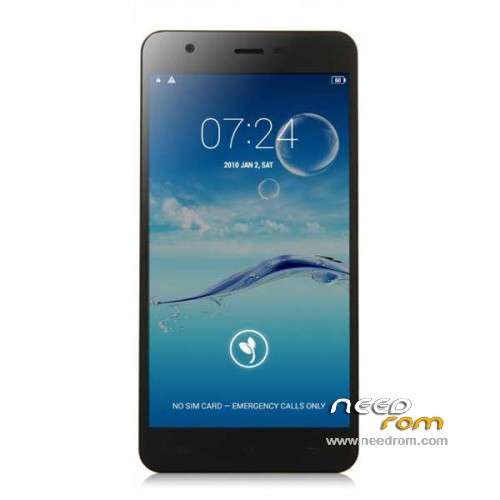
- Title: JIAYU S3
- Listed: January, 2015
- Last modified: 05/08/2015 7:28 pm
- Version: ROM Android 4.4.4
You must be logged for ROM download.
259214 total views, 11 today
217 Total favorites
 Member Info
DESCRIPTION
ROM Phone JIAYU S3 – ROM Android 4.4.4
ONLY MT6752
Update ROM 1 - S3S 20150507-083407- mt6752_h560_s3s_jyt_cc_128-24_kk_lte_5m-cs_tphone – KTU84P – Advanced – 3G Ram – no gapps – Multilang
Install Flash or OTA
———————————————————————————————————————————————————————————
Update ROM 2 – S3 20150430-131240 – mt6752_h560_s3_jyt_cc_kk_lte_5m-cs_tphone – KTU84P – Basic – 2G Ram - no gapps – Multilang
Install Flash or OTA
———————————————————————————————————————————————————————————
Update ROM 1 – S3S 20150411-154516 – mt6752_h560_s3s_jyt_cc_128-24_kk_lte_5m-cs_tphone – KTU84P – Advanced – 3G Ram – no gapps – Multilang
Install Flash or OTA
———————————————————————————————————————————————————————————
Update ROM 2 – S3 20150411-155027 – mt6752_h560_s3_jyt_cc_kk_lte_5m-cs_tphone – KTU84P – Basic – 2G Ram - no gapps – Multilang
Install Flash or OTA
———————————————————————————————————————————————————————————
ROM 4 – S3SW 20150314-141844 – mt6752_h560_s3sw_jyt_cc_128-24_kk_lte_5m-cs_mul_tphone – KTU84P – Advanced – 3G Ram – gapps – Multilang
———————————————————————————————————————————————————————————
Update ROM 2 – S3 20150319-073039 – mt6752_h560_s3_jyt_cc_kk_lte_5m-cs_tphone – KTU84P – Basic – 2G Ram - no gapps – Multilang
You've a Tuto for install
———————————————————————————————————————————————————————————
Update ROM 1 – S3S 20150127-151447 – mt6752_h560_s3s_jyt_cc_kk_lte_5m-cs_ldata_tphone – KTU84P – Advanced – 3G Ram – no gapps – Multilang
Update ROM 2 – S3 20150204-161147 – mt6752_h560_s3_jyt_cc_kk_lte_5m-cs_tphone – KTU84P – Basic – 2G Ram - no gapps – Multilang
Update ROM 3 – S3W 20150205-141543 – mt6752_h560_s3w_jyt_cc_kk_lte_5m-cs_mul_tphone – KTU84P – Basic – 2G Ram - gapps – Multilang
———————————————————————————————————————————————————————————
ROM 3 – S3W 20150123-225823 – mt6752_h560_s3w_jyt_cc_kk_lte_5m-cs_mul_tphone – KTU84P – Basic – 2G Ram
ONLY WCDMA
Gapps include – No Rooted
Language support: Multilang
———————————————————————————————————————————————————————————
Update ROM 2 – S3 20150120-121651 – mt6752_h560_s3_jyt_cc_kk_lte_5m-cs_tphone – KTU84P – Basic – 2G Ram
———————————————————————————————————————————————————————————
Official ROM JIAYU S3 version :
ATTENTION Two version :
ROM 1 – S3S 20150113-142450 – mt6752_h560_s3s_jyt_cc_kk_lte_5m-cs_ldata_tphone – KTU84P – Advanced – 3G Ram
ROM 2 – S3 20150117-172407 – mt6752_h560_s3_jyt_cc_kk_lte_5m-cs_tphone – KTU84P – Basic – 2G Ram
Gapps not include – No Rooted
Language support: Multilang
Install ROM :
- Unpack FlashTools, and Click on Flash_tool.exe
- Select a the MT6752_Android_scatter.txt in ROM
- Wait file to be added into Flash Tool
- choose Option->USB Model,click USB Model
–> Choose Option->DA DownLoad All->Speed->High Speed, click High Speed
- Turn off your phone
- "Press F9 (hit Download button)" OR " if upgrade ROM Firmware->Upgrade "
- and connect your phone into the computer via USB data cable.
- The process will start and a red progress bar will appear after color purple, yellow.
- And green circles display
- Finish !
- You can now safely disconnect your phone and turn it on.
※Please make a backup of your device before installing or updating ROM
hi gents, just received my jiayu s3 3G RAM version, google play store or any other google component wont work. Any advice? Thanks!
I have the same problem. I tried installing twrp and gapps but the versions on needrom only work for the basic version and not the advanced.
Probably TWRP is valid even for Advanced, but you need to install by hand. extract .img file, put it into root directory, call it recovery.img. Now I don't remember if you need mobile uncle tool or rom manager to do that, but one of those should be able to flash recovery rom. otherwise you should use sp flash tools.
I cannot guarantee basic version TWRP works on advanced version, do it without under your responsibility
in the latest rom of 2GB version – wcdma i just hear an echo when i call. It should be fixed in the newest rom, but i hear this noisy echo and its drive me crazy and i dont know what should i do/change?
check you have really latest ROM version (settings – about…)
I have version s3s 20150204-164258. I guess it is the latest one. It shipped with this version installed. There are no ots updates available.
It's ok. 20150205 is the same but with gapps, that's why you don't find OTA updates.
More, I suspect if you use 20150205 version to avoid install gapps manually, you'll loose OTA upgrades.
Also installing twrp does not work, i tried manual with mobile uncle as I always do but no succes. Gapps worked with a trick. Using a chinese app. http://www.boardsforphones.com.....ce-on-jiayu-s3/
Demetrio: i installed Update ROM 3 – S3W 20150205-141543 – mt6752_h560_s3w_jyt_cc_kk_lte_5m-cs_mul_tphone – KTU84P – Basic – 2G Ram - gapps – Multilang
Anybody knows why there is no option to "MOVE TO SD CARD" an application , in setting/applications….Rom S3W.
did you try to root before? …
@xervantes where did you get that Google Service in apk? Thanks!
@Demetrio
The phone is Root and S3W installed.
Normaly when in Setting/Applications you select an application you have for most of them the options: MOVE TO SD CARD or MOVE TO INTERNAL.
By the way did I have to install SUPERUSER? I didn't, because I beleave is already set in the ROM as is activated in SECURITY.
Try link2sd then.
About superuser, I don't know, may be I'll know something more when I'll receive my S3
phone comes pre-rooted!
how to activate root:
1. settings -> security
2. enable superuser.
SuperSu from playstore is COMPATIBLE!
btw: there is no move to sd, just the setting in store seetings to use the external sd card as the primary storage. app to sd wont work.
Thanks
That means it is not possible to move to or from the SD card an application. On the Jiayu G4S it was…
As Superuser is activated, I think that there is no need to install SuperSu .