
- Title: UPDATE 2015/01/14 G6 KitKat V2
- Listed: December, 2014
- Last modified: 01/18/2015 9:56 pm
- Version: 4.4.2 ROOT
You must be logged for ROM download.
31450 total views, 4 today
7 Total favorites

 Member Info
DESCRIPTION
CHANGELOG 14/01/2015 – KITKAT ELEPHONE G6 V2:
Aroma installer added (many thanks to Amarullz for his awesome work):
– optional launchers:
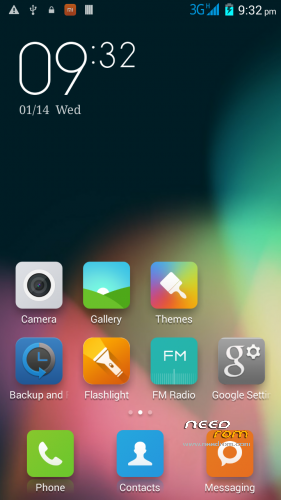
stock Elephone launcher
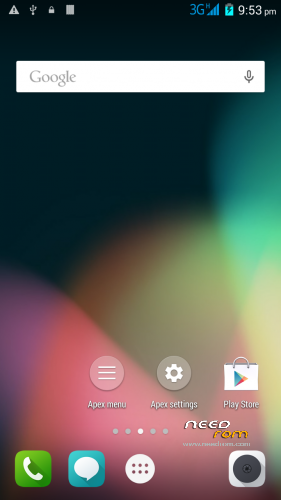
APEX launcher (recommended)
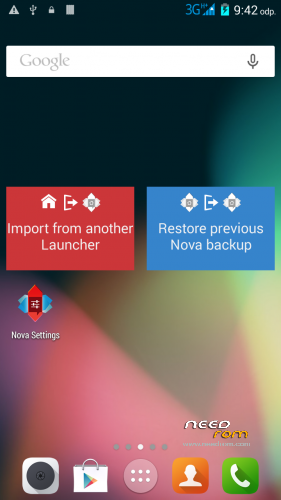
NOVA launcher
MIUI launcher
– partition patch included
– GPC configuration set up based on location
added battery optimization focused init.d scripts (merged from Lolli Experimental)
custom boot animation
some more tweaks…
NOTE: I've again divided the ROM into two versions, LITE and FULL.
The LITE version doesn't contain almost any apps like: Email, Calendar etc – as I believe many user (myself included) replace them with apps from Google Playstore.
The FULL version contains (almost) all the Elephone apps – but still with some bloatware removed.
Please, report anything you think that might be a bug to: honzikd+kitkat+v2@gmail.com Or, visit Elephone forum for more help: http://bbs.elephone.hk/?fromuid=2951
How to install:
(Make sure you have custom recovery installed, custom recoveries are: ClockWorkMod, TeamWinProject etc..)
PRIOR TO INSTALLATION MAKE A FULL BACKUP IN RECOVERY
ALSO, REBOOT THE RECOVERY BEFORE YOU START THE ROM INSTALLATION (Many thanks to Mike2957)
1. Place the ZIP to your sd-card
2. Select "Install zip from sd-card" or simmilar from your custom recovery
3. Follow the onscreen instructions
Note: if you select to apply the partition patch, the phone reboots the recovery automatically. After that, select to install the zip again > and select "Keep as it is" option in the patch section
CHANGELOG
Elephone G6 v1.1 by honzikd 2014/12/09
1. fully deodexed and zip-alligned for better performance
2. init.d scripting support
3. battery tweaks: set ART as default runtime, GPU as the primary rendering device
4. LITE VERSION: removed some rarely used apps (Calendar, Browser – as I usually replace them by apps from the from Play Store)
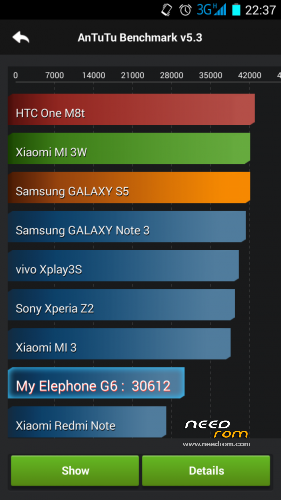
STABLE AND VERY WELL PERFORMING ROM
KNOWN BUGS:
None at the moment
If you think you found a bug, please, report to me: honzikd+needrom+kitkat+v1.1@gmail.com
Please, include logcat or at least well described steps how to reproduce the error.
Flashable zip (for custom recoveries like CWM) based on most current stock KitKat ROM, with sound patch – audio volume levels increased for internal speaker, headphones and handset.
Multilang, rooted, zip-alligned, with preinstalled MTK MobileUncle Tools and SuperSU. Chinese apps wiped out.
HOW TO INSTALL:
Install in custom recovery. (That is not the one which came pre-installed on the phone)
- Place the zip with the ROM to your SDCARD
- Reboot into recovery
- Do a full wipe – factory reset
- Install the ROM zip from SDCARD
- Done!
If you want to increase the system/primary partition size (from 1GB to 4GB), download my patch (see here: https://www.needrom.com/download/mod-increase-primary-partition-to-4gb/) and install it PRIOR the ROM installation.
IF YOU FIND IT USEFUL, PLEASE SUPPORT MY WORK AND DONATE. EVEN 1 EUR/USD COUNTS! 
I'd like to say big 'Thank You' to the following kind donators:
nobierom
Kevin Oluschinski
kara.s
Mirko_Polo
peknydenpreji
jeanca84
Jacques Kurvers
Pavlisk
layinglow
picky
alexkuipje
godlob
Frederick Steilen
leonidasleon
Sven-Christian Korrel
jurasek141
Knut Ulstein
Disclaimer: Use it at your own risk and always do backups.
※Please make a backup of your device before installing or updating ROM
Here is the report log, I am 100% sure I correctly installed the CWM:
Starting recovery on Mon Jan 26 15:41:07 2015
can't open /dev/tty0: No such file or directory
framebuffer: fd 3 (720 x 1280)
ioctl(): blank: Invalid argument
ioctl(): blank: Invalid argument
CWM automade 24.01.2015 01:07:24
recovery filesystem table
=========================
0 /tmp ramdisk (null) (null) 0
1 /misc emmc /dev/misc (null) 0
2 /data ext4 /dev/block/mmcblk0p7 (null) 0
3 /system ext4 /dev/block/mmcblk0p5 (null) 0
4 /cache ext4 /dev/block/mmcblk0p6 (null) 0
5 /boot emmc /dev/bootimg (null) 0
6 /recovery emmc /dev/recovery (null) 0
7 /emmc vfat /dev/block/mmcblk0p8 (null) 0
8 /sdcard vfat /dev/block/mmcblk1p1 /dev/block/mmcblk1 0
9 /sd-ext auto /dev/block/mmcblk1p2 (null) 0
W:Unable to get recovery.fstab info for /datadata during fstab generation!
I:Completed outputting fstab.
I:Processing arguments.
I:Checking arguments.
I:device_recovery_start()
Command: "/sbin/recovery"
ro.secure=0
ro.allow.mock.location=1
ro.debuggable=1
persist.sys.usb.config=mass_storage,adb
ro.build.id=IMM76L
ro.build.display.id=full_MTK-eng 4.0.4 IMM76L eng.rua1.20130129.114933 test-keys
ro.build.version.incremental=eng.rua1.20130129.114933
ro.build.version.sdk=15
ro.build.version.codename=REL
ro.build.version.release=4.0.4
ro.build.date=Вто Янв 29 11:51:46 MSK 2013
ro.build.date.utc=0
ro.build.type=eng
ro.build.user=rua1
ro.build.host=rua1-desktop
ro.build.tags=test-keys
ro.product.model=Full Android on Emulator
ro.product.brand=Android
ro.product.name=full_MTK
ro.product.device=MTK
ro.product.board=MTK
ro.product.cpu.abi=armeabi
ro.product.manufacturer=unknown
ro.product.locale.language=en
ro.product.locale.region=US
ro.wifi.channels=
ro.board.platform=unknown
ro.build.product=MTK
ro.build.description=full_MTK-eng 4.0.4 IMM76L eng.rua1.20130129.114933 test-keys
ro.build.fingerprint=Android/full_MTK/MTK:4.0.4/IMM76L/eng.rua1.20130129.114933:eng/test-keys
ro.build.characteristics=default
ro.cm.device=MTK
keyguard.no_require_sim=true
ro.com.android.dateformat=MM-dd-yyyy
ro.ril.hsxpa=1
ro.ril.gprsclass=10
ro.adb.qemud=1
ro.kernel.android.checkjni=1
ro.setupwizard.mode=OPTIONAL
net.bt.name=Android
net.change=net.bt.name
dalvik.vm.stack-trace-file=/data/anr/traces.txt
ro.factorytest=0
ro.serialno=
ro.bootmode=unknown
ro.baseband=unknown
ro.carrier=unknown
ro.bootloader=unknown
ro.hardware=mt6592
ro.revision=43775
ro.emmc=0
sys.usb.vid=0BB4
init.svc.recovery=running
sys.usb.config=mass_storage,adb
service.adb.root=1
init.svc.adbd=restarting
sys.usb.state=mass_storage,adb
I:Checking for extendedcommand…
I:Skipping execution of extendedcommand, file not found…
– Installing: /sdcard/ELEPHONE_G6_v_2FULL.zip
Finding update package…
I:Update location: /sdcard/ELEPHONE_G6_v_2FULL.zip
Opening update package…
Installing update…
Installation aborted.
Starting recovery on Mon Jan 26 15:41:07 2015
can't open /dev/tty0: No such file or directory
framebuffer: fd 3 (720 x 1280)
ioctl(): blank: Invalid argument
ioctl(): blank: Invalid argument
CWM automade 24.01.2015 01:07:24
recovery filesystem table
=========================
0 /tmp ramdisk (null) (null) 0
1 /misc emmc /dev/misc (null) 0
2 /data ext4 /dev/block/mmcblk0p7 (null) 0
3 /system ext4 /dev/block/mmcblk0p5 (null) 0
4 /cache ext4 /dev/block/mmcblk0p6 (null) 0
5 /boot emmc /dev/bootimg (null) 0
6 /recovery emmc /dev/recovery (null) 0
7 /emmc vfat /dev/block/mmcblk0p8 (null) 0
8 /sdcard vfat /dev/block/mmcblk1p1 /dev/block/mmcblk1 0
9 /sd-ext auto /dev/block/mmcblk1p2 (null) 0
W:Unable to get recovery.fstab info for /datadata during fstab generation!
I:Completed outputting fstab.
I:Processing arguments.
I:Checking arguments.
I:device_recovery_start()
Command: "/sbin/recovery"
ro.secure=0
ro.allow.mock.location=1
ro.debuggable=1
persist.sys.usb.config=mass_storage,adb
ro.build.id=IMM76L
ro.build.display.id=full_MTK-eng 4.0.4 IMM76L eng.rua1.20130129.114933 test-keys
ro.build.version.incremental=eng.rua1.20130129.114933
ro.build.version.sdk=15
ro.build.version.codename=REL
ro.build.version.release=4.0.4
ro.build.date=Вто Янв 29 11:51:46 MSK 2013
ro.build.date.utc=0
ro.build.type=eng
ro.build.user=rua1
ro.build.host=rua1-desktop
ro.build.tags=test-keys
ro.product.model=Full Android on Emulator
ro.product.brand=Android
ro.product.name=full_MTK
ro.product.device=MTK
ro.product.board=MTK
ro.product.cpu.abi=armeabi
ro.product.manufacturer=unknown
ro.product.locale.language=en
ro.product.locale.region=US
ro.wifi.channels=
ro.board.platform=unknown
ro.build.product=MTK
ro.build.description=full_MTK-eng 4.0.4 IMM76L eng.rua1.20130129.114933 test-keys
ro.build.fingerprint=Android/full_MTK/MTK:4.0.4/IMM76L/eng.rua1.20130129.114933:eng/test-keys
ro.build.characteristics=default
ro.cm.device=MTK
keyguard.no_require_sim=true
ro.com.android.dateformat=MM-dd-yyyy
ro.ril.hsxpa=1
ro.ril.gprsclass=10
ro.adb.qemud=1
ro.kernel.android.checkjni=1
ro.setupwizard.mode=OPTIONAL
net.bt.name=Android
net.change=net.bt.name
dalvik.vm.stack-trace-file=/data/anr/traces.txt
ro.factorytest=0
ro.serialno=
ro.bootmode=unknown
ro.baseband=unknown
ro.carrier=unknown
ro.bootloader=unknown
ro.hardware=mt6592
ro.revision=43775
ro.emmc=0
sys.usb.vid=0BB4
init.svc.recovery=running
sys.usb.config=mass_storage,adb
service.adb.root=1
init.svc.adbd=restarting
sys.usb.state=mass_storage,adb
I:Checking for extendedcommand…
I:Skipping execution of extendedcommand, file not found…
– Installing: /sdcard/ELEPHONE_G6_v_2FULL.zip
Finding update package…
I:Update location: /sdcard/ELEPHONE_G6_v_2FULL.zip
Opening update package…
Installing update…
Installation aborted.
Oh yeah, the CWM seems to be OK. Second most common issue is corrupted download – could you verify the integrity of the downloaded zip (by uisng the md5 hash). E.g. in Total Commander on Windows, you can do it by going: Files > Verify Checksums (From checksum files). The md5 checksum is placed right in the folder where you downloaded the ROM zip from..
Could you give me a more specific pathway to the Cheksums ? I cant seem to find them anywhere(not even sure what you mean by Files).
I installed this program MD5 & SHA Cheksum Utility 2.1 and ran my download trough it and I got this :
MD5 Checksum: DACE2682DAC7760BB1F07C7412D2AFBA
SHA-1 Checksum: 1C86246F904E9B9AA8C54111A7CD97368E75A112
SHA-256 Checksum: 4BF5A532B6948C1EA87116F238646CB85BEB3798E0BAF3F59CC858722F516DDF
SHA-512 Checksum: B5F09C49D7A209FC56F94BE28E4DCA89410A093D08E72C9E7F4ED1F5FF23A1737CB4453639DEDC209A55DBEF4A32C33AEAAAE112CED41E258479DF22198E9F7A
Generated by MD5 & SHA Checksum Utility @ http://raylin.wordpress.com/do.....hecksum-utility
The md5 checksums for V2FULL: a7d9301b558a2eb8289618929e45dae6
For V2LITE: d4b4054ae41c3f78da02df0b27bc84fe
The files with checksums are at: http://adf.ly/wFLw8 (LITE) and http://adf.ly/wMvNa (FULL). Yes, those are the locations you downloaded the ROM from.
Is seems to me, the checksum doesn't match. Please, try to download the file again.. Also, better to contact me via the e-mail (address is mentioned above) – that will make me respond more quickly..
By: "E.g. in Total Commander on Windows, you can do it by going: Files > Verify Checksums (From checksum files)" I tried to describe one of the ways, how you can verify checksum on a file under Windows..
install the firmware Elephone_G6_v2FULL – updated 2015/01/17.
Constantly on the main screen pops up an error : " The application " Google Search " An error occurred " (in English . "Unfortunately, Google Search has stopped.) How can I solve this problem?
On the old firmware kitkat, when he made the photo , I can choose functions: exposition , live photos, multi shooting . Why was not there ???
And everything else I really liked it . Thank U
Have you performed the factory reset prior to installation (the first screen in the Aroma installer)? Try to update the Google Search from the Playstore, or, reboot into recovery and try to fix permissions on the /system partition. What you described leads me to think you performed something unusual – as the ROM is quite well tested and without such issues. Could you advice if you did something special? Like maybe restoring your data using some backup app, like Titanium backup?
Hey honzikid,
you re rom works perfect. No problems with the software.
I got only one failure with my elephone g6. From time to time my online modus wont be switch between wifi at home and outside to provider internet.
Also phonecalls wont be work at this time. After i restart my smartphone then all works perfect. But this is not what i want. It must be work all the time.
I use an mirco sim card. Is it this maybe that elephone have problems with it?
I've heard about that happening on some models of G6, but unfortunatelly that seems to be the phone's radio firmware problem – and could be related to the micro SIM. If you have a chance, try to use that SIM in the regular slot – with some adaptor. Sorry, I cannot be more of help in such situation..
To me ir appears "installation aborted".
What do i do?
You would need to install custom recovery first.
I'm using stock rom now, and I did all things what find on forum for battery but it is max 2 hours ScreenOnTime. I want to instal your ROM to check can it stay ScreenOnTime to 4 hours what I saw on one topic ( on forum). I want to ask you what launcher is similar or same with stock ROM, beacuse I wouldnt like to change temporary design. Greetings.
Hi Honzikd,
Is possible to change the launcher after installation?
I have chosen the stock Eleph launcher but would like to test the Apex launcher.
BTW, cannot change lock screen background image with the stock launher. Got an App launcher3 forced quit message.
Thanks for your great work!
Hi All
First of all thanks Honzikd for such a good job :) just finished installation of Your ROM and seems to be damn good in My previous ROM was having annoing errors even after factory resetting My phone .
Anyone who got any problems of installing those ROM`s remember to unzipped files after downloading them , then You will get in one folder .zip file with ROM and MD5 check sum . .Zip file in that folder is the right file to be installed to Your G6 , if You trying to install it straight after downloading from the servers You will always get installation aborted problem
P.S
Remeber to put .zip file in the card memory if You planning to resize partitions , after resizing all data from internal memory will be DELETED .
Hope it will helps :)
Hi,
Dear Honzikd thanks for This rom. its solid and fast. the only problem i have is that after the phone booted completelyand some time when i working with phone this error apear:
"unfortunately exchange services has stopped"
i tested but default luncher and Apex.
the rom is light version.