
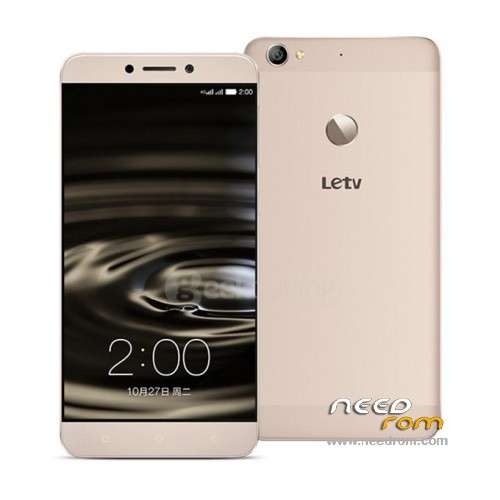
- Title: LeTV X500/1S
- Listed: November, 2015
- Last modified: 11/27/2015 2:38 pm
- Version: 5.5.008S
You must be logged for ROM download.
56294 total views, 3 today
24 Total favorites
 Member Info
DESCRIPTION
LeTV X500/1S – Original ROM from LeTV – 5.5.008S
- Android 5.0.2
- Build: 5.5.008S
- Only English & Chinese language
- Not rooted & no gapps (but follow my guide further down to get both!)
If you have the LeTV X500/1S with an unoriginal ROM (from one of the shops who install a modified ROM with multilanguage) but want the original ROM from LeTV follow these steps:
1. Enable USB debugging on the phone.
2. Download the file from here called "S1_x500-CN-OP-DBXCNOP5500811172S-5.5.008S.zip". Rename it to "update" (with the extention it is named "update.zip") and copy the file to the root of the phone.
3. Shutdown the phone.
4. Hold volume up and the power button together, as soon you see the LeTV bootlogo, let both go again, and it should boot into the stock recovery.
5. Now check Clear Data so both Update system and Clear data are checked – and then press the Start button
6. Now it will start flashing, now just wait for 10 minutes, and it should boot up and you have a clean new original LeTV system – done!
Now let's install TWRP so we can get ROOT and also install the GAPPS:
(You can also install Gapps via the "Google Installer APK" here http://www76.zippyshare.com/v/DqMeYkMQ/file.html – IMPORTANT: follow the videoguide here https://www.youtube.com/watch?v=q8ZidFOzl-k but with that it will not be permanent, so if you factory reset the phone, the Gapps will be gone, and you need to use the Google Installer again to reinstall the Gapps. If you use the method for TWRP it will be permanent and stay!)
1. Enable USB debugging on the phone.
2. Be sure to have installed ADB drivers, you can install http://pdanet.co/a/ for that (this is important to have a working ADB or it will not work!)
3. Download TWRP_ROOT.rar from in here. Unpack the rar file on the PC to C:TWRP_ROOT
4. Connect phone with the PC, copy the "X500-ROOT.zip" file (found in TWRP_ROOT.rar) into the root of the phone and also copy the ui.zip to the phone and place it in Phone storage/TWRP/theme/ui.zip (this will make the TWRP recovery english when you enter it, else it will be displayed in all chinese)
Copy also "open_gapps-arm64-5.0-nano-20151114.zip" to the root of the phone and "UPDATE-SuperSU-v2.46.zip"
5. Still connected, run the recover.bat on the PC inside the TWRP_ROOT directory
(If there comes a popup on the phones screen just set allow always USB debugging on the phone)
- A commandpromt screen also appears on the PC
- Press Enter there will be a black screen on the phone with a tiny text on bottom left saying fastboot.
- Enter 2 in command prompt and then press Enter
- On the phone there will be a black screen with tiny texts in the middle.
- Press Enter again and the phone will reboot in TWRP recovery mode that should be displayed in english
6. If you want to ROOT the phone (you can also skip this if you want) then choose in TWRP the Install button and flash the file in root (sdcard) called "UPDATE-SuperSU-v2.46.zip" reboot and the phone will be rooted.
7. If you want to flash Gapps/Play Store then choose in TWRP the Install button and flash the file in root (sdcard) called "open_gapps-arm64-5.0-nano-20151114.zip" and reboot
8. Done!
9. IF you should experience battery drain because of a WiFi BUG, you can also via TWRP try to flash the file called "x500_wifi_fix_flashWithTWRP.zip"
If you want to remove TWRP recovery, and flash the stock recovery:
Then go into the C:TWRP_ROOT folder and there you find recovery.img and TWRPrecovery.img – where the recovery.img is the original one. Just swap these 2 files, and run the recover.bat again from step 5. And it will flash the original back on the phone! /Guide by s7yler
If you want the X500 ROM with multilanguage and an app drawer then download the:
"Letv_X500_multilanguage_rom(but_no_OTA).rar" but the bad thing is that this ROM doesnt support any OTA, and it may also be missing some few features, like the IR blaster and QR scanner app is not included. So I recommend to use the official LeTV ROM instead.
You can also try BB72's multilanguage/pre-rooted ROM on Grossoshop's page – for instructions on how to install – just translate the page to english (all credits for the ROM goes to BB72). They also have an easy installer for TWRP.
http://blog.grossoshop.net/come-installare-rom-bb72-su-letv-x500/
※Please make a backup of your device before installing or updating ROM
i have le1s x507 but i am confused it is really x507, x507(indian) or x500. whenever i tried stock rom of x507 it says “this package is for x3_hk and your device is x3″ it always confuses me to know my device. give me a rom for x507 x3. i am stuck on vnmod custom rom. plz help
after flashing this rom my model no. will be x500 or x507. i am an indian and i want stock rom indian version but dont know my actual device. its confusing