
- Title: ResurrectionRemix v5.7.0 for Umi Zero (MM)
- Listed: July, 2016
- Last modified: 07/02/2016 12:44 pm
- Version: 6.0.1
You must be logged for ROM download.
20827 total views, 10 today
3 Total favorites
CUSTOM


 Member Info
DESCRIPTION
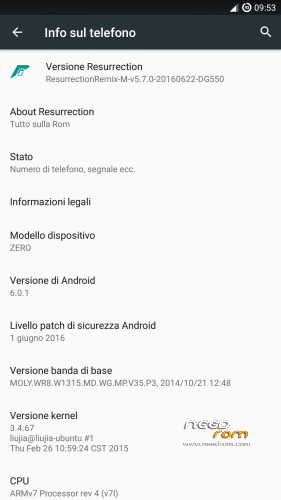
Resurrection Remix v5.7.0 ported from dg550, the rom is based on cm13.
There are not striking bugs or issues, the rom looks stable in almost every case, if u are experiencing some problems, please, write here. Someone is experiencing problems in accessing internal storage.
Gapps should be included (all essential ones), flash with latest twrp after a factory reset (u can skip it only if u know what u are doing).
※Please make a backup of your device before installing or updating ROM
Hello,
I have installed CM13 unofficial and no problem with memory but after i have installed RR V5.7.0 and no access memory ?
So what do you suggest as I can't downlaod twrp, shall i try reinstalling thru rootyjoy? I'm sure its something to do with Granting access with supersu
Other than this common problem, there is only wifi which cuts off regularly, other than that the phone does NOT restart which is a big PLus!!! All other roms, phone rebooted regularly.
@vazarg, did u tried, after installing this RR, to come back to cm13 (obiouvsly remaking all the correct wipes)?
@Hadziano, It seems that it makes no difference the way of installing, even if I think it will be more clean to use twrp. Why do u think it's a problem on root access? Does your apps that require root access have some problems? To check this u could only type 'su' on a terminal emulator (granting for permissions) and trying to do something that requires privileges (such as 'touch /data/foo; rm /data/foo'), if this do not say 'Permission Denied' root is working. U said that the problem regards apps like gallery and file manager that, generally, do not ask for root access. Actually the rom I used as base is provided in 2 versions, with different storage management, I will look on the method used to make it possible so that I may find good news.
@Gabry25 Maybe the error is in "boot.img\initrd\fstab.mt6592"
Gabry, its because its always to do with root and permissions, It's like you having a pin number on certain features, only way to unlock it is to enter correct pin number, I've a feeling the root access was not properly configured. I'd appreciate it if you tell me what to do please, as I have phone in handy, i have also installed ADB and SDK android tools, How do I reinstall the ROM providing that I cannot access the SD card? can you show me what to write in ADB and command prompt?
ps: btw do you deal with other phones , i.e. Voda smart ultra 6?
Dear friends! Unfortunately my English is not very good, so i ask pardon for any errors in this message!
Today I have flashed my device this firmware, and unfortunately get into some problems:
internal memory, which is in Android 4.4.4 at /storage/emulated/0 does not mount. For this reason, the camera and gallery do not have access to it. The file manager is also not displayed. In twrp recovery internal memory is displayed, it's all right. My device has no SD card due to the fact that the slot is broken.
We all seem to have the same problem.. My device doesn't have an SD card too, and slot seems faulty, what about your SIM card, doesn;t it go in the same slot? I haven't used this phone in a long time so trying to fix it, even ordered a new battery for it ( works fine ) now just waiting for original back case
I'm in the process of retrieiving backup from previous state. Gonna install previous version hopefully, then re-install this ROM and see what it does.. shall i reinstall using twrp rather than rootjoy and do u have link please?
I just installed same version again lol, how do I add previous rom onto sd card, i can only access it through recovery, not through laptop..?
Keeps installing the same ROM, doesnt make sense.. Am i missing something? jsut trying to download previous roms, but urs keeps reinstalling…
@wagnerlandio, I will give a look since someone says it’s a mount problem and not a permissions one.
At least u can try to install the same ROM substituting the boot.img from the cm13 (since u said that it makes no problems), u can do this on PC with any archive manager.
@Hadziano, downloading a ROM is a different thing than installing it, if u installed twrp u can connect it on the computer and enable USB connection in Mounts menu, from this u can move the ROMs u downloaded from the PC to the SD (or via mtp on the internal memory) and then through the Install menu u can install the ROM just moved (look out the name of the ROM u are installing to be sure it’s the correct one)
can't access sd tho, only through recovery…