
- Title: s422 OTA +Root (ROW)
- Listed: March, 2016
- Last modified: 03/18/2016 12:59 pm
- Version: 6.0
You must be logged for ROM download.
31205 total views, 9 today
22 Total favorites
 Member Info
DESCRIPTION
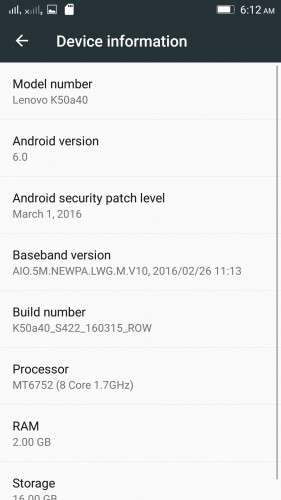
K50a40_S205_151118_ROW_TO_K50a40_S422_160315_ROW_WC46455750
Device:
Lenovo K3 Note
Android version:
6.0
OFFICIAL :
YES
MULTILANGUAGE:
YES!
UI:
Android Stock UI & VibeUI
Notes for flashing:
* This is an OTA update, so flashing the zip is tricky. Proceed with the flashing process if you're interested in doing the process, otherwise wait for my next post with flash-ready TWRP backup of this rom.
* Before you do anything to flash this rom make a complete backup of your current rom.
Flashing process:
Step 1
– Download S205 ROW zip file, and flash it using provided SP Flash tool
– Boot the rom
Step 2
Follow one of these 2 methods:
Method 1 (Using official recovery)
- Go to settings > about phone > system update > download and install the update
(or download the "S205 to S422 OTA" zip, rename it as "update.zip" and put it in internal memory,
Boot into official recovery and "install update")
Method 2 (Using TWRP recovery)
- Download the "S205 to S422 OTA (with Edited Updater Script)" zip, and patched boot image: http://ouo.io/7lNmvz , put the files in phone memory
- Turn off the phone, Flash TWRP using SP Flash Tool, and boot into TWRP recovery
- Install the OTA zip,
- BUT DON'T REBOOT SYSTEM YET. Flash the patched boot img.
- Now reboot system
Rooting process:
1. Flash the patched boot img: http://ouo.io/7lNmvz via TWRP recovery.
2. Download SuperSU 2.46: http://ouo.io/03yWh8, Flash it in TWRP, then Reboot System. Done!
* If you don't know how to flash custom recoveries in K3 note, here is a complete tutorial for you:
Installing custom recovery on K3 Note using SP Flash Tool (COMPLETE TUTORIAL):
http://forum.xda-developers.com/k3-note/general/sp-flash-tool-tutorial-to-install-twrp-t3346041
※Please make a backup of your device before installing or updating ROM
how to flash with flash tool? does phone must turned off?
Yes.
More detailed instruction:
- Install Lenovo driver
- Open SP Flash tool
- Go to Options> Option > Download> Tick "DA DL with checksum"
- Click "Scatter Loading" > Select scatter file from rom folder> Click Download
- Turn off your phone and connect it via USB cable
i do it all, but when i try to turn on my phone after flashing, nothing happens, it just vibrate few times, screen is not showing anything
Check this out http://mkgdroid.blogspot.mk/20.....vo-k3-note.html
it is working, it was probably because i did not check DA DL with checksum..
Thanks!!
does the data still switches on upon restart???
Yes
I mean, I'm gonna wait for a 1 file, 1 flash already rooted flashable via TWRP rom.
Check the roms page. I uploaded kinda 1-file-package. Named "SLICK S422"
Link:
https://www.needrom.com/downlo.....22-lite-rooted/
Root not working
The root works, I did it this way.
Just make sure you followed exactly as it said.
* FLASH PATCHED BOOT IMAGE and then flash supersu
So first i must flash it via sp flashtool first?
And what is diferent on this and on slick roms?
Data issue is still there
what is the difference between this update versions? i decide to update via system update, but i wanna know why someone will use this other method
i've bricked my phone for the 1st time. yey…. hahaha. I've been using spft for quite a long time and im really sure i've done nothing wrong. Just got black screen after flashing the row rom. Didn't get a chance to update hahaha. It just vibrate.
i was have the same problem, its resolved! i done this in flash tool – Go to Options> Option > Download> Tick "DA DL with checksum"
Because no all people have installed older version of this rom
but in first step says that you must flash old version..it does not have any sense
Please help me, i have twrp backup, but is not showing me nothing to restore