
- Title: s422 OTA +Root (ROW)
- Listed: March, 2016
- Last modified: 03/18/2016 12:59 pm
- Version: 6.0
You must be logged for ROM download.
31209 total views, 13 today
22 Total favorites
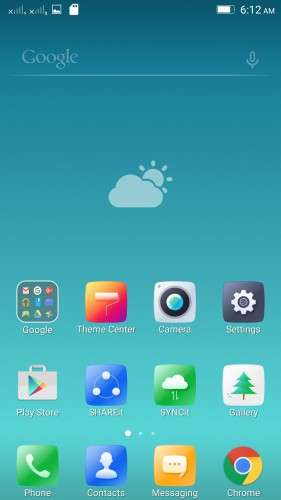
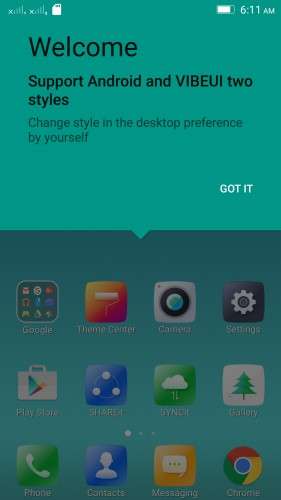
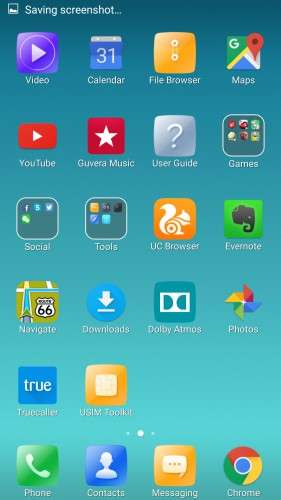
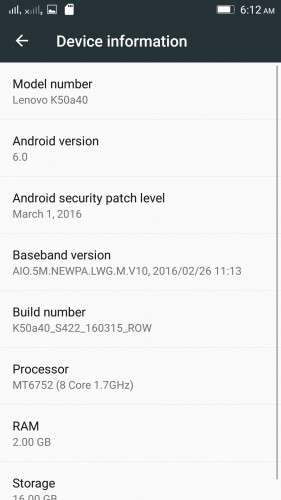
 Member Info
DESCRIPTION
K50a40_S205_151118_ROW_TO_K50a40_S422_160315_ROW_WC46455750
Device:
Lenovo K3 Note
Android version:
6.0
OFFICIAL :
YES
MULTILANGUAGE:
YES!
UI:
Android Stock UI & VibeUI
Notes for flashing:
* This is an OTA update, so flashing the zip is tricky. Proceed with the flashing process if you're interested in doing the process, otherwise wait for my next post with flash-ready TWRP backup of this rom.
* Before you do anything to flash this rom make a complete backup of your current rom.
Flashing process:
Step 1
– Download S205 ROW zip file, and flash it using provided SP Flash tool
– Boot the rom
Step 2
Follow one of these 2 methods:
Method 1 (Using official recovery)
- Go to settings > about phone > system update > download and install the update
(or download the "S205 to S422 OTA" zip, rename it as "update.zip" and put it in internal memory,
Boot into official recovery and "install update")
Method 2 (Using TWRP recovery)
- Download the "S205 to S422 OTA (with Edited Updater Script)" zip, and patched boot image: http://ouo.io/7lNmvz , put the files in phone memory
- Turn off the phone, Flash TWRP using SP Flash Tool, and boot into TWRP recovery
- Install the OTA zip,
- BUT DON'T REBOOT SYSTEM YET. Flash the patched boot img.
- Now reboot system
Rooting process:
1. Flash the patched boot img: http://ouo.io/7lNmvz via TWRP recovery.
2. Download SuperSU 2.46: http://ouo.io/03yWh8, Flash it in TWRP, then Reboot System. Done!
* If you don't know how to flash custom recoveries in K3 note, here is a complete tutorial for you:
Installing custom recovery on K3 Note using SP Flash Tool (COMPLETE TUTORIAL):
http://forum.xda-developers.com/k3-note/general/sp-flash-tool-tutorial-to-install-twrp-t3346041
※Please make a backup of your device before installing or updating ROM
@Shenge Thanks that you are helping & answering lot of noobs like me here.
I installed official S322 update from stock recovery, installed 3.0.0-2 TWRP via SP Flash Tool.
I tried flashing Patched Boot Image of S422, it flashes without giving any error; so i flashed SuperSU after that but it gives the following error
can you help me or provide me with a patched boot image for S322?
Thanks…
use su 2.46 instead of 2.65, it did the trick forme !
Not sure why it didn’t work out. Because you did the right steps and The patched boot image that i provided here is supposed to work for both s422 and s322.
What happened after you rebooted the system after that? Did you have a stuck boot logo/bricked rom? Or simply the system booted without root?
Thanks ravish31 for pointing the error! I didn’t notice the line from the snapshot.
He is right, you need to flash 2.46
2.65 or other version won’t work.
Anyway,if you still want the latest version, follow this:
Flash 2.46,then boot system, go to play store, go to supersu app page, update it, then open supersu, you’ll get update binary notice, press yes, and then “via twrp”. The phone will automatically reboot in twrp and update supersu to 2.65
Happy to help.
Thanks for a great ROM. I was stuck with Tinydeal ROM where I did not have an OTA update, but I did not even have a data usage to monitor consumption. As a user who uses a cell phone only for basic things this ROM is excellent and once again thank you and keep going like this.
Excelent ROM realy snappy and smoth after instaling additional aps stil can get around 1GB free ram excelent only bug i notices is when you rebot phone Mobile Data is automaticly on that can cost u money if you forgot to turn off…Now im roted it everything is easy you just need scatter file and thats all few clicks and done.Im gona freeze some apps i dont use it will be more snappy Chers my friends !! And thanx to uploader !
hi. the messaging app is different than developer version.
i tried to download that version boot its not work.
any one can find flashable of this app.
tnx
In the dev version, the messaging part was integrated into the dialer & contacts app.
But in the row version the messaging part is a separate app.
So to use it like the dev version, u need to disable the dialer and messaging app in row, and then install the dev dialer app, then set it as default dialer and messaging in settings.
Although things can get messy so be prepared for system failures.
Really appreciate the positive feedbacks guyz. Inspires a lot
if you use dev messaging app you see its have a lot future than this app. in cuoco92 1610 he released to different rom without any problems.
Cuoco92 ported 1610 from the official 1610 DEV which already had that msging app you want to use
Hey Shenge. Great to see your continuous reply to needy people like us. Thanks for ur contractor k50 community. Ur making it awesome. By the way Ur other 422 rom. N this rom are same? I don’t find any difference pls tell me so it will able me to make decisions also if you upload screenshot or details about Antutu Score it will help people a lot. Again thanks for ur efforts.
Thanks for your appreciation.
These two are the same rom with a slight difference.
The other one is absolutely non-modified official rom.
This one is slightly modified, but the main rom is same as the other one.
I have included the modifications in the description.
About the Antutu score… It's over 48000 on first boot for this rom.
Oops… Corrections:
THIS one (OTA) is absolutely non-modified official rom, and you need a long process to install this.
THE OTHER one (SLICK S422) is slightly modified, but the main rom is same as this one.
I have included the modifications in the description there.
Can i root before updating to 6.0??
No.
Can i root before updating to 6.0?? Im asking because i want to repair invalid IMEI before… somehow after upgrading i cannot install twrp so im stuck to root it ;/
You can repair invalid IMEI after update. And if you root before you update to 6.0, you will have to update it via TWRP method. The stock recovery will not work, also, you will have to root again after the update, and will need to root again if needed.